

 Login
Login


 December 11, 2025
|
Voiced by Amazon Polly |
Introduction
In today’s digital world, software applications play a significant role in our everyday lives. From mobile banking apps to online shopping platforms and work tools, people expect software to be fast, reliable, and error-free. Even a small bug can lead to poor user experience, loss of customers, or business impact.
This is where software testing becomes extremely important. Testing helps ensure that an application behaves as expected before it is released to end users.
Among the many testing approaches available, Manual Testing and Automation Testing are the most commonly used. While both aim to identify defects and ensure quality, they differ in terms of execution method, speed, effort, and use cases.
Many beginners and professionals often have questions such as:
- What exactly is manual testing?
- How is automation testing different?
- Do we need both?
- Which testing approach should be used and when?
This blog explains the difference between manual testing and automation testing in a simple, clear, and practical manner, accompanied by real-world examples that help you understand where each approach is best suited.
Pioneers in Cloud Consulting & Migration Services
- Reduced infrastructural costs
- Accelerated application deployment
Understanding Manual Testing
Manual testing is a testing approach where test cases are executed by a human tester without using any automation tools. The tester interacts with the application just like an actual end user would.
In manual testing, the tester:
- Opens the application
- Performs actions such as clicking buttons, entering inputs, and navigating pages
- Observes the system’s behaviour
- Verifies whether the results match the expected outcome
Key Characteristics of Manual Testing
- Performed entirely by humans
- No scripting or automation tools required
- Relies on human observation, thinking, and judgment
- Flexible and adaptable
Simple Example of Manual Testing
Imagine a tester checking a login feature manually:
- Open the login page
- Enter a valid username and password
- Click the login button
- Verify that the user is successfully logged in
Next, the tester repeats the process using an invalid password and checks whether an appropriate error message is displayed.
In this case, the tester observes not only whether the functionality works, but also checks error messages, layout, clarity, and user experience, things that require a human eye.
Understanding Automation Testing
Automation testing is a testing technique where test cases are executed using automated scripts and tools, rather than relying on human effort. Once the test scripts are created, they can run repeatedly with minimal manual intervention.
Automation testing is mainly used for scenarios where:
- Tests are repetitive
- Tests need to be executed frequently
- Accuracy and speed are critical
Common Automation Testing Tools
Some popular automation tools include:
- Selenium
- Cypress
- TestNG
- JUnit
- Playwright
Example of Automation Testing
Consider an e-commerce application. An automation script is written to:
- Launch the browser
- Open the application
- Log in using valid credentials
- Verify that the dashboard loads properly
- Log out
Once written, this script can be executed every time a new build is deployed, saving time and effort while ensuring consistency.
Core Differences Between Manual and Automation Testing
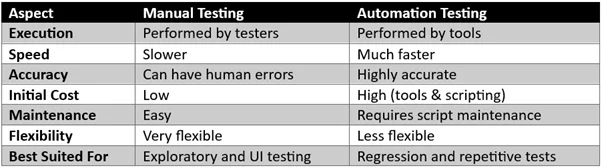
Real-Life Examples
Example 1: Testing a Newly Developed Feature
A new feature has been added to a food delivery app, such as live order tracking.
Manual Testing is ideal here because:
- The feature is new and evolving
- Requirements may change frequently
- Testers need to evaluate usability and flow
- Human feedback is important
Manual testing allows testers to provide valuable insights that automation cannot capture in early stages.
Example 2: Regression Testing Before Every Release
A banking application must verify critical features like:
- User login
- Fund transfers
- Account balance display
Automation Testing is the better choice because:
- The same tests must run repeatedly
- Any failure can have serious consequences
- Automation ensures faster execution and consistency
Automation reduces human effort and ensures high reliability for such repetitive test cases.
Situations Where Manual Testing Works Best
Manual testing should be preferred when:
- The application is in the early development phase
- Requirements change frequently
- Exploratory testing is needed
- UI, UX, and visual elements must be validated
- Human judgment and creativity are required
Manual testing helps uncover usability issues and unexpected user behaviors that automated scripts may miss.
Situations Where Automation Testing Is the Right Choice
Automation testing is the best option when:
- Test cases are stable and well-defined
- Tests must be executed frequently
- The project follows Continuous Integration (CI)
- Large applications require quick regression testing
- Time and long-term effort need to be optimized
Although automation requires an initial investment, it provides long-term benefits in terms of speed and reliability.
Final Thoughts
Both manual testing and automation testing play equal and complementary roles in software quality assurance.
- Manual testing brings flexibility, creativity, and human insight
- Automation testing provides speed, accuracy, and efficiency
Instead of choosing one over the other, successful teams use a balanced combination of both, based on project requirements and timelines.
When used correctly, these testing approaches work together to deliver stable, reliable, and high-quality software, ensuring better user satisfaction and business success.
Drop a query if you have any questions regarding manual testing or automation testing and we will get back to you quickly.
Making IT Networks Enterprise-ready – Cloud Management Services
- Accelerated cloud migration
- End-to-end view of the cloud environment
About CloudThat
FAQs
1. Can automation testing completely replace manual testing?
ANS: – No. Automation testing cannot fully replace manual testing. While automation handles repetitive tasks efficiently, manual testing remains essential for usability, exploratory testing, and scenarios that require human judgment.
2. Is manual testing easier than automation testing?
ANS: – Yes. Manual testing is easier to start because it does not require programming or tool knowledge. Automation testing requires scripting skills and an understanding of tools, frameworks, and maintenance.
3. Which testing approach should beginners learn first?
ANS: – Beginners should start with manual testing to understand testing fundamentals, application behaviour, and test case design. Once comfortable, they can upgrade their skills by learning automation testing.


WRITTEN BY Nisha D V
Nisha is a Software Tester at CloudThat, specializing in manual and automation testing. She ensures the quality and reliability of web and mobile applications. Passionate about quality assurance, focuses on improving user experience and product stability. She enjoys learning new technologies, exploring testing methodologies, and writing informative blogs in her free time.


 PREV
PREV












Comments