

 Login
Login


 February 25, 2026
|
Voiced by Amazon Polly |
Introduction
Jenkins has been a cornerstone of CI/CD pipelines for DevOps engineers for over a decade. Even with the rise of managed CI platforms, Jenkins continues to power mission-critical automation workflows due to its flexibility, extensibility, and massive plugin ecosystem.
As organizations increasingly adopt Kubernetes for running production workloads, deploying Jenkins on traditional virtual machines introduces scalability, availability, and maintenance challenges. Kubernetes solves many of these problems, but only if Jenkins itself is deployed correctly.
This blog explores how DevOps engineers can deploy, configure, and manage Jenkins on Kubernetes using Helm, enabling a repeatable, scalable, and production-ready CI/CD platform. We’ll also cover best practices, common pitfalls, and security considerations to ensure your Jenkins deployment aligns with modern DevOps standards.
Pioneers in Cloud Consulting & Migration Services
- Reduced infrastructural costs
- Accelerated application deployment
Why Run Jenkins on Kubernetes?
Running Jenkins on Kubernetes offers multiple operational advantages compared to VM-based deployments:
- High Availability: Kubernetes automatically restarts failed Jenkins pods.
- Scalability: Jenkins agents can be dynamically created as Kubernetes pods.
- Resource Efficiency: Containers use resources more efficiently than long-running VMs.
- Declarative Management: Jenkins infrastructure can be defined as code.
However, manually deploying Jenkins using raw Kubernetes manifests can quickly become complex and error-prone. This is where Helm becomes essential.
What Is Helm and Why Use It for Jenkins?
Helm is Kubernetes’ package manager that simplifies application deployment using reusable templates called charts.
Using Helm for Jenkins deployment provides several benefits:
- Consistency across environments (dev, QA, prod)
- Centralised configuration through a single values.yaml file
- Simplified upgrades and rollbacks
- GitOps compatibility
- Reduced manual configuration errors
For DevOps teams managing multiple clusters, Helm dramatically reduces operational overhead.
Prerequisites
Before deploying Jenkins using Helm, ensure the following prerequisites are met:
- A running Kubernetes cluster
- kubectl configured with cluster access
- Helm v3 or later installed
- Cluster permissions to create namespaces, services, and persistent volumes
Step 1: Adding the Jenkins Helm Repository
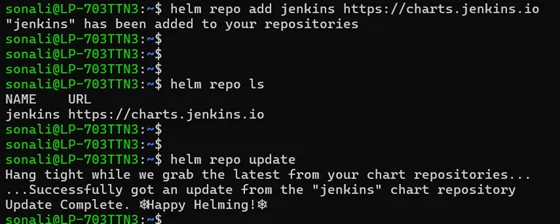
The first step is to add the official Jenkins Helm chart repository and update the local index:
|
1 2 |
# helm repo add jenkins https://charts.jenkins.io # helm repo update |
This ensures you’re working with the latest and officially maintained Jenkins chart.
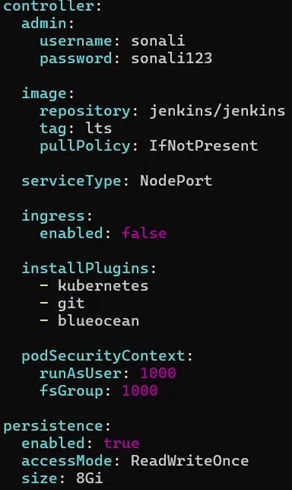
Step 2: Configuring Jenkins using values.yaml
Helm allows you to customise Jenkins behaviour using a configuration file called values.yaml. This file acts as the single source of truth for your Jenkins deployment.
Key Configuration Areas
- Admin Credentials: Define the Jenkins admin username and password during deployment to avoid manual unlocking steps.
- Service Exposure
Choose how Jenkins should be exposed:
- NodePort – suitable for non-production or lab environments
- LoadBalancer – recommended for production on cloud platforms
- Ingress – ideal for domain-based access with TLS
- Persistent Storage: Enable persistent volumes to ensure Jenkins data (jobs, configs, plugins) survives pod restarts.
- Resource Allocation: Set CPU and memory requests and limits to prevent performance bottlenecks or pod evictions.
- Plugin Installation: Pre-define Jenkins plugins to ensure consistency across environments and reduce manual setup.
Step 3: Installing Jenkins Using Helm
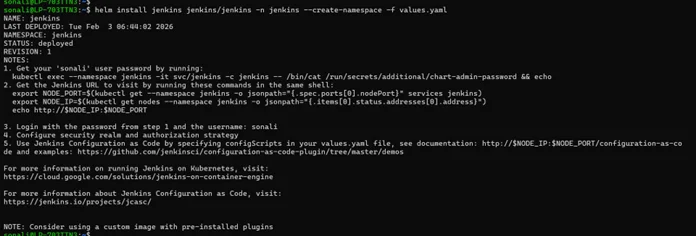
Once the values.yaml file is ready, Jenkins can be deployed using a single command:
|
1 |
# helm install jenkins jenkins/jenkins -n jenkins --create-namespace -f values.yaml |

This command:
- Creates a dedicated Jenkins namespace
- Deploys the Jenkins controller

- Installs required plugins
- Applies persistence and service configurations
Within a few minutes, Jenkins will be up and running.
Step 4: Verifying the Jenkins Deployment
Check whether the Jenkins pod is running:
|
1 |
# kubectl get pods -n jenkins |
Next, verify the service configuration:
|
1 |
# kubectl get svc -n jenkins |
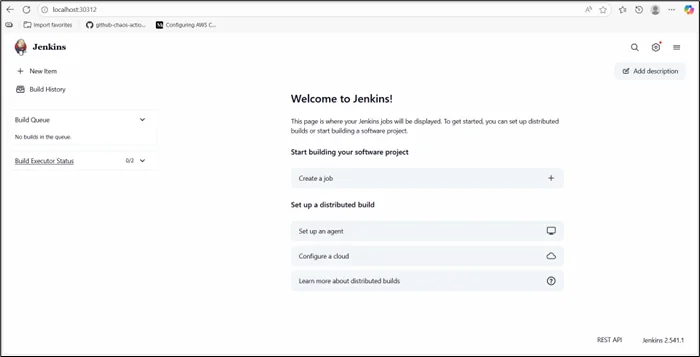
Depending on the service type, note the NodePort, external IP, or ingress hostname.
Step 5: Accessing the Jenkins UI
You can access Jenkins using one of the following methods:
- NodePort: http://<node-ip>:<node-port>
- LoadBalancer: http://<external-ip>
- Ingress: https://jenkins.yourdomain.com
Since admin credentials are already defined in values.yaml, there is no need to retrieve the initial admin password manually.
Automating Jenkins Plugin Management
Managing Jenkins plugins manually often leads to plugin drift, where different environments run different plugin versions. This causes inconsistent pipeline behavior and hard-to-debug failures.
Helm solves this by allowing plugins to be declared upfront in the values.yaml file. Jenkins installs the required plugins automatically during startup, ensuring consistency across deployments.
Key benefits include:
- Consistent Jenkins behavior across all environments
- Faster recovery during cluster rebuilds or failures
- Elimination of manual UI-based plugin installation
- Automated plugin management improves reliability, simplifies upgrades, and makes Jenkins deployments reproducible and easier to maintain.
GitOps-Ready Jenkins Deployment
In modern DevOps setups, Jenkins should be managed as infrastructure-as-code rather than a manually configured tool. GitOps enables this by using Git as the single source of truth.
A GitOps-aligned Jenkins deployment typically involves:
- Storing values.yaml in Git
- Deploying Jenkins using tools like Argo CD or Flux
- Managing changes through pull requests
- Rolling back changes using Git history
This approach ensures Jenkins follows the same DevOps principles it enforces, automation, consistency, traceability, and reliability, making it scalable and easier to manage across environments.
Security Best Practices for Jenkins on Kubernetes
To secure Jenkins deployments:
- Store credentials in Kubernetes Secrets
- Enable HTTPS using Ingress and TLS
- Restrict access using Kubernetes RBAC
- Limit plugin usage to trusted sources
- Regularly update Jenkins and plugins
Given Jenkins’ access to production systems, security should always be a top priority.
Conclusion
Deploying Jenkins on Kubernetes using Helm provides a clean, scalable, and production-ready CI/CD foundation for DevOps teams.
Whether you are setting up Jenkins for the first time or standardizing deployments across multiple clusters, a Helm driven approach ensures reliability, scalability, and long-term maintainability.
Drop a query if you have any questions regarding Jenkins and we will get back to you quickly
Empowering organizations to become ‘data driven’ enterprises with our Cloud experts.
- Reduced infrastructure costs
- Timely data-driven decisions
About CloudThat
FAQs
1. Why should Jenkins be deployed on Kubernetes?
ANS: – Kubernetes provides scalability, resilience, and better resource utilization compared to traditional VM-based Jenkins deployments.
2. Why is Helm preferred for Jenkins deployment?
ANS: – Helm enables repeatable, configurable, and version-controlled Jenkins deployments using a single configuration file.
3. Is Helm-based Jenkins suitable for production?
ANS: – Yes. With proper persistence, resource limits, security controls, and monitoring, Helm-based Jenkins is production-ready.


WRITTEN BY Sidda Sonali
Sidda Sonali is a Research Associate at CloudThat with a strong passion for DevOps and cloud-native technologies. She is committed to mastering modern DevOps practices and staying abreast of the latest advancements in cloud services. Sonali has hands-on experience with tools such as Terraform, Amazon EKS, Kubernetes, and Docker, and is proficient in implementing CI/CD pipelines, managing Infrastructure as Code (IaC), and automating cloud deployments. Her expertise extends to container orchestration, deployment automation, and building secure, scalable infrastructures across diverse cloud environments.


 PREV
PREV












Comments