

 Login
Login


 December 11, 2025
|
Voiced by Amazon Polly |
Introduction
Modern applications require safe, scalable, and repeatable deployment workflows. Deploying directly to production without thorough testing can compromise the user experience, disrupt business operations, and introduce bugs. This is why companies use multiple environments, Development, Staging, and Production, to create a smooth release pipeline.
React applications work seamlessly with AWS services like Amazon S3 and Amazon CloudFront because they produce static build files that can be delivered via a global CDN. A well-structured multi-environment setup ensures reliability, faster testing, and consistent deployments.
Pioneers in Cloud Consulting & Migration Services
- Reduced infrastructural costs
- Accelerated application deployment
Why Multi-Environment Architecture Matters?
- Prevents production downtime by isolating risky changes
- Enables QA teams to validate builds safely
- Allows developers to test features independently
- Supports CI/CD pipelines and automated workflows
- Ensures predictable releases and a stable user experience
- Reduces the chance of accidental overwrites to production
- Helps maintain separate API endpoints for cleaner data flows
Architecture Overview
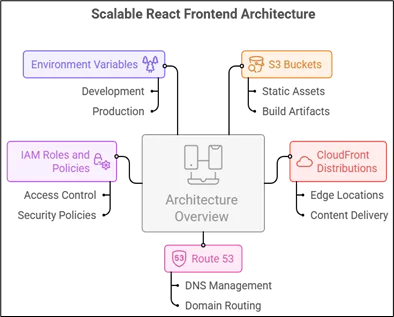
A scalable setup includes:
- Amazon S3 buckets for hosting static React builds
- Amazon CloudFront distributions for global CDN caching
- Amazon Route 53 for DNS and domain routing (optional)
- AWS IAM roles and policies for secure access control
- Environment variables for switching configs based on environment
Example domains:
- Dev: dev.myapp.com
- Stage: stage.myapp.com
- Prod: myapp.com
Three Environment Workflow
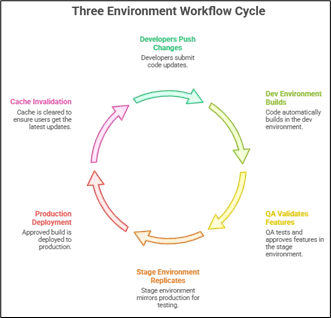
- Developers push changes → Dev environment auto-builds.
- QA validates features → Stage environment replicates production.
- Final approved build → Deployed to Production with cache invalidation.
Step-by-Step Setup
- Create 3 Amazon S3 Buckets
Create separate buckets:
|
1 2 3 |
- myapp-dev - myapp-stage - myapp-prod |
Enable Static Website Hosting for each:
– Index Document: index.html
– Error Document: index.html (required for React Router)
Upload a placeholder index.html to verify.
- Configure Bucket Policies
Your Amazon S3 buckets need correct permissions for Amazon CloudFront or public access.
Basic public policy example:
|
1 2 3 4 5 6 7 8 9 10 11 |
{ "Version": "2012-10-17", "Statement": [ { "Effect": "Allow", "Principal": "*", "Action": "s3:GetObject", "Resource": "arn:aws:s3:::myapp-dev/*" } ] } |
For secure setups, use Amazon CloudFront Origin Access Control (OAC):
– Blocks direct Amazon S3 access
– Ensures only Amazon CloudFront serves content
- Create Amazon CloudFront Distributions
Create separate distributions for each environment.
Recommended settings:
– Origin: Your Amazon S3 bucket
– Viewer Protocol: Redirect HTTP to HTTPS
– Cache Policy: CachingOptimized
– Default Root Object: index.html
– Enable compression (gzip/brotli)
– Custom error responses:
– 404 → /index.html
– 403 → /index.html
Add Domain Mapping (Optional)
Using Amazon Route 53:
– Create A/AAAA record
– Point to Amazon CloudFront distribution
– Add SSL using ACM certificates
- Add Environment Variables in React
React supports multiple environment files:
– .env.development
– .env.staging
– .env.production
Examples:
|
1 2 |
REACT_APP_API_URL=https://api-dev.myapp.com REACT_APP_FEATURE_LOGIN=true |
To load environment-specific builds:
Use library: env-cmd
Scripts:
|
1 2 3 4 5 |
"scripts": { "build:dev": "env-cmd -f .env.development react-scripts build", "build:stage": "env-cmd -f .env.staging react-scripts build", "build:prod": "env-cmd -f .env.production react-scripts build" } |
- CI/CD Pipeline Integration
This setup works perfectly with GitHub Actions, GitLab, Jenkins, or Bitbucket.
Basic GitHub Action example:
– Build React
– Sync to Amazon S3
– Trigger Amazon CloudFront invalidation
- Build and Deploy
Local deployment example:
|
1 2 |
npm run build:dev aws s3 sync build/ s3://myapp-dev --delete |
To invalidate Amazon CloudFront cache:
|
1 |
aws cloudfront create-invalidation --distribution-id ABC123 --paths "/*" |
Best Practices
- Never store secrets inside .env files
- Use AWS Parameter Store or Secrets Manager
- Use separate AWS IAM roles per environment
- Enable Amazon S3 versioning for rollback
- Turn on Amazon CloudFront access logs
- Use AWS WAF (Web Application Firewall) for production
- Set TTL wisely to avoid stale UI issues
- Automate everything using CI/CD
Advanced Topics
- Blue-Green Deployment
Maintain two production buckets:
– Blue (current live)
– Green (next release)
Switch Amazon CloudFront origin dynamically for zero downtime.
- Canary Releases
Serve new UI to a small percentage of users using Lambda@Edge or Amazon CloudFront Functions.
- Environment-Based Routing
You can route traffic dynamically based on:
– Headers
– Cookies
– Paths
Useful for feature testing.
- Handling Cache Invalidation
Amazon CloudFront caches aggressively. To avoid outdated UI:
– Invalidate /* after every deploy
– Use hashed filenames (default in React)
- Using AWS SSM Parameter Store
Store configurations and load them at build time or via API.
Real-World Company Workflow
A typical enterprise workflow:
- Developers merge to dev → automatic deployment to myapp-dev
- QA validates → promotes build to stage
- Stage mirrors production with the same:
- API endpoints
- Load balancer rules
- UI settings
- Business signs off → deploy to prod with cache invalidation
- Monitoring tools update production reports
Conclusion
By implementing a structured Dev–Stage–Prod workflow with Amazon S3 and Amazon CloudFront, React applications become easier to test, deploy, and scale. This architecture minimizes risk, improves performance, and enables consistent, predictable releases.
Drop a query if you have any questions regarding Multi-Environment and we will get back to you quickly.
Empowering organizations to become ‘data driven’ enterprises with our Cloud experts.
- Reduced infrastructure costs
- Timely data-driven decisions
About CloudThat
FAQs
1. Why can't all environments share the same bucket?
ANS: – Each environment needs isolation for caching, testing, debugging, and to avoid accidental overwrite.
2. Does Amazon CloudFront automatically update after deployment?
ANS: – No. You must trigger invalidation, or users may see old files.
3. Can I use this setup with Next.js?
ANS: – Yes, only when exporting as static using the next export.


WRITTEN BY Shreya Shah
Shreya Shah is a Frontend Developer II at CloudThat, specializing in building scalable, user-focused web applications. She has a strong emphasis on creating clean, responsive interfaces with seamless integration to cloud-based solutions. Passionate about delivering smooth user experiences, Shreya continuously explores innovative ways to enhance efficiency, quality, and overall product performance.


 PREV
PREV












Comments