

 Login
Login


 May 19, 2026
|
Voiced by Amazon Polly |
Introduction
Every SQL developer faces a common question while writing complex queries, should I use a CTE, a subquery, or a temporary table? All three help break large SQL logic into smaller, more manageable parts, but each works differently and is suited to different situations.
Choosing the wrong approach can lead to slow queries, difficult debugging, and poor readability. Choosing the right one improves performance, makes SQL cleaner, and makes it easier for teams to maintain code.
In data engineering and analytics projects, this becomes even more important because queries often involve large datasets, multiple joins, and several transformation steps. Understanding where each option works best helps build efficient and scalable solutions.
In this blog, we will understand CTEs, subqueries, and temp tables, compare them with practical examples, and learn when to use each one.
Pioneers in Cloud Consulting & Migration Services
- Reduced infrastructural costs
- Accelerated application deployment
CTE (Common Table Expression)
A CTE is a named temporary result set created using the WITH keyword. It exists only during the execution of a single query and helps simplify complex SQL by breaking the logic into clear, readable steps.
Example
|
1 2 3 4 5 6 7 |
WITH high_value_customers AS ( SELECT customer_id, customer_name, total_purchase FROM customers WHERE total_purchase > 50000 ) SELECT * FROM high_value_customers; |
Here, the CTE creates a reusable intermediate result called high_value_customers, making the final query easier to understand.
CTEs are especially useful when queries involve multiple steps, repeated logic, or recursive structures such as employee hierarchies and parent-child relationships.
Subquery
A subquery is a query written inside another query. It can be placed inside SELECT, FROM, or WHERE clauses and works as part of the main query.
Example
|
1 2 3 4 5 6 |
SELECT * FROM ( SELECT customer_id, customer_name, total_purchase FROM customers WHERE total_purchase > 50000 ) AS high_value_customers; |
This gives the same result as the CTE example, but the logic is nested inside the main query.
Subqueries work well for simple and one-time logic. However, when queries become deeply nested, they become harder to read, debug, and maintain.
Temporary Table
A temporary table is a physical table created in temporary database storage. Unlike CTEs and subqueries, it exists for the duration of the database session and can be reused across multiple queries.
Example
|
1 2 3 4 5 6 7 |
CREATE TEMP TABLE high_value_customers AS SELECT customer_id, customer_name, total_purchase FROM customers WHERE total_purchase > 50000; SELECT * FROM high_value_customers; |
Here, the intermediate result is stored physically rather than recalculated repeatedly.
This is especially useful when working with large datasets, as it improves performance and enables faster joins and filtering.
Choosing the Right Approach
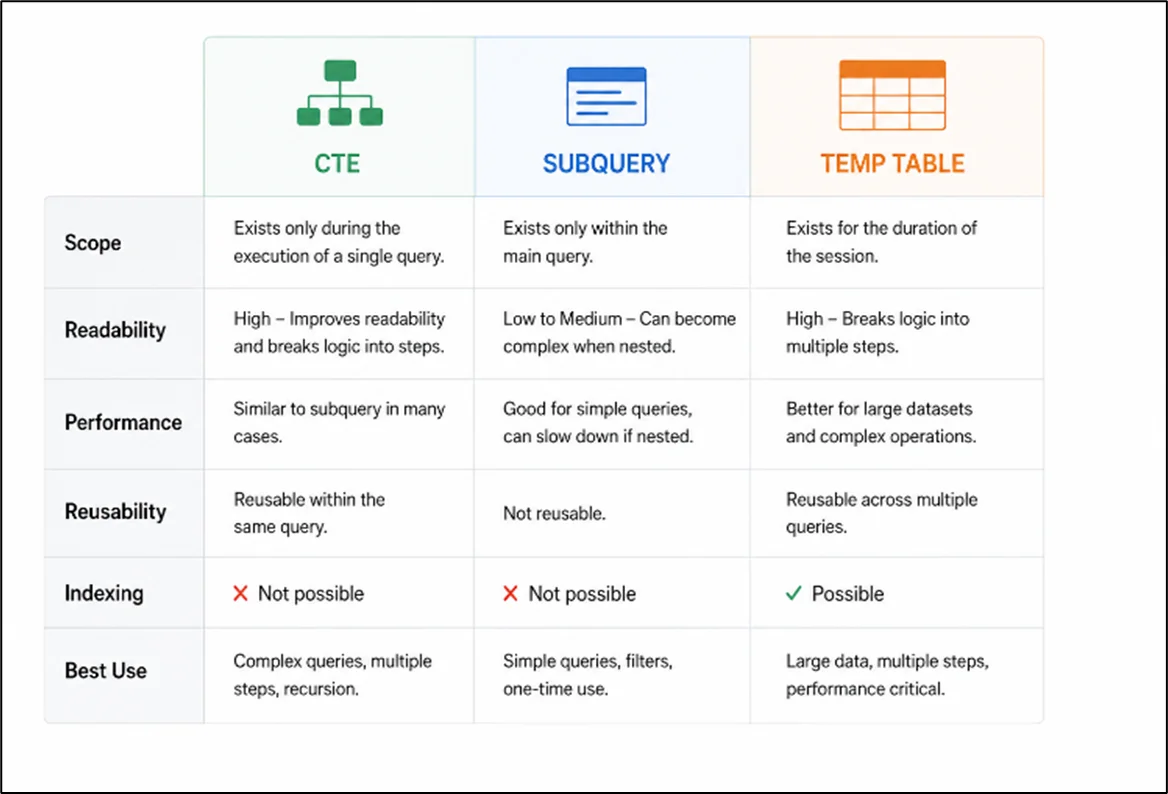
The best choice depends on three main factors: complexity, performance, and reuse.
Use a Subquery
Choose a subquery when the logic is simple, used only once, and fits naturally inside a WHERE or FROM clause. It works best for quick filters and small lookups.
Use a CTE
Choose a CTE when the query has multiple logical steps, readability matters, or the same intermediate result is needed within a single query. It is also the best option for recursive queries.
Use a Temp Table
Choose a temp table when working with large datasets, repeated calculations, or results that need to be reused across multiple SQL statements. It is ideal when performance optimization and indexing are important.
Practical Rule
A simple rule is to start with a CTE for better readability. If performance becomes a problem, especially with large datasets, move to a temp table. Use subqueries primarily for simple, short-lived logic.
This approach keeps SQL development clean, scalable, and easier to maintain.
Conclusion
Instead of treating one as better than the others, strong SQL development comes from knowing when each one fits best. Choosing the right approach helps build faster queries, cleaner code, and more scalable data pipelines.
Drop a query if you have any questions regarding CTEs, and we will get back to you quickly.
Empowering organizations to become ‘data driven’ enterprises with our Cloud experts.
- Reduced infrastructure costs
- Timely data-driven decisions
About CloudThat
FAQs
1. Are CTEs better than subqueries?
ANS: – For complex logic, yes. CTEs improve readability and make debugging easier compared to deeply nested subqueries.
2. Do CTEs improve performance?
ANS: – Not always. In many databases, CTEs and subqueries perform similarly. For large datasets, temp tables often provide better performance.
3. When should I use temp tables?
ANS: – Use temp tables when working with large data sets, performing repeated calculations, or when indexing intermediate results is needed for better performance.


WRITTEN BY Anusha
Anusha works as a Subject Matter Expert at CloudThat. She handles AWS-based data engineering tasks such as building data pipelines, automating workflows, and creating dashboards. She focuses on developing efficient and reliable cloud solutions.


 PREV
PREV











Comments