

 Login
Login

 May 15, 2026
|
Voiced by Amazon Polly |
Overview
The Amazon Quick Desktop App is built for professionals who want a faster, more connected way to work. Instead of switching between emails, chats, files, spreadsheets, and calendars throughout the day, users can bring their work into one intelligent desktop experience. The app is designed to help people access information quickly, stay organized, and create useful outputs without repeating manual steps.
As workplaces become more digital, the amount of information employees handle every day continues to grow. Important updates may be buried in emails, data may be stored in spreadsheets, and action items may live in chat messages or meeting notes. A desktop AI assistant like Amazon Quick helps reduce this chaos by connecting work context and making it easier to move from information to action.
The modern workplace runs on many tools at once. A single project may involve communication platforms, reports, local files, presentations, meeting notes, and internal systems. While these tools help teams collaborate, they also create a new challenge: too much information spread across too many places.
This is where the Amazon Quick Desktop App becomes relevant. It is designed to simplify the daily work experience by acting as a smart assistant that understands your work environment and helps you handle tasks more efficiently. Rather than functioning as a simple chatbot, it aims to support real productivity by helping users find the right information, continue ongoing work, and produce useful business deliverables more quickly.
Pioneers in Cloud Consulting & Migration Services
- Reduced infrastructural costs
- Accelerated application deployment
Introduction to a smarter desktop workspace
One of the biggest challenges in knowledge work is fragmentation. Professionals constantly jump from email to messaging apps, from spreadsheets to presentations, and from local folders to online systems. This constant switching may seem normal, but it slows productivity, breaks focus, and increases the chances of missing important details.
Amazon Quick Desktop App is designed to reduce this friction. By operating through the desktop, it fits more naturally into how people actually work. It can support tasks across multiple sources of information and help users interact with work content more uniformly. This makes the app feel less like a separate tool and more like an intelligent layer on top of the user’s everyday workflow.
Another important aspect of a desktop assistant is convenience. Users often keep important documents on their own devices while also depending on communication tools and business platforms to stay updated. A desktop-based experience can help bridge this gap by making it easier to work across these environments without constantly shifting attention between apps.
Turning scattered work into meaningful output
A major strength of the Amazon Quick Desktop App is its ability to help transform disconnected pieces of information into finished work. In many professional settings, completing even a small task requires gathering updates from various sources. A report might require data from a spreadsheet, comments from a manager, notes from a meeting, and numbers shared in team messages. Gathering all of this manually takes time and effort.
An AI assistant designed for desktop productivity can make this process smoother. Instead of asking users to collect everything themselves, it can help organize relevant context and support the creation of polished outputs. This could include documents, spreadsheets, summaries, presentations, or other work products. The result is a workflow that feels faster, cleaner, and more efficient.
This is especially valuable for employees who spend a large part of their day creating knowledge-based deliverables. Analysts, team leads, business managers, HR professionals, and operations staff all deal with a mix of information sources. Tools that reduce manual collection and repetition can significantly improve both speed and accuracy.
Reducing repetitive effort
One of the most frustrating parts of digital work is having to repeat the same setup over and over. Many professionals regularly re-explain projects, search for old files again, revisit past conversations, or rewrite follow-up messages from scratch. This repetition creates unnecessary effort and often takes attention away from higher-value work.
Amazon Quick Desktop App offers a more context-aware approach. Instead of treating every interaction as brand new, it is meant to support continuity. This is important because productivity does not come only from answering questions quickly. It also comes from remembering what matters, understanding the background of ongoing work, and helping users continue without restarting.
That kind of continuity can make a real difference in day-to-day operations. A user working on a project over several days or weeks benefits far more from an assistant that recognizes the project context than from one that only responds to isolated prompts. Over time, this makes the experience feel more natural and much more useful.
Helping users stay ahead of the day
Productivity tools are often judged by how much time they save, but another important factor is how well they help users stay prepared. In a busy workday, people do not just need help creating output. They also need help tracking responsibilities, remembering follow-ups, and preparing for upcoming meetings or decisions.
A desktop AI assistant can support this by making work feel more proactive instead of purely reactive. Rather than forcing users to search for every detail manually, it can help surface relevant context when needed. This may include reminders, summaries, pending actions, or preparation materials tied to the day’s workflow.
That is a meaningful shift in how digital assistants are used. Instead of existing only as tools users open when they are stuck, they become part of the rhythm of everyday work. This creates a smoother experience and can help professionals spend less time organizing and more time executing.
Why this matters for modern professionals?
The value of the Amazon Quick Desktop App becomes clearer when viewed through the lens of modern work habits. Today’s professionals are expected to move quickly, manage large volumes of information, and deliver polished work under tight deadlines. At the same time, they are often overwhelmed by the number of systems they must monitor every day.
An intelligent desktop assistant responds to this reality by reducing complexity. It helps users bring together what they need, focus on priorities, and complete work with less friction. For people working in business operations, sales, analytics, HR, project management, or technical roles, this kind of support can become highly practical.
It also reflects a broader shift in workplace technology. Users no longer want tools that only store information. They want tools that help interpret, organize, and act on that information. Amazon Quick Desktop App fits into this trend by aiming to make the desktop a smarter and more responsive work environment.
Conclusion
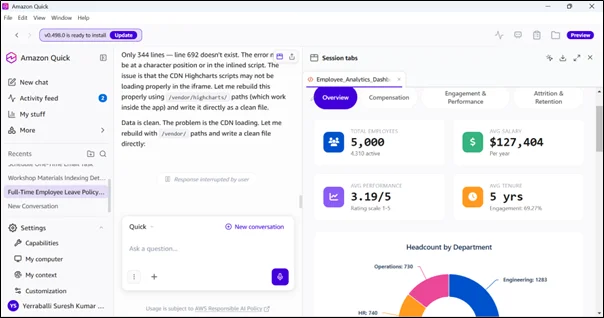
Amazon Quick Desktop App represents a practical evolution in workplace productivity. It is not simply about adding AI to the desktop. It is about creating a more connected work experience where files, communication, tasks, and output come together in a way that feels natural and efficient.
Drop a query if you have any questions regarding Amazon Quick Desktop App and we will get back to you quickly.
Empowering organizations to become ‘data driven’ enterprises with our Cloud experts.
- Reduced infrastructure costs
- Timely data-driven decisions
About CloudThat
FAQs
1. Why is the desktop format important?
ANS: – A desktop experience feels more natural for many users because work often happens across local files, office tools, communication apps, and day-to-day business systems.
2. Is it only for large enterprises?
ANS: – While it offers strong enterprise value, the broader productivity benefits can also appeal to individual professionals seeking a more organized, context-aware work experience.
3. What makes it different from a regular AI chatbot?
ANS: – A regular chatbot usually responds to one prompt at a time. At the same time, a desktop work assistant is more valuable because it can support ongoing workflows, reduce repeated effort, and feel more integrated into the user’s daily routine.


WRITTEN BY Yerraballi Suresh Kumar Reddy
Suresh is a highly skilled and results-driven Generative AI Engineer with over three years of experience and a proven track record in architecting, developing, and deploying end-to-end LLM-powered applications. His expertise covers the full project lifecycle, from foundational research and model fine-tuning to building scalable, production-grade RAG pipelines and enterprise-level GenAI platforms. Adept at leveraging state-of-the-art models, frameworks, and cloud technologies, Suresh specializes in creating innovative solutions to address complex business challenges.


 PREV
PREV












Comments