

 Login
Login


 March 24, 2026
|
Voiced by Amazon Polly |
Introduction
Organizations waste 30% of their cloud spend on underutilized resources, while AWS Spot Instances offer up to 90% discounts. Bridging this gap is one of cloud computing’s biggest cost optimization opportunities. Two AWS services that help solve this challenge are AWS Auto Scaling and AWS Spot Instances. Auto Scaling automatically adjusts compute resources based on demand to maintain application performance. AWS Spot Instances, on the other hand, allow organizations to use unused Amazon EC2 capacity at significantly reduced prices.
While AWS Spot Instances provide substantial cost savings, they can be interrupted when AWS needs the capacity back. When combined with AWS Auto Scaling, however, they allow organizations to build scalable, resilient, and cost-efficient cloud architectures.
Effective cloud cost management typically involves strategies such as workload optimization, resource scaling, and using discounted compute resources, such as Spot Instances, as discussed in this cloud cost optimization guide.
Pioneers in Cloud Consulting & Migration Services
- Reduced infrastructural costs
- Accelerated application deployment
Understanding AWS Auto Scaling
AWS Auto Scaling ensures applications always have the right amount of compute capacity. It automatically launches or terminates instances based on predefined scaling policies and Amazon CloudWatch metrics such as CPU utilization or request count.
At the center of this system is the Auto Scaling Group (ASG), which manages a collection of Amazon EC2 instances. The ASG maintains the desired number of instances, replaces unhealthy instances, and distributes resources across multiple Availability Zones to improve reliability.
AWS Auto Scaling operates using three key capacity settings:
- Minimum capacity – The lowest number of instances that must always run
- Desired capacity – The target number of instances for the normal workload
- Maximum capacity – The upper limit allowed during peak demand
Configuring AWS Auto Scaling
Setting up AWS Auto Scaling generally involves three key steps.
- Create a Launch Template – A launch template defines how new Amazon EC2 instances should be configured, including the machine image, instance type, storage settings, and security groups.
- Create an AWS Auto Scaling Group – The AWS Auto Scaling Group manages instance lifecycle and ensures the desired number of instances are running. It can distribute instances across multiple Availability Zones for improved availability.
- Define Scaling Policies – Scaling policies determine when new instances should be added or removed. These policies typically rely on performance metrics such as CPU usage or application request rates.
Best Practices for AWS Auto Scaling
Organizations can improve efficiency and reliability by following these best practices:
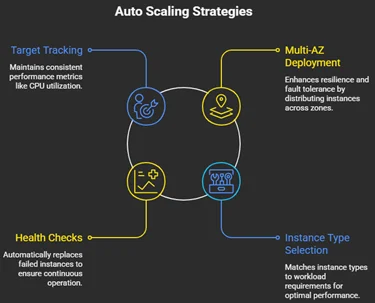
These practices help ensure that scaling actions are efficient and that infrastructure remains stable during demand fluctuations.
Using AWS Spot Instances Effectively
AWS Spot Instances allow organizations to use unused EC2 capacity at significantly discounted prices. These instances can cost up to 90% less than On-Demand instances, making them a highly effective way to reduce cloud infrastructure costs.
However, AWS can reclaim Spot Instances when the capacity is required elsewhere. AWS sends a two-minute interruption notice before the AWS Spot Instance is terminated.
According to an AWS whitepaper on cost optimization, Amazon EC2 Spot Instances provide a powerful way to reduce compute costs by utilizing spare cloud capacity at large discounts, as detailed in this AWS cost optimization whitepaper.
Workloads Suitable for AWS Spot Instances
Spot Instances are most effective for workloads that are flexible and fault-tolerant.
Common use cases include:
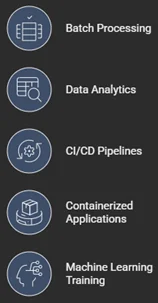
These workloads often run in distributed environments, meaning individual instance interruptions have minimal impact on overall task completion.
Combining AWS Auto Scaling and AWS Spot Instances
Using AWS Auto Scaling together with Spot Instances is a powerful strategy for balancing cost and performance.
AWS Auto Scaling Groups support mixed instance policies, which allow organizations to run a combination of On-Demand and AWS Spot Instances within the same infrastructure. In practice, many organizations maintain a small baseline of On-Demand instances while allowing AWS Spot Instances to scale dynamically during peak demand.
In this approach:
- On-Demand instances provide baseline stability
- Spot Instances provide additional scaling capacity at a lower cost
Research on cloud resource scheduling suggests that leveraging AWS Spot Instances across distributed workloads can significantly reduce compute costs while maintaining acceptable performance levels, as discussed in this research study.
Advantages of Using Both Together
- Cost savings – AWS Spot Instances dramatically reduce infrastructure expenses for large-scale workloads.
- Automatic recovery – If an AWS Spot Instance is interrupted, the Auto Scaling Group automatically launches a replacement instance.
Practical Use Case: Scalable Web Application
Consider an e-commerce platform that experiences traffic spikes during promotions or seasonal sales.
To maintain performance while controlling costs, the architecture may include:
- An Application Load Balancer to distribute traffic
- An Auto Scaling Group managing Amazon EC2 instances
- A mixed instance strategy using both On-Demand and Spot Instances
- Monitoring tools to track performance and scaling activity
In this architecture, a small number of On-Demand instances handle baseline traffic. During peak demand, AWS Auto Scaling launches additional instances, many of which can be AWS Spot Instances.
If an AWS Spot Instance is interrupted, Auto Scaling quickly replaces it, keeping the application available to users. This approach allows organizations to maintain performance while significantly reducing operational costs.
Best Practices for AWS Spot Instance
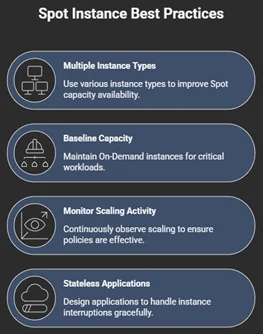
Conclusion
AWS Auto Scaling and AWS Spot Instances play an important role in building scalable and cost-efficient cloud architectures. AWS Auto Scaling dynamically adjusts infrastructure to workload demand, maintaining performance while minimizing unused resources. Spot Instances provide access to significantly discounted compute capacity, helping organizations reduce cloud costs.
Drop a query if you have any questions regarding AWS Auto Scaling or AWS Spot Instances and we will get back to you quickly.
Empowering organizations to become ‘data driven’ enterprises with our Cloud experts.
- Reduced infrastructure costs
- Timely data-driven decisions
About CloudThat
FAQs
1. When should organizations use AWS Spot Instances instead of On-Demand instances?
ANS: – AWS Spot Instances are ideal for workloads that can tolerate interruptions, such as batch processing, analytics, or machine learning training. Critical services requiring continuous availability should rely on On-Demand or Reserved instances.
2. How does Auto Scaling help reduce cloud costs?
ANS: – AWS Auto Scaling automatically adjusts the number of running instances based on demand. This prevents overprovisioning during low traffic periods and ensures sufficient resources during peak usage.
3. Can AWS Auto Scaling automatically replace interrupted Spot Instances?
ANS: – Yes. When an AWS Spot Instance is terminated, the AWS Auto Scaling Group can automatically launch a replacement instance to maintain the desired capacity and keep the application running.


WRITTEN BY Anusha R
Anusha R is Senior Technical Content Writer at CloudThat. She is interested in learning advanced technologies and gaining insights into new and upcoming cloud services, and she is continuously seeking to expand her expertise in the field. Anusha is passionate about writing tech blogs leveraging her knowledge to share valuable insights with the community. In her free time, she enjoys learning new languages, further broadening her skill set, and finds relaxation in exploring her love for music and new genres.


 PREV
PREV












Comments