

 Login
Login


 March 24, 2026
|
Voiced by Amazon Polly |
Introduction
In modern cloud-native environments, engineers often rely heavily on managed services, containers, and orchestration tools like Kubernetes. However, beneath all these abstractions lies a fundamental layer, Linux.
Every container, virtual machine, and Kubernetes node ultimately runs on a Linux kernel. While cloud tools simplify operations, a lack of understanding of Linux internals can lead to inefficient troubleshooting, poor performance tuning, and delayed incident resolution.
For cloud engineers and DevOps professionals, mastering Linux is not optional, it is essential.
In this blog, we explore key Linux internals, their roles in cloud environments, common challenges, and best practices for building efficient and reliable systems.
Pioneers in Cloud Consulting & Migration Services
- Reduced infrastructural costs
- Accelerated application deployment
Architecture Overview
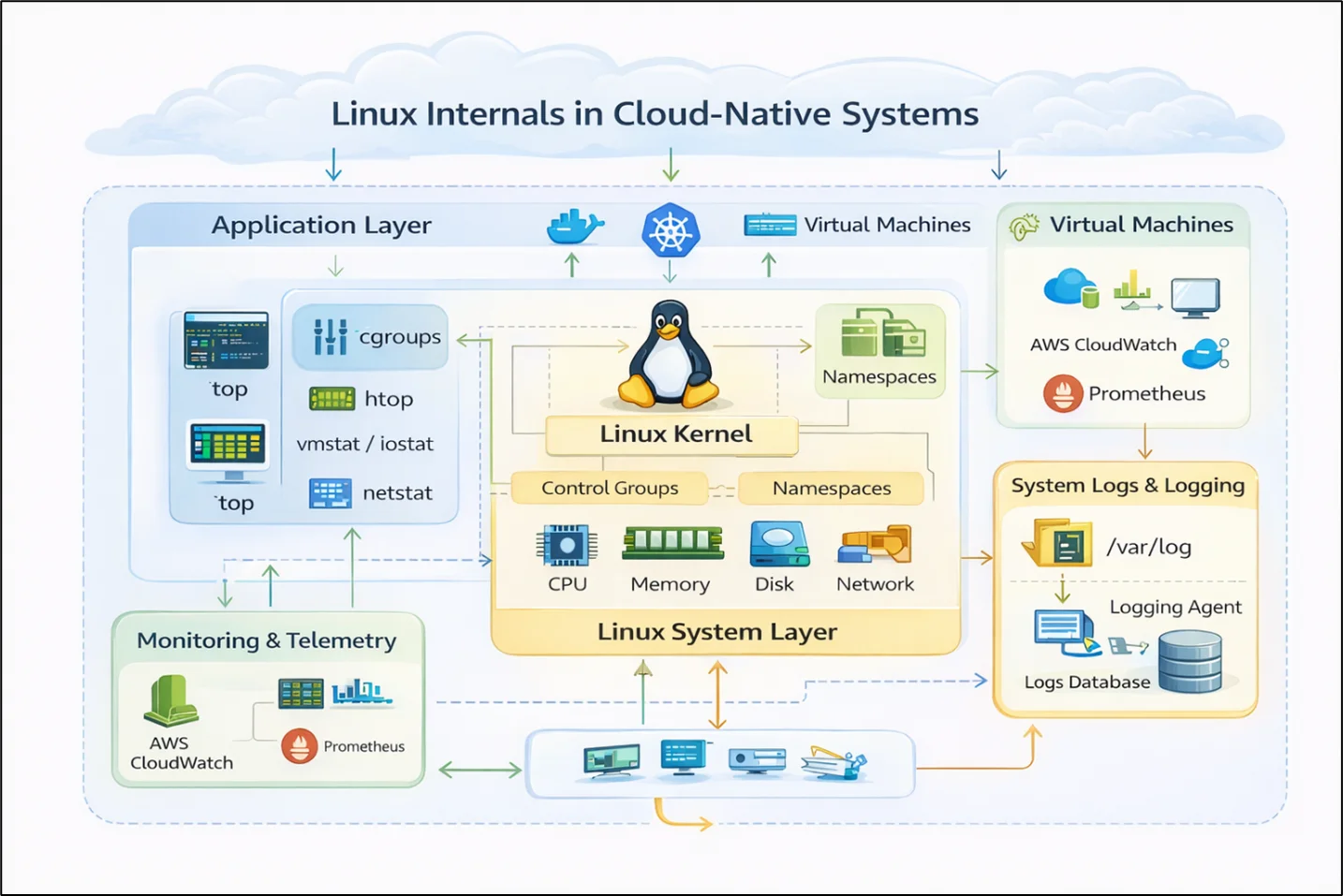
Architecture Explanation:
The architecture represents how Linux operates as the foundational layer in cloud-native systems.
Applications run inside containers or directly on virtual machines, relying on the Linux kernel for process management, networking, memory allocation, and storage.
The Linux kernel interacts with system resources such as CPU, memory, disk, and network interfaces, ensuring efficient resource utilization.
Control groups (cgroups) and namespaces isolate workloads, forming the backbone of containerization technologies like Docker and Kubernetes.
System-level telemetry is collected using tools such as top, htop, vmstat, iostat, and netstat, providing visibility into system performance.
Logs generated by the system and applications are stored in /var/log and processed by logging agents.
Cloud monitoring tools such as CloudWatch or Prometheus integrate with Linux metrics to provide centralized observability.
Understanding this layered architecture helps engineers debug issues efficiently and optimize system performance.
The Shift: From Managed Services to System Awareness
Modern cloud usage often emphasizes:
- Managed services abstraction
- Minimal infrastructure visibility
- Tool-driven troubleshooting
However, real-world issues require:
- Deep system-level understanding
- Root cause analysis at the OS level
- Performance tuning beyond the application layer
Linux knowledge bridges the gap between cloud abstraction and real system behavior.
Core Pillars of Linux for Cloud Engineers
- Process Management
Processes are the fundamental units of execution in Linux.
Key concepts:
- Foreground and background processes
- Process states (running, sleeping, zombie)
- Tools: ps, top, htop, kill
Understanding processes helps identify CPU bottlenecks and runaway applications.
- Memory Management
Linux manages memory using virtual memory and paging.
Key concepts:
- RAM vs Swap usage
- Page cache and buffer cache
- Tools: free, vmstat, sar
Memory leaks and high swap usage can degrade application performance.
- CPU Scheduling
The Linux scheduler allocates CPU time to processes.
Key concepts:
- Load average
- CPU utilization
- Context switching
Tools like top and mpstat help analyze CPU behavior.
- Disk and I/O Management
Efficient disk usage is critical in cloud environments.
Key concepts:
- I/O wait
- Disk throughput
- File systems
Tools: iostat, df, du, lsblk
- Networking
Networking issues are common in distributed systems.
Key concepts:
- TCP/IP stack
- Ports and sockets
- Latency and packet loss
Tools: netstat, ss, tcpdump, ping
- Containers and Linux Internals
Containers are built using Linux primitives:
- Namespaces → Isolation
- cgroups → Resource control
Understanding these helps debug Kubernetes-level issues effectively.
Best Practices for Cloud Engineers
- Learn Core Linux Commands
Master essential tools:
- top, htop
- df, du
- netstat, ss
- vmstat, iostat
- Correlate Metrics with System Behavior
Combine cloud monitoring with Linux-level insights.
- Use Logs Effectively
Analyze logs from /var/log and application logs together.
- Monitor System Health Continuously
Proactively track CPU, memory, disk, and network metrics.
- Debug from Bottom-Up
Start from OS → container → application.
This approach ensures faster root cause analysis.
Outcome of Strong Linux Fundamentals
- Faster incident resolution and debugging
- Improved system performance and optimization
- Reduced dependency on trial-and-error troubleshooting
- Better understanding of Kubernetes and container behavior
- Increased confidence in handling production issues
- Stronger DevOps and cloud engineering skills
Conclusion
While cloud platforms provide powerful abstractions, Linux remains the core engine powering modern infrastructure.
In the world of cloud and DevOps, Linux is not just a skill, it is a superpower.
Drop a query if you have any questions regarding Linux and we will get back to you quickly.
Making IT Networks Enterprise-ready – Cloud Management Services
- Accelerated cloud migration
- End-to-end view of the cloud environment
About CloudThat
FAQs
1. Why is Linux important for cloud engineers?
ANS: – Because all major cloud workloads run on Linux-based systems, making it is essential for troubleshooting and optimization.
2. Do I need deep Linux knowledge for Kubernetes?
ANS: – Yes. Kubernetes relies heavily on Linux features like cgroups and namespaces.
3. What are the most important Linux tools to learn?
ANS: – top, htop, vmstat, iostat, netstat, and df are essential.


WRITTEN BY Anusha R
Anusha R is Senior Technical Content Writer at CloudThat. She is interested in learning advanced technologies and gaining insights into new and upcoming cloud services, and she is continuously seeking to expand her expertise in the field. Anusha is passionate about writing tech blogs leveraging her knowledge to share valuable insights with the community. In her free time, she enjoys learning new languages, further broadening her skill set, and finds relaxation in exploring her love for music and new genres.


 PREV
PREV












Comments