

 Login
Login


 March 18, 2026
|
Voiced by Amazon Polly |
Overview
If you’ve ever built a web application that pulls assets or data from an Amazon S3 bucket, chances are you’ve run into the dreaded CORS error at least once. That wall of red text in the browser console can feel intimidating, but once you understand what’s happening and why, fixing it becomes second nature.
Let’s break down Amazon S3 CORS from the ground up, in plain terms.
Pioneers in Cloud Consulting & Migration Services
- Reduced infrastructural costs
- Accelerated application deployment
What Is CORS, and Why Does Amazon S3 Care About It?
CORS stands for Cross-Origin Resource Sharing. It’s a browser-level security mechanism that controls how web pages request resources from domains other than the one that loaded them.
Think of it this way: your frontend lives at https://myapp.com, but you’re fetching images or JSON files from https://my-bucket.s3.amazonaws.com. In the browser’s eyes, those are two different origins, different hosts, different rules. By default, the browser blocks those requests unless the server (in this case, Amazon S3) explicitly says “yes, I allow traffic from that origin.”
How Amazon S3 CORS Configuration Works?
Amazon S3 lets you attach a CORS policy directly to a bucket. This JSON policy specifies how Amazon S3 should respond when it receives a cross-origin request.
A basic CORS rule has a few key components:
- AllowedOrigins — Which domains are permitted to make requests. You can whitelist specific origins like https://myapp.com or use a wildcard * to allow everyone (though a wildcard should be used carefully in production).
- AllowedMethods — The HTTP methods you’re permitting: GET, PUT, POST, DELETE, or HEAD.
- AllowedHeaders — Which request headers Amazon S3 should accept. Authorization and Content-Type are common ones.
- ExposeHeaders — Headers the browser is allowed to access in the response (e.g., ETag for upload workflows).
- MaxAgeSeconds — How long the browser should cache the preflight response, reducing the number of OPTIONS requests your bucket has to handle.
Here’s what a typical Amazon S3 CORS rule looks like:
JSON
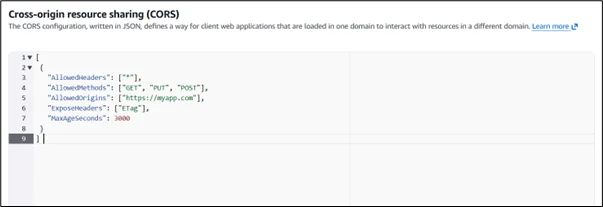
You apply this through the AWS Management Console under your bucket’s Permissions tab, or via the AWS CLI and SDKs.
The Preflight Request
One thing that trips up many developers is the preflight request. Before making certain cross-origin requests (like a PUT with custom headers), the browser sends an OPTIONS request first. It’s essentially asking Amazon S3: “Hey, is this kind of request allowed?”
Amazon S3 responds with the appropriate CORS headers, and if everything checks out, the browser proceeds with the actual request. If the preflight fails, say, because the origin isn’t listed or the method isn’t allowed, the real request never even leaves the browser.
This is why misconfigured CORS policies often show up as mysterious failures. The real error isn’t in your application code; it’s in what Amazon S3 is (or isn’t) telling the browser during that OPTIONS handshake.
Common Mistakes to Avoid
Using * as the origin with credentials. If your requests include cookies or authentication tokens, you cannot use a wildcard origin. The browser will reject it. You need to specify the exact origin.
Forgetting to include Authorization in AllowedHeaders. If you’re accessing private objects with signed URLs or STS credentials, missing this header in your CORS config will cause failures that look unrelated to CORS at first glance.
Applying CORS to the wrong bucket. If you’re using Amazon CloudFront in front of Amazon S3, CORS behavior can get more complex. Amazon CloudFront can cache responses, including CORS headers, and if those headers were cached for one origin, another origin might get the wrong response. In this case, you need to configure Amazon CloudFront to forward the Origin header to Amazon S3 and set up proper cache behavior policies.
Not saving changes. This sounds obvious, but in the AWS Console, it’s easy to edit a CORS config and navigate away without saving. Always confirm changes went through.
When to Use Amazon S3 CORS vs. a Backend Proxy?
Amazon S3 CORS is ideal for serving static assets, images, fonts, JavaScript files, or pre-signed upload flows, directly from the browser. But if your use case involves sensitive data or complex authentication, routing requests through your backend and letting it communicate with the Amazon S3 server-side is often a cleaner, safer pattern. CORS configuration is powerful, but it’s not always the right tool for every job.
Conclusion
Amazon S3 CORS configuration is one of those topics that feels complicated until it suddenly clicks, and once it does, you realize the underlying concept is pretty logical. The browser is just doing its job, enforcing a security boundary that exists for good reason. Your job is simply to tell Amazon S3 how to respond to those boundary checks so your application runs smoothly.
The key takeaways are worth repeating: always be specific with your allowed origins in production, understand that preflight requests are your friend (not your enemy), and remember that CORS headers and bucket permissions are two entirely separate layers. Confusing the two is where most of the head-scratching happens.
Whether you’re building a single-page application that fetches assets directly from a bucket, enabling browser-based file uploads with pre-signed URLs, or serving a public API through Amazon S3, getting your CORS policy right from the start saves you a lot of debugging time down the road.
The good news is that once your CORS rules are properly set, they quietly do their job in the background without you ever having to think about them again. And that’s exactly how good infrastructure should work, invisible when it’s right, obvious only when something needs attention.
Drop a query if you have any questions regarding Amazon S3 CORS and we will get back to you quickly.
Empowering organizations to become ‘data driven’ enterprises with our Cloud experts.
- Reduced infrastructure costs
- Timely data-driven decisions
About CloudThat
FAQs
1. Can I add multiple origins to a single Amazon S3 CORS rule?
ANS: – Yes, you can list multiple origins within a single rule’s AllowedOrigins array. However, if you want different rules for different methods or headers depending on the origin, it’s a better practice to create separate CORS rules for each origin. Amazon S3 evaluates rules in order and applies the first matching one.
2. Will CORS configuration affect my Amazon S3 bucket's public access settings?
ANS: – No, CORS and bucket access policies are separate concerns. CORS only controls how browsers handle cross-origin requests at the HTTP header level. It doesn’t grant or restrict actual access to objects. A user can still access an object directly via its URL regardless of CORS settings; CORS only applies when the request originates from a browser in a cross-origin context.
3. Why is my CORS error still showing up even after I updated the configuration?
ANS: – The most common reason is browser caching. The browser may have cached the old preflight response (based on the MaxAgeSeconds value). Try clearing the browser cache or testing in an incognito window. Also, double-check that the origin in your request exactly matches what’s in the CORS policy, including the protocol (http vs https) and any trailing slashes, since CORS matching is case-sensitive and exact.


WRITTEN BY Sneha Naik
Sneha is a Frontend Developer II at CloudThat, passionate about crafting visually appealing and intuitive websites. Skilled in HTML, CSS, JavaScript, and frameworks such as ReactJS, she combines technical expertise with a strong understanding of web development principles to deliver responsive, user-friendly designs. Dedicated to continuous learning, Sneha stays updated on the latest industry trends and enjoys experimenting with emerging technologies in her free time.


 PREV
PREV












Comments