

 Login
Login


 March 10, 2026
|
Voiced by Amazon Polly |
Introduction
Apache Kafka is widely used for real-time streaming, event-driven architectures, and messaging between distributed systems. As infrastructure evolves, organizations often need to migrate Kafka data between clusters for disaster recovery (DR), environment separation (PROD to DR/DEV), data center migration, or infrastructure upgrades. A successful Kafka migration must ensure zero data loss, minimal downtime, and consistent replication.
MirrorMaker 2 (MM2) is the recommended Kafka tool for cross-cluster replication. It supports topic replication, partition sync, consumer offset migration, and configuration synchronization. With Kafka running in KRaft mode (without ZooKeeper), the migration process becomes simpler and more scalable.
This blog explains a step-by-step Kafka migration from PROD cluster to DEV cluster using MirrorMaker 2, including network validation, cluster preparation, replication setup, monitoring, and final verification.
Pioneers in Cloud Consulting & Migration Services
- Reduced infrastructural costs
- Accelerated application deployment
Overview
Kafka migration is executed in multiple controlled phases:
- Network Validation
- Broker Reachability Check
- Cluster Preparation
- MirrorMaker 2 Setup
- Migration Monitoring
- Validation
This structured approach ensures a smooth migration without data inconsistency or replication failures.
Phase 1 – Network Validation (Private IP Only)
Kafka clusters must communicate only over private IPs.
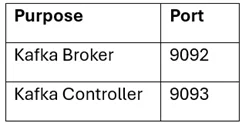
Required Ports
Connectivity Test (From DEV Broker)
|
1 |
nc -vz 10.10.1.21 9092 |
Output
|
1 |
Connection to 10.10.1.21 9092 port [tcp/*] succeeded! |
|
1 |
nc -vz 10.10.0.84 9092 |
Output
|
1 |
Connection to 10.10.0.84 9092 port [tcp/*] succeeded! |
|
1 |
nc -vz 10.10.14.63 9092 |
Output
|
1 |
Connection to 10.10.14.63 9092 port [tcp/*] succeeded! |
All must succeed.
Phase 2 – Confirm Broker Reachability
|
1 |
kafka-broker-api-versions.sh --bootstrap-server 10.10.1.21:9092 |
Output
|
1 2 3 4 5 |
10.10.1.21:9092 (id: 1 rack: null) -> ( Produce(0): 0 to 12 [usable: 12], Fetch(1): 0 to 15 [usable: 15], Metadata(3): 0 to 12 [usable: 12] ) |
This confirms that the broker is reachable and that Kafka is running.
Phase 3 – Prepare DEV Cluster for Load
Disk Check
|
1 |
df -h |
Output
|
1 2 |
Filesystem Size Used Avail Use% /dev/xvda1 500G 290G 210G 58% |
Ensure ≥ 30–40% free space.
Replication Settings
|
1 2 |
default.replication.factor=3 min.insync.replicas=2 |
(No command output – configuration change)
Phase 4 – MirrorMaker 2 Setup
Start MirrorMaker
|
1 |
bin/connect-mirror-maker.sh mm2.properties |
Output
|
1 2 3 4 5 |
INFO Starting MirrorMaker 2 INFO Created replication flow prod->Dev INFO Topics discovered: 52 INFO Replication running successfully INFO Heartbeat thread started |
MirrorMaker is now replicating.
Phase 5 – Migration Monitoring
Verify Topics on DEV
|
1 |
kafka-topics.sh --bootstrap-server 10.20.1.11:9092 --list |
Output
|
1 2 3 4 5 |
orders payments user-events logs-stream test-migration |
Topics are successfully replicated.
Phase 6 – Validation (Mandatory)
Topic Validation
|
1 |
kafka-topics.sh --bootstrap-server 10.20.1.11:9092 --list |
Output
|
1 2 3 4 5 |
orders payments user-events logs-stream test-migration |
All PROD topics must exist.
Message Validation
Produce on PROD
|
1 |
kafka-console-producer.sh --bootstrap-server 10.10.1.21:9092 --topic test-migration |
Output
|
1 |
> Hello from PROD cluster |
Consume on DEV
|
1 |
kafka-console-consumer.sh --bootstrap-server 10.20.1.11:9092 --topic test-migration --from-beginning |
Output
|
1 |
Hello from PROD cluster |
Data replication verified.
Offset Sync Validation
|
1 |
kafka-consumer-groups.sh --bootstrap-server 10.20.1.11:9092 --list |
Output
|
1 2 3 4 5 |
order-service-group payment-service-group analytics-consumer mirror-maker Consumer offsets are synced. |
|
1 |
kafka-consumer-groups.sh --bootstrap-server 10.20.1.11:9092 --describe --group mirror-maker |
Output
|
1 2 3 4 |
TOPIC PARTITION CURRENT OFFSET LOG-END-OFFSET LAG orders 0 458392 458392 0 payments 1 239182 239182 0 user-events 2 182993 182993 0 |
Migration is complete only when Lag = 0
Conclusion
Kafka cross-cluster migration using MirrorMaker 2 in KRaft mode is a reliable and scalable approach for replicating streaming data across environments. A successful migration requires proper network validation, sufficient disk capacity, correct replication configuration, and continuous monitoring.
A well-executed Kafka migration strengthens disaster recovery readiness, improves system resilience, and ensures reliable real-time data streaming across distributed systems.
Drop a query if you have any questions regarding MirrorMaker 2 and we will get back to you quickly.
Making IT Networks Enterprise-ready – Cloud Management Services
- Accelerated cloud migration
- End-to-end view of the cloud environment
About CloudThat
FAQs
1. What is MirrorMaker 2, and why is it used?
ANS: – MirrorMaker 2 (MM2) is a Kafka tool used for cross-cluster data replication. It replicates topics, partitions, consumer offsets, and configurations from one Kafka cluster to another. It is commonly used for disaster recovery (DR), data migration, multi-region replication, and cluster upgrades. MM2 ensures continuous data flow between clusters with minimal downtime and no data loss.
2. Can MirrorMaker 2 work with Kafka in KRaft mode?
ANS: – Yes. MirrorMaker 2 fully supports Kafka KRaft mode (Kafka without ZooKeeper) in newer Kafka versions. It can replicate topics, offsets, ACLs, and configurations across KRaft-based clusters without requiring ZooKeeper, simplifying and scaling the architecture.
3. How do I know if my Kafka migration is successful?
ANS: – Kafka migration is considered successful when:
- All topics from the source cluster appear in the target cluster
- Messages produced in the source cluster are visible in the target cluster
- Consumer group offsets are synchronized
- MirrorMaker lag becomes 0
- No errors appear in MirrorMaker logs


WRITTEN BY Shaikh Mohammed Fariyaj Najam
Mohammed Fariyaj Shakh is a Sr. Research Associate – Cloud Engineer at CloudThat with a strong background in AWS and Azure infrastructure management, security, optimization, and automation. Certified in both AWS and Azure, he has hands-on experience in designing, implementing, and managing highly reliable, secure, and scalable cloud solutions. Well-versed in DevOps practices and tools such as Git, GitHub, AWS CI/CD, Jenkins, Docker, Kubernetes, and Terraform, Fariyaj leverages his expertise in automation, Infrastructure as Code (IaC), and container orchestration to build and manage robust deployment pipelines. Known for his strong troubleshooting skills, he delivers effective and scalable solutions to complex cloud challenges.


 PREV
PREV












Comments