

 Login
Login


 January 22, 2026
|
Voiced by Amazon Polly |
Overview
Managing permissions in a growing AWS environment is often one of the biggest challenges teams face, especially when you’re dealing with many users, evolving roles, and dozens or hundreds of Amazon S3 buckets. Traditionally, access to Amazon S3 buckets is controlled using AWS Identity and Access Management (IAM) policies and bucket policies that explicitly list principals (users/roles) and their corresponding permissions. While this works, it quickly becomes unwieldy as organizations scale and change.
To address this complexity, AWS has introduced Attribute-Based Access Control (ABAC) for Amazon S3 general-purpose buckets. With ABAC, you can use tags, key-value metadata attached to buckets and IAM principals as the basis for controlling access. This approach replaces rigid, resource-specific policies with flexible, attribute-driven permissions that automatically adapt as resources and users change over time.
Pioneers in Cloud Consulting & Migration Services
- Reduced infrastructural costs
- Accelerated application deployment
Introduction
Attribute-Based Access Control (ABAC) is a modern access control strategy in which access decisions are made based on attributes, such as tags assigned to resources, users, or roles. Instead of manually updating policies every time a user or bucket is added, ABAC lets AWS automatically grant or deny access based on tag matches between AWS IAM policies and bucket resources.
Why Do We Need ABAC for Amazon S3 Buckets?
In traditional Role-Based Access Control (RBAC), administrators must continually maintain and edit AWS IAM policies or bucket policies to reflect changes in teams, projects, or environments. Every time a new developer joins or a new bucket is created, policies may need to be updated.
With ABAC:
- You avoid constant policy updates as resources and users change.
- Permissions naturally scale with your organization because access is tied to attributes, such as tags, rather than fixed resource names.
- It simplifies management in multi-tenant environments, where user roles and buckets frequently change.
This approach is especially beneficial for large organizations with dynamic environments and complex access requirements.
How ABAC Works in Amazon S3?
To take advantage of ABAC for Amazon S3 general-purpose buckets, you must:
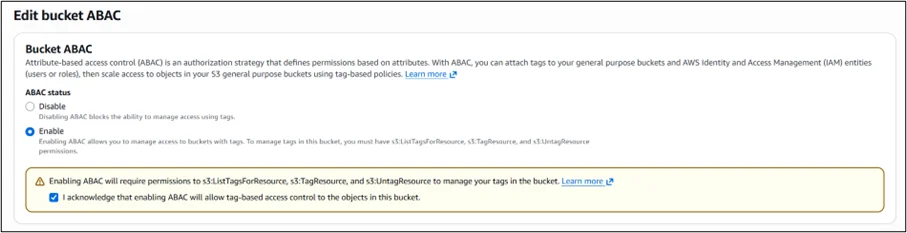
- Enable ABAC on each bucket
ABAC isn’t enabled by default. You can turn it on per bucket using the AWS Management Console, AWS CLI, AWS SDKs, or AWS CloudFormation with the new PutBucketAbac API.
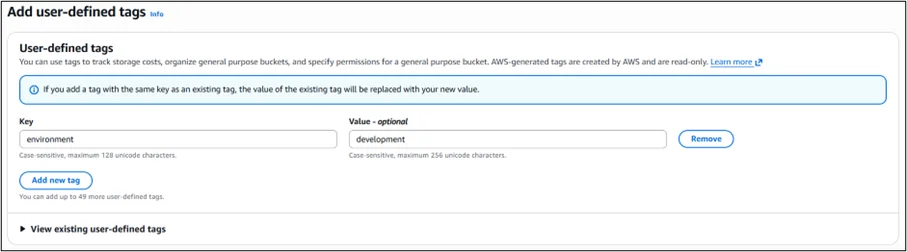
2. Add user-defined tags during bucket creation
Choose tag key-value pairs that reflect attributes such as environment (dev, test, prod), team, department, or project. These tags will become the basis for policy conditions.
3. Create AWS IAM policies that use tag conditions
In your AWS IAM policies, include condition keys like aws:ResourceTag/<tag key> and aws:RequestTag/<tag key> to match the tag values between principals and buckets. These conditions control access dynamically.
Here’s what a simple ABAC policy condition might look like in an IAM policy:
|
1 2 3 4 5 6 7 8 9 10 11 12 13 |
{ "Condition": { "StringEquals": { "aws:ResourceTag/environment": "development" } } } |
When a developer assumes a role with this policy and requests access to a bucket tagged environment=development, access is automatically granted.
Conclusion
Attribute-Based Access Control (ABAC) for Amazon S3 general-purpose buckets represents a significant step forward in scalable access management. By using tags as the basis for permission evaluation, organizations can simplify policy maintenance, improve governance, and adapt more quickly to changes in team structures and cloud resources.
Whether you’re managing access for multiple teams, enforcing environment-specific permissions, or just tired of manual policy upkeep, ABAC provides a powerful, dynamic way to grant secure access. This capability is available in all AWS Regions at no additional cost, works across the AWS Management Console, CLI, SDKs, and integrates easily with existing AWS infrastructure.
Drop a query if you have any questions regarding ABAC and we will get back to you quickly.
Empowering organizations to become ‘data driven’ enterprises with our Cloud experts.
- Reduced infrastructure costs
- Timely data-driven decisions
About CloudThat
FAQs
1. What is ABAC, and how is it different from RBAC?
ANS: – ABAC (Attribute-Based Access Control) grants permissions based on attributes such as tags on resources and principals, while RBAC (Role-Based Access Control) relies on fixed roles and explicit policy assignments. ABAC scales more easily in dynamic environments.
2. Do I have to tag all Amazon S3 buckets for ABAC?
ANS: – Yes, tags form the core of ABAC. You must apply consistent tags to both buckets and IAM principals to use ABAC effectively.
3. Is ABAC enabled by default for Amazon S3 buckets?
ANS: – No, ABAC must be explicitly enabled per bucket using the console, CLI, or APIs.


WRITTEN BY Sridhar Andavarapu
Sridhar Andavarapu is a Senior Research Associate at CloudThat, specializing in AWS, Python, SQL, data analytics, and Generative AI. He has extensive experience in building scalable data pipelines, interactive dashboards, and AI-driven analytics solutions that help businesses transform complex datasets into actionable insights. Passionate about emerging technologies, Sridhar actively researches and shares knowledge on AI, cloud analytics, and business intelligence. Through his work, he strives to bridge the gap between data and strategy, enabling enterprises to unlock the full potential of their analytics infrastructure.


 PREV
PREV











Comments