

 Login
Login


 December 9, 2025
|
Voiced by Amazon Polly |
Overview
Amazon Bedrock now offers three service tiers, Priority, Standard, and Flex, so you can align AI workload performance with your latency needs and budget, rather than paying a single flat rate for everything. These tiers enable you to send each request at the optimal performance level, ranging from ultra-low-latency user-facing apps to batch-style, cost-optimized jobs. For teams running mixed workloads (chatbots, summarization, evaluations, agents), this makes it much easier to tune spend without sacrificing critical user experience.
Pioneers in Cloud Consulting & Migration Services
- Reduced infrastructural costs
- Accelerated application deployment
Introduction
As companies scale generative AI, two driving factors tend to determine architectural choices: predictable latency for critical paths and economically sustainable costs for high-volume or background workloads. Until today, too many Amazon Bedrock customers have had to overpay just to maintain speed or accept performance variability when usage spikes. These new tiers remove that trade-off by making performance a distinct, per-call decision. You can now decide, at the API level, which requests should receive priority computing and which can afford to be processed more inexpensively.
Service Tiers
Priority Tier
The Priority tier is designed for critical applications that require rapid responses. Slow responses can negatively impact user experience and revenue. Requests in this tier are processed first, ahead of those in Standard and Flex. They receive better computing resources even during peak times. Typical examples include customer chatbots, real-time translation tools, trading applications, and interactive assistants in frontline settings. You pay more than you do for Standard, but you get noticeably faster output rates and more consistent latency when it matters most.
Standard Tier
The Standard tier is the default choice for most tasks. It offers steady and predictable performance at regular on-demand token rates. This tier is well-suited for common AI tasks, such as content generation, text analysis, routine document processing, internal tools, and non-urgent chat. For many teams, Standard is the baseline, offering a good balance of speed and cost without requiring additional setup. You can handle most of your traffic here and move only the most crucial or least time-sensitive tasks to Priority or Flex.
Flex Tier
The Flex tier is ideal for tasks that can tolerate slower speeds in exchange for lower costs, while still requiring reliable performance. This tier costs less than Standard and is great for model evaluations, large-scale summarization, labelling and annotation, offline testing, and multi-step workflows that don’t block user activity. During busy times, Flex requests are intentionally treated as lower priority compared to Priority and Standard, which works well for batch processes and background tasks. For teams watching their budget, moving heavy, non-real-time workloads to Flex can significantly reduce costs without requiring changes to code beyond specifying the tier for each request.
Matching Workloads to Tiers
A practical way to use these tiers is to categorize workloads into three buckets:
- Mission-critical: User-facing or revenue-impacting; map to Priority.
- Business-standard: Important but not ultra-latency-sensitive; keep on Standard.
- Business-noncritical: Background, exploratory, or delay-tolerant; move to Flex.
You can start by routing a small percentage of traffic from Standard into Priority or Flex, measure latency and cost, then gradually increase coverage. Over time, this becomes part of your architecture playbook: each API integration or feature chooses a default tier based on SLOs and budget.
How to Use Tiers in Practice
From an implementation perspective, the service tier is chosen per API call through a simple parameter in the request body. This allows you to:
- Use Priority for certain user roles or paths (for example, paid vs free users).
- Route retries or low-priority background jobs to Flex automatically.
- Build routing logic that selects tiers dynamically based on queue depth, latency SLOs, or business rules.
Observability and Cost Control
Tiers are only useful if you can see their impact. You should:
- Track invocation metrics by tier (requests, tokens, latency) in your monitoring stack.
- Segment cost reports by tier to see where Priority is justified and where Flex is over- or under-used.
- Set alerts on latency and error rates per tier to catch misconfigurations or unexpected contention early.
Over time, this data will help you converge on a stable configuration where critical paths remain fast, and background work remains inexpensive.
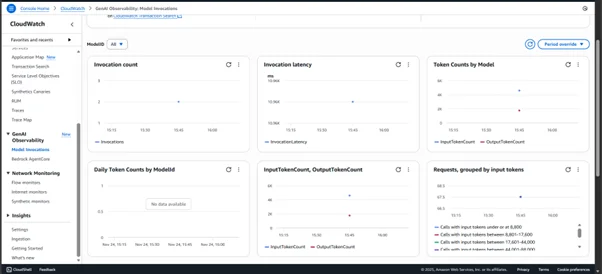
Source: https://console.aws.amazon.com/
Supported Models and Coverage
The new tiers are initially available for a subset of high-demand foundation models, including major third-party providers, such as OpenAI-compatible models, popular open models like DeepSeek-V3.1 and Qwen3 variants, and first-party Amazon models like Nova Pro and Nova Premier. Standard remains available for all Amazon Bedrock models, while Priority and Flex are gradually expanding as more models adopt tiered inference. It is worth checking which specific model–tier combinations are supported when you design your architecture in your target Region.
Conclusion
The new Amazon Bedrock service tiers provide a clean and explicit way to align AI workload performance with cost, without requiring a redesign of your entire stack. Priority keeps your most critical, user-facing experiences responsive under load; Standard continues to handle everyday workloads reliably; and Flex unlocks meaningful savings for background, evaluation, and agentic workflows that can wait.
Drop a query if you have any questions regarding Amazon Bedrock and we will get back to you quickly.
Empowering organizations to become ‘data driven’ enterprises with our Cloud experts.
- Reduced infrastructure costs
- Timely data-driven decisions
About CloudThat
FAQs
1. Which workloads are best suited for the Flex tier?
ANS: – Flex is ideal for non-time-critical jobs such as model evaluations, large-scale or offline summarization, labelling and annotation pipelines, and long-running, multi-step agent workflows. These workloads benefit most from lower pricing while being resilient to queueing and longer response times.
2. How do these tiers affect pricing and performance?
ANS: – Priority is more expensive than Standard but can deliver significantly better output token throughput and more stable latency under load. Standard maintains existing pay-as-you-go pricing and performance characteristics. Flex reduces per-token costs by allowing the service to process requests with lower priority during contention.


WRITTEN BY Nekkanti Bindu
Nekkanti Bindu works as a Research Associate at CloudThat, where she channels her passion for cloud computing into meaningful work every day. Fascinated by the endless possibilities of the cloud, Bindu has established herself as an AWS consultant, helping organizations harness the full potential of AWS technologies. A firm believer in continuous learning, she stays at the forefront of industry trends and evolving cloud innovations. With a strong commitment to making a lasting impact, Bindu is driven to empower businesses to thrive in a cloud-first world.


 PREV
PREV












Comments