

 Login
Login


 December 9, 2025
|
Voiced by Amazon Polly |
Overview
JSON (JavaScript Object Notation) has long been a staple in the world of data interchange, powering config files, web APIs, and more thanks to its simple and readable structure. However, developers often complain about its limitations, especially the inability to include comments within the data. JSONC (JSON with Comments) is an enhanced version of JSON that enables comments, making configuration and data files more readable and maintainable. This blog examines JSONC’s features, compares it to classic JSON, and evaluates whether adopting it yields tangible benefits.
Pioneers in Cloud Consulting & Migration Services
- Reduced infrastructural costs
- Accelerated application deployment
Introduction
JSONC emerged primarily because developers wanted an easy way to annotate their configuration files or data objects without breaking syntax. JSON itself prohibits comments, trailing commas, and non-quoted keys. JSONC, popularized by editors like Microsoft’s Visual Studio Code, addresses a major headache: adding comments directly to JSON files while preserving the fundamental structure.
Key Features of JSONC
- Comment Support: JSONC uniquely allows both single-line (//) and multi-line (/* … */) comments, enabling explanatory notes to coexist alongside the actual data.
- Extends JSON: Any valid JSON file is also a valid JSONC file, but the reverse isn’t true. If you want to process JSONC with a regular JSON parser, you’ll need to strip out comments first.
- Commonly Used in Configs: JSONC is frequently found in project configuration files where temporary notes or explanations are useful, such as settings.json in VS Code.
- Parser Libraries Available: Several open-source libraries, such as Microsoft’s jsonc-parser for JavaScript and yyjson for C, enable developers to work directly with JSONC files.
JSON vs JSONC
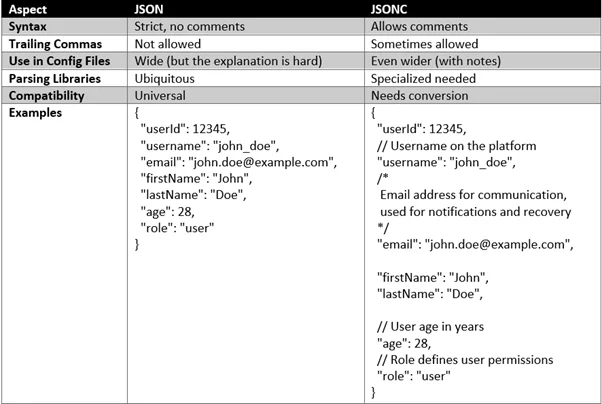
While JSONC’s main change is comment support, JSON5 and YAML go even further, letting you use trailing commas, single quotes, or multiline strings. JSONC is intentionally minimal, retaining the structure and spirit of plain JSON while introducing one practical enhancement.
Why Comments Matter?
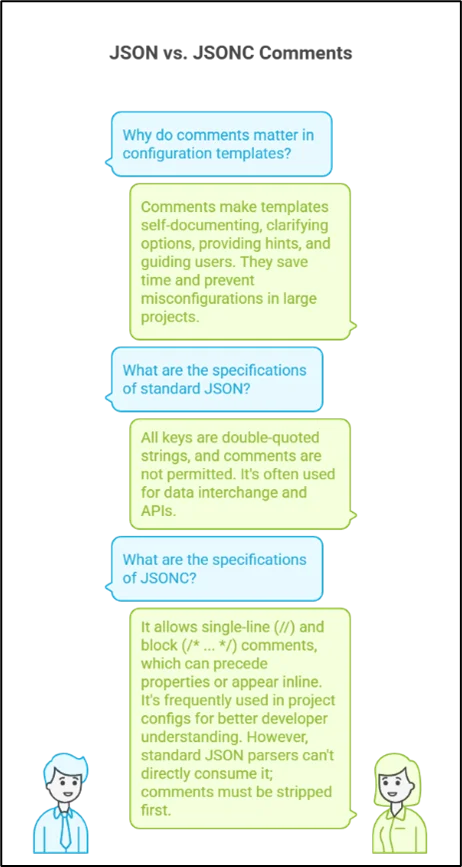
Comments allow configuration templates to be self-documenting, eliminating the need for supplemental documentation. They can clarify why certain options exist, provide hints for maintainers, or guide users in tweaking settings. In large or complex projects, this ability can save time and prevent misconfigurations.
This standard JSON follows the strict JSON specification:
- All keys are double-quoted strings.
- No comments are permitted, any comments will cause a parsing error.
- Often used for data interchange and APIs.
This JSONC follows the specifications below:
- Allows both single-line (//) and block (/* … */) comments.
- Comments can precede properties or appear inline with trailing values.
- Frequently used in project configs (e.g., settings.jsonc or tasks.jsonc for developer tools), where in-file documentation improves developer understanding and maintains project context.
- Not directly consumable by standard JSON parsers: comments must be stripped before machine parsing.
JSON and JSONC in Configuration and API Scenarios
Including comparisons of where JSON or JSONC would be better suited, depending on use cases, can provide actionable guidance.
- Configuration Files: JSONC excels by allowing comments to explain options, making it ideal for development tools like Visual Studio Code settings or webpack configurations.
- API Data Exchange: JSON is preferred for APIs where strict formatting and maximum compatibility across clients and servers are critical.
Conclusion
However, it’s not a strict successor to JSON. JSONC files require preprocessing before being handled by many JSON parsers, and they are less ubiquitous in APIs and other systems where strict interoperability is crucial. For project and configuration files, especially ones edited manually, JSONC is a worthwhile upgrade. For data interchange between systems, classic JSON remains the safer choice.
Drop a query if you have any questions regarding JSON or JSONC and we will get back to you quickly.
Empowering organizations to become ‘data driven’ enterprises with our Cloud experts.
- Reduced infrastructure costs
- Timely data-driven decisions
About CloudThat
FAQs
1. Is JSONC a drop-in replacement for JSON?
ANS: – No. While every JSON file is a valid JSONC file, JSONC files containing comments aren’t valid JSON. Parsers need to strip comments before standard processing.
2. Where is JSONC commonly used?
ANS: – JSONC is popular for configuration files, such as those in Visual Studio Code. It’s less frequently used in general-purpose APIs or inter-system communication.
3. Can I process JSONC with standard JSON libraries?
ANS: – Not without removing comments first. Tools or preprocessing steps (like jsonc-parser, JSMin, or yyjson) are required for direct compatibility.

WRITTEN BY Sridhar Andavarapu
Sridhar Andavarapu is a Senior Research Associate at CloudThat, specializing in AWS, Python, SQL, data analytics, and Generative AI. He has extensive experience in building scalable data pipelines, interactive dashboards, and AI-driven analytics solutions that help businesses transform complex datasets into actionable insights. Passionate about emerging technologies, Sridhar actively researches and shares knowledge on AI, cloud analytics, and business intelligence. Through his work, he strives to bridge the gap between data and strategy, enabling enterprises to unlock the full potential of their analytics infrastructure.


 PREV
PREV












Comments