

 Login
Login


 March 9, 2026
|
Voiced by Amazon Polly |
Amazon DynamoDB is widely known for its speed, scalability, and ability to handle massive workloads without compromising performance. One of its most powerful features is the Global Secondary Index (GSI), which allows developers to query data efficiently using alternate keys.
Traditionally, GSIs were limited to a single partition key and a single sort key. However, with the introduction of multi-key support, DynamoDB takes flexibility and performance to the next level. Now DynamoDB supports up to four attributes for the partition key (PK) and four attributes for the sort key (SK) in a composite manner to identify items as part of a GSI.
Multi-key support enables you to define multiple attributes as keys within a single GSI, allowing queries to span across different dimensions without creating multiple indexes. This means you can:
- Reduce the number of GSIs needed for complex queries.
- Optimise storage and cost by consolidating indexes.
- Improve query performance for diverse access patterns.
Start Learning In-Demand Tech Skills with Expert-Led Training
- Industry-Authorized Curriculum
- Expert-led Training
Why Does This Matter?
In real-world applications, data access patterns evolve. For example:
- IoT systems might query device reading data by location, year, month or timestamp.
- E-commerce platforms may need to query orders by customer ID, product category, or status.
Previously, you had to create separate GSIs for each pattern, which increased complexity and cost. Multi-key support simplifies this by allowing one GSI to serve multiple query dimensions.
Key Benefits
- Cost Efficiency: Fewer GSIs mean lower storage and maintenance costs.
- Simplified Design: Reduce schema complexity and operational overhead.
- Improved Query Flexibility: Support multiple access patterns without redesigning your database.
Getting Started
To leverage multi-key support for time-series data with hierarchical time attributes (year → month → day → timestamp) for efficient queries at any time granularity without date parsing or manipulation.
Base Table Design:

Figure 1: DynamoDB table name – IoTReadings
Indexed Table – GSI with multiple key attributes.

Figure 2: Secondary Index name – DeviceLocationTimeIndex
To create a base table and its GSI, create a JSON file named “table.json” shown below:
|
1 2 3 4 5 6 7 8 9 10 11 12 13 14 15 16 17 18 19 20 21 22 23 24 25 26 27 28 29 30 31 32 33 34 35 36 37 38 39 40 41 42 43 44 45 46 47 48 49 50 51 52 53 54 55 56 |
<em>{</em> <em> “TableName”: “IoTReadings”,</em> <em> "KeySchema": [</em> <em> {“AttributeName”: “readingId”, “KeyType”: “HASH”}</em> <em> ],</em> <em> “AttributeDefinitions”: [</em> <em> {“AttributeName”: “readingId”, “AttributeType”: “S”},</em> <em> {“AttributeName”: “deviceId”, “AttributeType”: “S”},</em> <em> {“AttributeName”: “locationId”, “AttributeType”: “S”},</em> <em> {“AttributeName”: “year”, “AttributeType”: “S”},</em> <em> {“AttributeName”: “month”, “AttributeType”: “S”},</em> <em> {“AttributeName”: “day”, “AttributeType”: “S”},</em> <em> {“AttributeName”: “timestamp”, “AttributeType”: “S”}</em> <em> ],</em> <em> “GlobalSecondaryIndexes”: [{</em> <em> “IndexName”: “DeviceLocationTimeIndex”,</em> <em> "KeySchema": [</em> <em> {“AttributeName”: “deviceId”, “KeyType”: “HASH”},</em> <em> {“AttributeName”: “locationId”, “KeyType”: “HASH”},</em> <em> {“AttributeName”: “year”, “KeyType”: “RANGE”},</em> <em> {“AttributeName”: “month”, “KeyType”: “RANGE”},</em> <em> {“AttributeName”: “day”, “KeyType”: “RANGE”},</em> <em> {“AttributeName”: “timestamp”, “KeyType”: “RANGE”}</em> <em> ],</em> <em> “Projection”: {“ProjectionType”: “ALL”}</em> <em> }],</em> <em> “BillingMode”: “PAY_PER_REQUEST”</em> <em>} </em> |
To create a table using AWS CLI, run the following command shown below.
|
1 |
aws dynamodb create-table --cli-input-json file://table.json |
Added a set of items to a table. Below are sample items added into the table as shown in Figure 3, using the AWS CLI command shown below.
|
1 2 |
#To add an item to a table aws dynamodb put-item --table-name IoTReadings --item '{"readingId": {"S": "R001"}, "deviceId": {"S": "D001"}, "locationId": {"S": "L001"}, "year": {"S": "2024"}, "month": {"S": "01"}, "day": {"S": "15"}, "timestamp": {"S": "2024-01-15T08:30:00Z"}}' --region ap-south-1 |
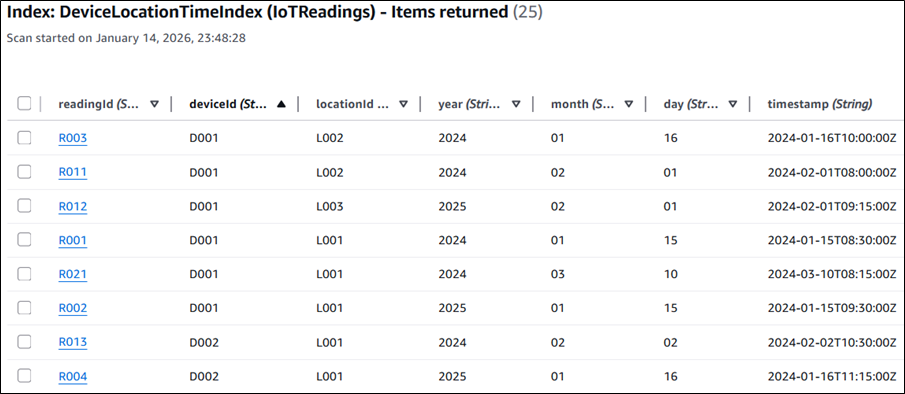
Figure 3: Items added to the table
Access Pattern Requirement:
- All readings for a device in a specific location
- Readings for the device in a specific location for a specific year and specific month
Similarly, you may have various requirements that you can fulfil with GSI for reading data related to a specific device, with granularity down to a specific day and time.
To retrieve the data for the access pattern requirement 1, run the command below using the AWS CLI, and the output is shown in Figure 4 below.
|
1 2 3 |
<em>#All readings for device - D001 in location - L001</em> <em> </em><em>aws dynamodb query --table-name IoTReadings --index-name DeviceLocationTimeIndex --key-condition-expression "deviceId = :device_id AND locationId = :locationid" --region ap-south-1 --expression-attribute-values '{":device_id": {"S": "D001"}, ":locationid": {"S": "L001"}}'</em> |
Output of access pattern requirement 1, displaying readings of device – D001, in location – L001.
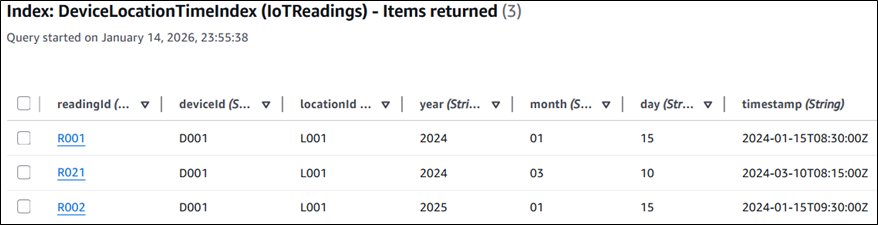
Figure 4: output of query operation on GSI for access requirement 1
To retrieve the data for the access pattern requirement 2, run the command below using AWS CLI.
|
1 2 3 |
#Readings for device - D001 in location - L001 for year - 2024 in specific month - 01 aws dynamodb query --table-name IoTReadings --index-name DeviceLocationTimeIndex --key-condition-expression "deviceId = :device_id AND locationId = :locationid AND #year = :year AND #month = :month" --region ap-south-1 --expression-attribute-names '{"#year": "year","#month": "month"}' --expression-attribute-values '{":device_id": {"S": "D001"}, ":locationid": {"S": "L001"},":year": {"S": "2024"},":month": {"S": "01"}}' |
Output of access pattern requirement 1, displaying readings of device – D001, in location – L001, for year 2024 and month 01.

Figure 5: output of query operation on GSI for access requirement 2
For detailed implementation guidance, check the official instructions on using global secondary indexes in DynamoDB, or to know more about DynamoDB or other NoSQL solutions on AWS, you can also check out courses like “Build Modern Applications with AWS NoSQL Databases”.
Flexible DynamoDB Querying
Multi-key support for GSIs in DynamoDB is a significant enhancement for developers building scalable, flexible applications. It reduces complexity, optimises cost, and unlocks new possibilities for data access patterns, all while maintaining DynamoDB’s hallmark performance. This enhancement is a major leap forward for anyone architecting scalable, query-efficient NoSQL solutions on AWS.
Upskill Your Teams with Enterprise-Ready Tech Training Programs
- Team-wide Customizable Programs
- Measurable Business Outcomes
About CloudThat


WRITTEN BY Kamlesh N
Kamlesh Nenwani is a Subject Matter Expert at CloudThat, specializing in AWS Architecting and DevOps. With 13 years of experience in training and consultancy, he has guided over 2500+ professionals and students in mastering diverse technologies. Renowned for his clarity in explaining complex topics and his commitment to continuous learning, Kamlesh delivers practical, interactive sessions grounded in deep technical expertise.


 PREV
PREV












Comments