

 Login
Login


 December 11, 2025
|
Voiced by Amazon Polly |
Modern organizations rely on automation and seamless coordination between their collaboration tools. Within Microsoft 365, which encompasses Teams, SharePoint and Outlook, these platforms form the core of digital teamwork. However, bringing automation across them requires a central engine. Azure Logic Apps fulfils this role as a scalable, low-code integration platform that unifies processes, data and communication intelligently.
Start Learning In-Demand Tech Skills with Expert-Led Training
- Industry-Authorized Curriculum
- Expert-led Training
Understanding Azure Logic Apps:
Azure Logic Apps enable users, from developers to IT administrators, to design workflows that respond to specific events, transfer information between systems and execute business logic without extensive coding.
Each workflow follows a trigger-action pattern: it starts when a specific event occurs (for instance, uploading a document to SharePoint) and then performs one or more actions (such as posting a Teams notification, updating metadata or sending an Outlook message).
The platform offers hundreds of connectors, which act as prebuilt links between Azure services and external systems, allowing users to integrate Microsoft 365 components effortlessly.

For a more detailed overview of Azure Logic Apps, please refer to courses such as AZ-204 Certification: Developing Solutions for Microsoft Azure and AZ-305 Learning Path: Azure Solution Architect Expert.
The Power of Integration:
Integrating Logic Apps with Microsoft 365 does more than automate simple tasks- it connects people, processes and platforms. Take the example of a document approval process. Traditionally, this process involves manual steps, such as uploading a file, emailing reviewers, waiting for replies and tracking approvals.
A Logic App can condense this workflow into a single automated sequence:
- Trigger: A new file is added to a SharePoint document library.
- Action: A message appears in a Microsoft Teams channel, displaying an adaptive card with “Approve” or “Reject” buttons.
- Logic: Once an approver responds, Logic Apps updates the SharePoint metadata and sends a follow-up email to the requester.
The outcome is a frictionless approval cycle that unfolds in minutes, rather than hours.
Adaptive Cards in Teams:
Adaptive Cards are a way to make messages in Microsoft Teams more interactive and easier to use. Instead of sending plain text, you can share cards that clearly display information and allow people to take immediate action, such as approving a request, filling out a form or opening a link. These cards are built using a simple JSON format, but you don’t need to be a developer to create them. Tools like the Adaptive Card Designer make it easy to design and customize cards. They work across Teams and other Microsoft apps, so your messages look good everywhere. In short, Adaptive Cards help turn conversations into action, making teamwork faster and more efficient.
Building Interoperability:
What makes Logic Apps particularly effective for Microsoft 365 integration is its use of connectors that share identity and context. When you authenticate through Microsoft Entra ID, your workflow can securely access SharePoint files, Teams channels and mailboxes under unified governance.
This consistency ensures:
- Identity continuity across all actions.
- Data compliance through Azure’s security boundary.
- Simplified management for administrators using built-in monitoring and diagnostics.
The Logic App Designer in the Azure portal provides a graphical view of this flow, enabling teams to visualize data paths and conditional logic.
Governance and Best Practices:
While building integrations may feel simple, production-grade workflows demand discipline. A few pragmatic guidelines include:
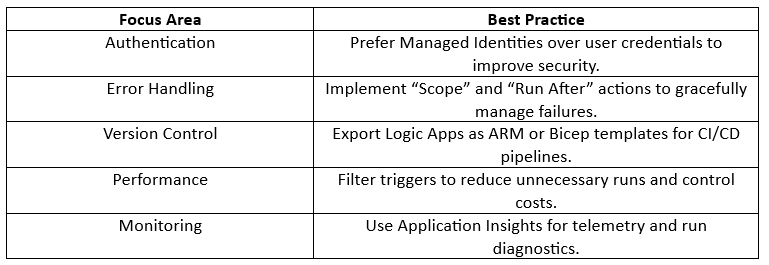
These measures ensure that your Logic Apps remain scalable, secure and maintainable across environments.
Unified Workflow Advantage:
By connecting Azure Logic Apps with Microsoft 365, Teams and SharePoint, organizations can build an integrated environment where information flows automatically, and collaboration happens without manual intervention.
This approach reduces repetitive work, strengthens governance and empowers employees to respond in real-time.
Upskill Your Teams with Enterprise-Ready Tech Training Programs
- Team-wide Customizable Programs
- Measurable Business Outcomes
About CloudThat


WRITTEN BY Kunal Khadke
Kunal Khadke is a Subject Matter Expert and Microsoft Certified Trainer at CloudThat, with a strong focus on Microsoft Azure Infrastructure and security. With 10+ years of experience in cloud, he has trained over 5000 professionals. Kunal has a strong passion for empowering IT professionals and organizations on their cloud journey. He has hands-on experience in cloud architecture, deployment, and security. He delivers practical, real-world training that bridges the gap between certification and implementation. Kunal has trained professionals across industries, helping them master Azure services such as Virtual Networks, Azure Active Directory, Security, Networking, and more. Known for his clear teaching style and deep technical knowledge, Kunal is dedicated to shaping the next generation of cloud experts.


 PREV
PREV












Comments