

 Login
Login


 January 23, 2026
|
Voiced by Amazon Polly |
Overview
In Part 1, we explored the conceptual foundations of Azure AI Search, focusing on OCR enrichment, AI skillsets, and the end-to-end indexing architecture. We examined how unstructured and image-based content is transformed into searchable, AI-ready data.
In Part 2, we move from theory to execution. This blog provides a developer-centric implementation guide, covering how to configure OCR pipelines, index enriched content, query it programmatically using Python, and integrate Azure AI Search into Retrieval-Augmented Generation (RAG) workflows using large language models.
This part is written for developers, solution architects, and platform engineers building enterprise search systems, AI chatbots, and copilots that must be accurate, explainable, and scalable.
Pioneers in Cloud Consulting & Migration Services
- Reduced infrastructural costs
- Accelerated application deployment
Introduction
Once OCR-extracted content is indexed inside Azure AI Search, the platform becomes far more than a traditional search engine. It serves as a retrieval layer for AI systems, supplying authoritative, domain-specific knowledge to applications and large language models.
Within this blog, we will be concentrating on the ways and means by which developers can:
- Establish the OCR indexing pipeline
- Query and enrich content programmatically
- Feed retrieved results into LLMs
- Ensure implementation of RAG architectures with reliable answers
End-to-End Implementation Flow
In terms of implementation, the flow of an Azure AI Search solution enabled with OCR is deterministic and repeatable as follows:
- Documents are uploaded to Azure Blob Storage
- Azure Search indexers ingest raw files
- OCR and AI skillsets add to content
- Enriched documents are stored in a search index
- Applications and AI agents query the index
This separation of concerns for ingestion, enrichment, and retrieval ensures that AI systems do not work directly with the raw data. They work with the refined data.
Configuring OCR Skillsets (Python)
The skillset is at the root of all OCR enrichment. A skillset specifies “how raw documents are transformed before indexing. The transformation of documents from raw form into a neutral or indexed form requires processing.
The OCR capability reads images and scanned documents and produces normalized, searchable text.
|
1 2 3 4 5 6 7 8 9 10 11 12 13 14 15 16 17 18 19 20 21 22 23 24 25 26 27 28 |
from azure.search.documents.indexes.models import ( SearchIndexerSkillset, OcrSkill, InputFieldMappingEntry, OutputFieldMappingEntry ) ocr_skill = OcrSkill( inputs=[ InputFieldMappingEntry( name="image", source="/document/normalized_images/*" ) ], outputs=[ OutputFieldMappingEntry( name="text", target_name="content" ) ], detect_orientation=True, default_language_code="unk" ) skillset = SearchIndexerSkillset( name="ocr-skillset", skills=[ocr_skill] ) |
Why It Matters?
This setup is designed to achieve the following
- Every image that has been embedded gets processed
- Text is extracted irrespective of orientation
- The output from the OCR process goes into the content field
Once indexed, the OCR text will be indistinguishable from native digital text during search and retrieval.
Indexer Execution and Incremental Updates
All three, data source, skill set, and index, are tied together through the indexer. Once invoked, it handles the entire enrichment process.
Production-wise, indexers play a vital role because
- They allow incremental indexing
- They promote scheduled refresh
- They decouple ingestion from query traffic
This allows new documents to keep being added without disrupting the applications and AI models that follow.
Querying OCR-Enriched Content
Once indexed, OCR-derived text can be queried using the same APIs as any other searchable field.
|
1 2 3 4 5 6 7 8 9 10 11 12 13 14 15 16 |
from azure.search.documents import SearchClient from azure.core.credentials import AzureKeyCredential search_client = SearchClient( endpoint="https://<service-name>.search.windows.net", index_name="documents-index", credential=AzureKeyCredential("<api-key>") ) results = search_client.search( search_text="termination clause", top=5 ) for result in results: print(result["content"]) |
What Happens Behind the Scenes?
- OCR text is tokenized and analyzed
- Semantic ranking improves result relevance
- Filters and facets can be applied to metadata
- Vector search can be layered for semantic similarity
This allows scanned documents to behave exactly like native digital content in enterprise search workflows.
Vector Search and Semantic Retrieval
Beyond keyword matching, Azure AI Search supports vector search, enabling similarity-based retrieval using embeddings.
This is especially powerful when OCR text is noisy or incomplete. Even if keywords do not match exactly, vector similarity allows concept-level matching.
In production systems, developers often combine:
- OCR text search (precision)
- Vector search (recall)
- Semantic ranking (relevance)
This hybrid approach significantly improves the quality of results.
OCR + RAG (Retrieval-Augmented Generation)
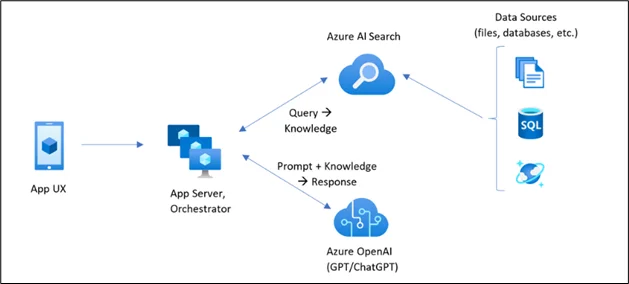
Retrieval-Augmented Generation is where Azure AI Search truly shines.
RAG Flow
- The user enters a natural-language question via a chat system and/or application.
- The search is submitted to Azure AI Search, which is the retrieval layer.
- Azure AI Search indexes its content for semantic, vector, and full-text search, even from images and scanned documents.
- The most pertinent document texts and details are extracted as grounding content.
- The retrieved information is then fed into a large language model as contextual information.
- The LLM produces an answer solely based on the given context.
- The answer to the question is traceable to the source documents.
- Moreover, this method ensures fact-based responses, reduces hallucinations, and supports enterprise compliance.
- Microsoft has developed the Azure AI Search service to facilitate the Retrieval-Augmented Generation pattern and has incorporated it as the default retriever layer for the Azure OpenAI-enabled assistant.
Enterprise Security and Governance
Azure AI Search inherits enterprise-grade security controls from Azure, including:
- Azure Active Directory authentication
- Role-based access control (RBAC)
- Private endpoints (VNet integration)
- Encryption at rest and in transit
This ensures that sensitive OCR-extracted data is never exposed unintentionally.
Business Value of OCR-Driven Search
In terms of business, Azure AI Search with OCR offers value through:
- Decreased the cost of operation through the elimination of manual data extraction.
- Fast decision-making through immediate document search
- Enhanced compliance through traceable AI responses
- Increased employee productivity through AI-based access to knowledge
The scanned documents are no longer handled by organizations merely as inactive repositories of knowledge; rather, they are treated as active knowledge assets.
Conclusion
Coupled with Retrieval-Augmented Generation, it forms the backbone of modern enterprise AI, driving search portals, copilots, and intelligent assistants that deliver accurate, explainable, and scalable intelligence.
Part 1 and Part 2 together form a whole, end-to-end technical guide for developers implementing next-generation AI search systems on Azure.
Drop a query if you have any questions regarding Azure AI Search and we will get back to you quickly.
Empowering organizations to become ‘data driven’ enterprises with our Cloud experts.
- Reduced infrastructure costs
- Timely data-driven decisions
About CloudThat
FAQs
1. In which ways does Azure AI Search serve as the retrieval component of a Retrieval-Augmented Generation (RAG) model, and why is this important for hallucinations?
ANS: – A RAG system has an architecture in which Azure AI Search, after receiving a user query, searches its index and provides information that serves as context for a Large Language Model. This means that, since the Large Language Model responds to questions with answers it obtains from Enterprise information, it does not respond with information it assumes or with information it has pre-trained knowledge of. This reduces hallucination and ensures it responds with Fact-Verified information.
2. What must one consider when implementing skill sets, indexers, and search indexes in larger-scale Enterprise scenarios?
ANS: – In enterprise-level implementations, it is necessary to properly design index schemas, restrict skill sets to the required enrichments, and perform incremental indexing. The OCR settings should include functionality for handling languages, orientation detection, and document quality. The indexers should be scheduled properly to handle data ingestion, and the partitions and replicas should be sized based on the data volume and query workload. It is important to monitor the execution and failure logs of the indexers.


WRITTEN BY Shantanu Singh
Shantanu Singh is a Research Associate at CloudThat with expertise in Data Analytics and Generative AI applications. Driven by a passion for technology, he has chosen data science as his career path and is committed to continuous learning. Shantanu enjoys exploring emerging technologies to enhance both his technical knowledge and interpersonal skills. His dedication to work, eagerness to embrace new advancements, and love for innovation make him a valuable asset to any team.


 PREV
PREV












Comments