

 Login
Login


 January 23, 2026
|
Voiced by Amazon Polly |
AWS Lambda SnapStart
AWS Lambda SnapStart is a performance optimization feature that reduces cold start latency by initializing and caching a function’s execution environment ahead of time. When you deploy or update your Lambda function, AWS SnapStart initializes the function, takes a snapshot of the fully initialized execution environment, and then uses this pre-initialized snapshot to launch new instances of the function on demand quickly.
In simple terms, instead of starting your function “from scratch” each time, AWS Lambda SnapStart restores a ready-to-run version of it, drastically reducing initialization time.
Currently, AWS Lambda SnapStart supports Java 11 and Java 17 runtimes, with plans to extend support to other languages in the future.
Pioneers in Cloud Consulting & Migration Services
- Reduced infrastructural costs
- Accelerated application deployment
Why AWS Lambda SnapStart Matters?
Cold-start latency is often negligible for lightweight functions but becomes a major performance bottleneck for Java-based functions, particularly those that load large frameworks (such as Spring Boot or Micronaut) or rely on heavy initialization.
By leveraging SnapStart, AWS helps customers deliver consistent low-latency responses without changing application logic or architecture.
Key Benefits:
- Up to 10× Faster Cold Starts
AWS reports that SnapStart can reduce cold start times from several seconds to a few hundred milliseconds for Java functions. - No Additional Cost
There’s no extra charge for using SnapStart, it’s included as part of the standard Lambda pricing. - Improved User Experience
For latency-sensitive applications such as APIs, chatbots, or real-time analytics, SnapStart ensures near-instant responses even during idle periods. - Zero Infrastructure Overhead
Developers don’t need to manage warmers, keep-alive strategies, or pre-warming scripts, SnapStart handles it automatically.
How AWS Lambda SnapStart Works?
Here’s how SnapStart optimizes the AWS Lambda cold start process:
- Initialization Phase (During Deployment)
- When you publish a new version of your function, AWS creates a fresh execution environment and runs the function’s initialization code (static initializers, class loading, dependency injection, etc.).
- Once initialization completes, AWS takes a snapshot of this environment, including memory, preloaded libraries, and initialized states.
- Restore Phase (During Invocation)
- When a new instance of the function is needed, Lambda restores the environment from the snapshot, skipping the initialization phase entirely.
- This leads to a much faster startup and execution.
Essentially, SnapStart moves initialization from runtime to build time, caching the heavy lifting upfront.
Use Cases for AWS Lambda SnapStart
- API-Driven Applications
For APIs built on frameworks such as Spring Boot or Micronaut, SnapStart helps ensure consistent, low-latency responses even during idle periods. - Event-Driven Workflows
Ideal for functions triggered by events (like Amazon Kinesis, Amazon S3, or Amazon EventBridge) where occasional spikes in invocation occur. - AI/ML Inference Functions
Functions that load pre-trained models or perform NLP tasks can start faster without reloading large dependencies each time. - Financial and E-Commerce Applications
In latency-sensitive domains, SnapStart ensures reliability and speed for functions triggered by real-time transactions.
Enabling AWS Lambda SnapStart
You can enable SnapStart via the AWS Management Console, CLI, or AWS CloudFormation.
In the Console:
- Navigate to your Lambda function.
- Choose Configuration → SnapStart.
- Enable “Apply on Published Versions”.
- Publish a new version to trigger snapshot creation.
Using AWS CLI:
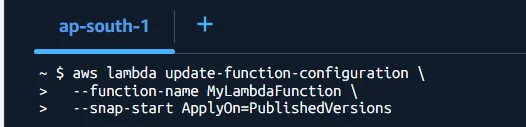
After enabling, SnapStart will automatically create and use snapshots for subsequent invocations.
Best Practices for Using AWS Lambda SnapStart
- Use Immutable Initialization Data
Since the snapshot captures memory state, avoid storing credentials, temporary tokens, or environment-specific data during initialization. - Leverage RuntimeHooks
AWS provides RuntimeHooks APIs to reinitialize dynamic data (like database connections or secrets) that shouldn’t persist across invocations. - Monitor with CloudWatch
Track latency metrics before and after enabling SnapStart to quantify performance improvements. - Combine with Provisioned Concurrency (If Needed)
For ultra-low latency use cases, combine SnapStart with Provisioned Concurrency for predictable performance. - Test Thoroughly Before Deployment
Ensure that restoring from snapshots doesn’t cause side effects in applications that rely on mutable or dynamic state.
Limitations and Considerations
While SnapStart offers major performance gains, there are a few limitations:
- Currently supports only Java 11 and Java 17 runtimes.
- Snapshots are created only for published versions, not for $LATEST.
- Functions that rely on ephemeral system data (e.g., network sockets or random seeds) need to be reinitialized via runtime hooks.
- May not significantly impact already fast, lightweight functions.
Conclusion
AWS Lambda SnapStart is a significant innovation in serverless computing, especially for Java workloads that struggle with cold-start latency. By caching pre-initialized execution environments, it delivers consistent, low-latency performance without additional cost or complexity.
In essence, AWS has taken one of the biggest pain points of serverless architecture, cold starts, and turned it into a thing of the past.
Drop a query if you have any questions regarding AWS Lambda SnapStart and we will get back to you quickly.
Making IT Networks Enterprise-ready – Cloud Management Services
- Accelerated cloud migration
- End-to-end view of the cloud environment
About CloudThat
FAQs
1. What is AWS Lambda SnapStart?
ANS: – It reduces AWS Lambda cold start latency by restoring a pre-initialized execution environment.
2. Which runtimes support AWS Lambda SnapStart?
ANS: – AWS Lambda SnapStart currently supports Java 11 and Java 17 runtimes.
3. Does AWS Lambda SnapStart add extra cost?
ANS: – No, AWS Lambda SnapStart is included at no additional cost in standard AWS Lambda pricing.


WRITTEN BY Manjunath Raju S G
Manjunath Raju S G works as a Research Associate at CloudThat. He is passionate about exploring advanced technologies and emerging cloud services, with a strong focus on data analytics, machine learning, and cloud computing. In his free time, Manjunath enjoys learning new languages to expand his skill set and stays updated with the latest tech trends and innovations.


 PREV
PREV












Comments