

 Login
Login


 December 9, 2025
|
Voiced by Amazon Polly |
Overview
A custom domain name plays a crucial role in presenting a polished and consistent identity for your applications. When working with Amazon API Gateway, the service automatically generates long and complex default URLs that are not ideal for production use. By configuring a custom domain, such as api.example.com, you can provide users and clients with a clean, branded, and secure endpoint for accessing your APIs.
This setup not only elevates the user experience but also enhances security and API lifecycle management. AWS offers a seamless way to integrate custom domains using AWS Certificate Manager (ACM) for SSL/TLS certificates, Amazon API Gateway for routing, and Amazon Route 53 (or any external DNS provider) for domain resolution. Whether you’re hosting a single microservice or multiple API versions, a custom domain simplifies URL management and strengthens your architecture’s reliability.
This guide walks you through the complete process, requesting certificates, setting up the domain in Amazon API Gateway, creating base path mappings, and configuring DNS, ensuring you can implement a production-ready custom domain with confidence and ease.
Pioneers in Cloud Consulting & Migration Services
- Reduced infrastructural costs
- Accelerated application deployment
Introduction
In today’s cloud-driven world, APIs are at the core of almost every modern application, enabling seamless communication between services, systems, and users. Amazon API Gateway is one of the most widely used fully managed services for creating, deploying, and managing APIs at scale. However, the default URLs generated by Amazon API Gateway are long, difficult to remember, and not ideal for production environments.
Step-by-Step Guide: How to Create a Custom Domain for Amazon API Gateway
Step 1: Request an SSL/TLS Certificate in AWS ACM
Open AWS Certificate Manager (ACM) → choose Request a Public Certificate.
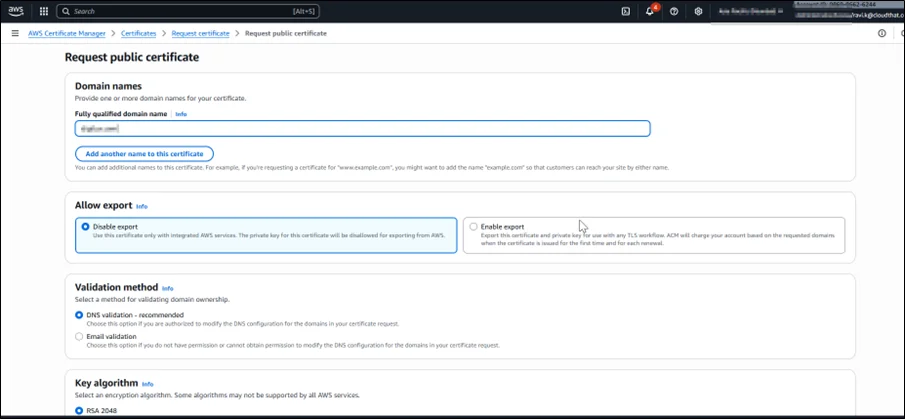
Enter your domain
Select DNS validation.
Add the provided CNAME record to Amazon Route 53 or an external DNS server.
Wait until the certificate shows Issued.
Step 2: Create a Custom Domain Name in Amazon API Gateway
Open Amazon API Gateway → Custom Domain Names
Click Create Custom Domain
Enter: api.example.com
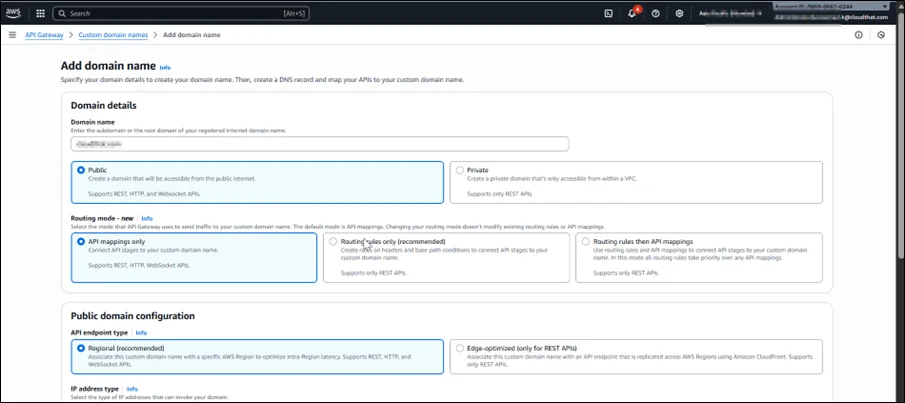
Select endpoint type: Regional (recommended) or Edge-Optimized
Choose the ACM certificate you created
Save to generate the API Gateway target domain name, e.g.:
d-xyz123.cloudfront.net
Step 3: Add Base Path Mapping
Open your custom domain
Select Configure Base Path Mapping
Choose your API and stage (dev/test/prod)
Provide a base path or leave blank for root mapping
Save your configuration
Example:
api.example.com/v1/orders
Step 4: Update DNS Records
Using Amazon Route 53
Go to your Hosted Zone
Create A Record → Alias → API Gateway Domain Name
Save
Using External DNS
Create a CNAME:
Name: api.example.com
Type: CNAME
Value: d-xyz123.cloudfront.net
TTL: 300
Step 5: Test the Custom Domain
Open:
https://api.example.com
Or (if mapped):
https://api.example.com/v1/resource
Your API should now be accessible via the custom domain.
Conclusion
Configuring a custom domain for Amazon API Gateway is one of the most effective ways to elevate the professionalism, security, and usability of your API endpoints. By integrating AWS Certificate Manager for SSL/TLS, leveraging Amazon API Gateway’s domain features, and mapping your DNS records using Amazon Route 53 or any external DNS provider, you gain full control over how users access your APIs.
A well-configured custom domain not only improves user confidence but also supports better versioning, cleaner routing, and long-term scalability for your backend services. Whether you’re developing a small application or managing multiple microservices, using a custom domain ensures your API architecture is production-ready and aligned with industry best practices.
With this setup in place, you can now build reliable, secure, and beautifully structured APIs that strengthen your brand identity and enhance the overall developer experience.
Drop a query if you have any questions regarding Amazon API Gateway and we will get back to you quickly.
Empowering organizations to become ‘data driven’ enterprises with our Cloud experts.
- Reduced infrastructure costs
- Timely data-driven decisions
About CloudThat
FAQs
1. Can I use a subdomain, such as auth.example.com, instead of api.example.com?
ANS: – Yes, Amazon API Gateway supports any subdomain as long as you issue an SSL certificate for it.
2. Do I need Amazon Route 53 to use a custom domain?
ANS: – No. You can use any DNS provider (GoDaddy, Hostinger, Namecheap) by adding a CNAME record.
3. Why is the certificate not showing in Amazon API Gateway?
ANS: – The AWS ACM certificate must be created in us-east-1 for edge-optimized APIs.


WRITTEN BY Ravi Kose
Ravi Kose works as a Senior Research Associate at CloudThat. He is a skilled cloud and infrastructure professional with a strong focus on managing infrastructure, security, and cloud migration projects. Ravi has hands-on experience designing secure, scalable, and efficient cloud architectures. With a solid understanding of cloud best practices and tools, he ensures smooth and secure transitions during cloud adoption and modernization initiatives. In his free time, he enjoys exploring emerging cloud technologies and deepening his expertise in DevOps and security practices.


 PREV
PREV












Comments