

 Login
Login


 December 9, 2025
|
Voiced by Amazon Polly |
Introduction
In Part 1, we focused on why multi-cloud cost management is hard and how to build a unified visibility and monitoring framework. With that foundation in place, the logical next question is:
“Now that I can see my spend across AWS and Azure, how do I actually reduce it in a structured way?”
Part 2 answers that question.
In this part, we move from visibility to action. We will walk through step-by-step optimization workflows for both AWS and Azure, and then explain how to compare costs between them, so you can place each workload on the most cost-effective platform.
The structure is intentional:
- First, optimize within each cloud
- Then, compare between clouds
- Finally, use that information for smart workload placement
Pioneers in Cloud Consulting & Migration Services
- Reduced infrastructural costs
- Accelerated application deployment
AWS Cost Optimization – Step-by-Step
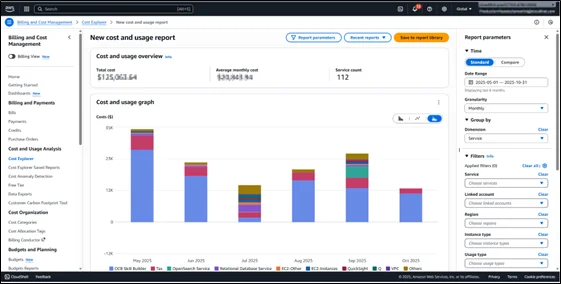
Step 1: Establish a Baseline for AWS Spend
Before changing anything, you need to understand where the money is going.
Key actions:
- Use AWS Cost Explorer to break down costs by:
- Service (Amazon EC2, Amazon S3, Amazon RDS, etc.)
- Linked accounts
- Tags such as Environment and CostCenter
- Identify:
- Top 3 most expensive services
- Top 10 costliest accounts or projects
- Any unusual spikes in the last 30–90 days
Outcome: You know which areas to target first (usually Amazon EC2, Amazon RDS, Amazon S3, and data transfer).
Step 2: Optimize AWS Compute (EC2) – Commitments and Rightsizing
For most organizations, Amazon EC2 is the single largest cost driver. Optimization here has the biggest impact.
Analyze Instance Utilization
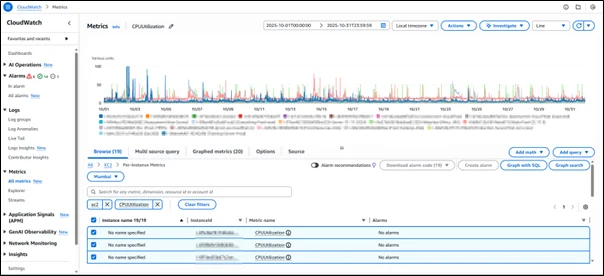
- Use Amazon CloudWatch metrics and AWS Compute Optimizer to check:
- Average CPU utilization
- Memory utilization (where available)
- Network I/O
- Look for instances that:
- Run at very low CPU (e.g., under 20% over a long period)
- Are idle during nights or weekends
Are oversized (e.g., m5.4xlarge but using m5.large capacity)
Rightsize and Reclassify
Based on the analysis:
- Downgrade large instances to smaller sizes or cheaper families.
- Switch to burstable instances (t3, t4g) for low, spiky workloads.
- Shut down or terminate truly unused resources (old Dev/POC instances).
Use Savings Plans and Reserved Instances
Once workloads are stable and right-sized, introduce commitment-based savings.
- For dynamic or mixed workloads:
- Use Compute Savings Plans to cover a portion of your steady usage.
- For very predictable usage:
- Use Reserved Instances (Standard RIs) for specific instance families and regions.
A simple approach:
- Calculate your stable baseline (e.g., the average of always-on usage over the last 3–6 months).
- Cover 50–70% of that baseline with Savings Plans.
Use Spot Instances for Fault-Tolerant Workloads
For workloads that can be interrupted:
- Use Spot Instances via:
- Auto Scaling groups with mixed instance policies
- Amazon ECS/Amazon EKS worker nodes that tolerate restarts
- Analytics, batch processing, CI/CD runners
This can dramatically reduce cost, especially in data processing workloads.
Step 3: Optimize AWS Storage and Backups
Storage is often “set and forget”, which makes it a silent cost leak.
Amazon S3 Optimization
- Enable Amazon S3 Storage Class Analysis to understand access patterns.
- Based on this:
- Use Amazon S3 Intelligent-Tiering for data with unknown or variable access patterns.
- Move old/unaccessed data to cheaper tiers (Infrequent Access, Glacier, Glacier Deep Archive).
- Create Lifecycle Policies for:
- Logs older than X days → IA
- Data older than Y months → Glacier
EBS Optimization
- Identify and delete unattached EBS volumes.
- Consolidate or shrink oversized volumes where utilization is low.
- Consider switching from older volume types to gp3, as it can offer equivalent performance at a potentially lower cost.
Snapshot Management
- Implement automated snapshot retention policies:
- Keep daily snapshots for 7–14 days
- Weekly snapshots for a certain number of weeks
Step 4: Control AWS Database Costs (Amazon RDS, Amazon DynamoDB)
Amazon RDS
- Right-size Amazon RDS instances based on CPU, memory, I/O, and connections.
- Enable storage autoscaling where appropriate, but monitor growth closely.
- For stable production workloads, use Amazon RDS Reserved Instances.
Amazon DynamoDB
- Monitor read/write capacity and evaluate if:
- You should move from on-demand to provisioned capacity with autoscaling (or vice versa).
- You can use DAX caching to reduce direct table reads.
Azure Cost Management Techniques – Step-by-Step
We now mirror a similar approach on Azure, utilizing the native tooling and licensing benefits.
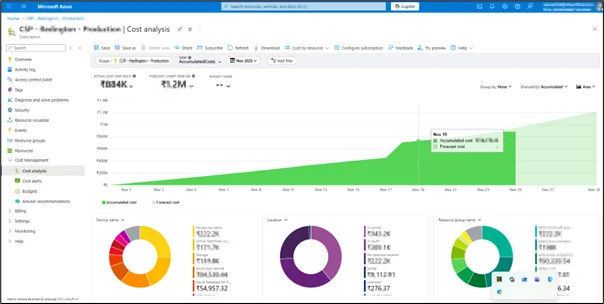
Step 1: Establish a Baseline with Azure Cost Management
- Use Cost Analysis to segment costs by:
- Subscription
- Resource group
- Tags (Environment, CostCenter, Project)
- Identify:
- Top services (Virtual Machines, Storage, SQL Database, etc.)
- Largest consuming resource groups
- Any cost anomalies over recent months
This indicates where optimization efforts are most effective.
Step 2: Use Azure Reserved Instances for Stable Workloads
For virtual machines that run continuously:
- Analyze VM usage over the past 3–12 months.
- Commit to 1-year or 3-year Azure Reserved VM Instances where suitable.
Key points:
- Choose the right scope:
- Single subscription
- Shared scope (across subscriptions)
- Management group level for large enterprises
- Enable instance size flexibility whenever possible, allowing reservations to apply across similar SKUs.
Step 3: Leverage Azure Hybrid Benefit
This is a major cost differentiator.
If your organization already owns Windows Server and SQL Server licenses with Software Assurance:
- Apply Azure Hybrid Benefit on:
- Windows VMs
- Azure SQL Database
- Azure SQL Managed Instances
This reduces the compute costs significantly because you reuse your existing licenses instead of paying for them again on Azure.
Step 4: Optimize Azure Storage and Database Costs
Azure Storage (Blob, Files, Disks)
- Choose the correct storage tiers:
- Hot tier for frequently accessed data
- Cool or Archive tier for long-term infrequent access data
- Clean up:
- Unused managed disks
- Old snapshots and backup blobs
- Stale file shares
Azure SQL and Databases
- For SQL workloads:
- Review performance levels (DTUs or vCores)
- Reduce tiers where utilization is consistently low
- Consider serverless or elastic pools for variable workloads
- For non-SQL databases:
- Monitor provisioned throughput and scale down where possible.
Conclusion
In this part, we shifted from “seeing the bill” to actively shaping it. We walked step by step through:
- How to reduce costs on AWS using commitments, rightsizing, storage lifecycle policies, and Spot usage
- How to take advantage of Azure’s strengths, such as Reservations and Hybrid Benefit
With these optimization levers in place, the next stage is to ensure that cost efficiency is not a one-time project but a continuous process.
Drop a query if you have any questions regarding AWS or Azure and we will get back to you quickly.
Making IT Networks Enterprise-ready – Cloud Management Services
- Accelerated cloud migration
- End-to-end view of the cloud environment
About CloudThat
FAQs
1. What should be optimized first to get the fastest cost reduction?
ANS: – Start with compute (Amazon EC2/Azure VMs) because they represent the largest cost share in most environments. Rightsizing, shutting down idle instances, and applying Savings Plans/Reserved Instances offer quick and impactful savings.
2. When should Spot Instances be used?
ANS: – Use Spot instances for fault-tolerant workloads such as:
- CI/CD runners
- Container workloads (Amazon EKS/Amazon ECS)
- Big data processing & analytics
- Rendering and video processing
3. How often should cost optimization be done?
ANS: – Cost optimization is not a one-time activity. Recommended cycles:
- Weekly / Bi-weekly: rightsizing review
- Monthly: billing review & anomaly check
- Quarterly: Reserved Instances / Savings Plans strategy review


WRITTEN BY Samarth Kulkarni
Samarth is a Senior Research Associate and AWS-certified professional with hands-on expertise in over 25 successful cloud migration, infrastructure optimization, and automation projects. With a strong track record in architecting secure, scalable, and cost-efficient solutions, he has delivered complex engagements across AWS, Azure, and GCP for clients in diverse industries. Recognized multiple times by clients and peers for his exceptional commitment, technical expertise, and proactive problem-solving, Samarth leverages tools such as Terraform, Ansible, and Python automation to design and implement robust cloud architectures that align with both business and technical objectives.


 PREV
PREV











Comments