

 Login
Login


 September 7, 2026
|
Voiced by Amazon Polly |
Overview
Containerized applications make deployment faster and more consistent, but they also introduce another security responsibility: keeping the software inside an image free from known vulnerabilities. Trivy is an open-source security scanner that helps DevOps teams identify vulnerable operating system packages and application dependencies before containers are deployed. This revised guide covers the common security challenges addressed by Trivy, its main capabilities, installation, image scanning, Jenkins integration, and practical usage recommendations.
Pioneers in Cloud Consulting & Migration Services
- Reduced infrastructural costs
- Accelerated application deployment
Challenges in Container Security
- Manual Scanning Effort: Checking container contents manually is difficult to maintain and can easily result in security issues being overlooked.
- 2. Vulnerabilities Found Too Late: If security checks are performed only near release time, developers have less time to fix vulnerable components before deployment.
- 3. Dependency Visibility Gaps: Docker images contain multiple layers and dependencies, making it difficult to understand which components introduce security risks without automated scanning.
- 4. CI/CD Security Integration: Adding security validation to an existing delivery pipeline can become complicated when scanning is not automated.
- Outdated Vulnerability Information: Vulnerability databases need regular updates. Relying on manual updates can delay awareness of newly identified security issues.
Introduction to Trivy
Security needs to be considered throughout the software delivery lifecycle, especially when applications are packaged as containers. A vulnerable library or operating system package inside an image can become a security concern after deployment. Trivy, developed by Aqua Security, provides a straightforward approach to detecting known vulnerabilities during development and delivery. By introducing scanning before an image reaches production, teams can identify problems earlier and make security checks part of the normal DevOps workflow.
What is Trivy?
Trivy is a lightweight and comprehensive vulnerability scanner designed for modern development and container environments. It examines container images and identifies known security vulnerabilities in operating system packages and application-level dependencies. Its command-line interface makes it easy to use locally, while its automation capabilities enable teams to integrate security checks into CI/CD workflows.
Key Features of Trivy
- Fast Scanning: Trivy is designed to perform vulnerability checks quickly, making it practical for frequent scans during development and builds.
- Broad Dependency Detection: It checks OS packages and dependencies used by various programming languages.
- Updated Vulnerability Database: Trivy uses vulnerability information that is regularly refreshed, so scans can identify recently published security issues.
- Multiple Scan Targets: In addition to container images, Trivy can examine file systems and Git repositories.
- CI/CD Friendly: Its command-line interface and exit-code options make it suitable for automated security gates in tools such as Jenkins.
Installing Trivy
- Install Trivy on your local machine:
|
1 2 3 4 5 |
- sudo apt-get install wget apt-transport-https gnupg lsb-release - wget -qO - https://aquasecurity.github.io/trivy-repo/deb/public.key | sudo apt-key add – - echo deb https://aquasecurity.github.io/trivy-repo/deb $(lsb_release -sc) main | sudo tee -a /etc/apt/sources.list.d/trivy.list - sudo apt-get update - sudo apt-get install trivy |
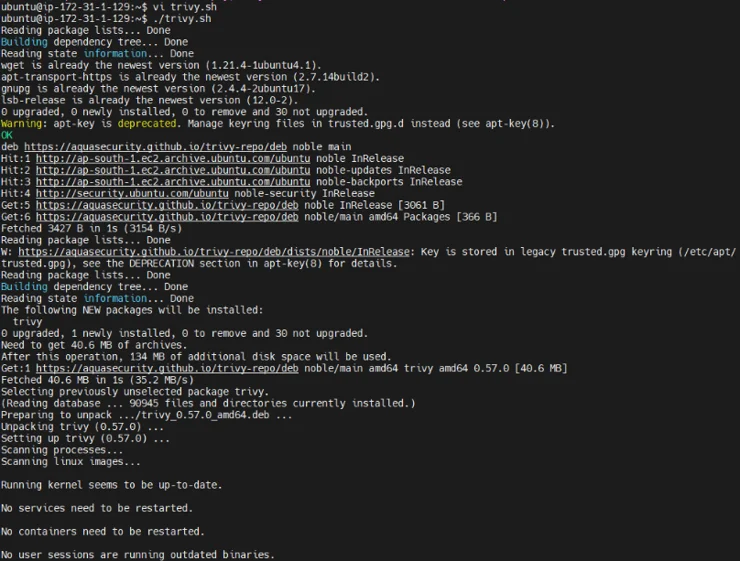
Using Trivy to Scan Docker Images
- Scan a Docker Image: Trivy makes scanning Docker images simple. To start a scan, use:
trivy image [image-name]
Example:
trivy image nginx:latest
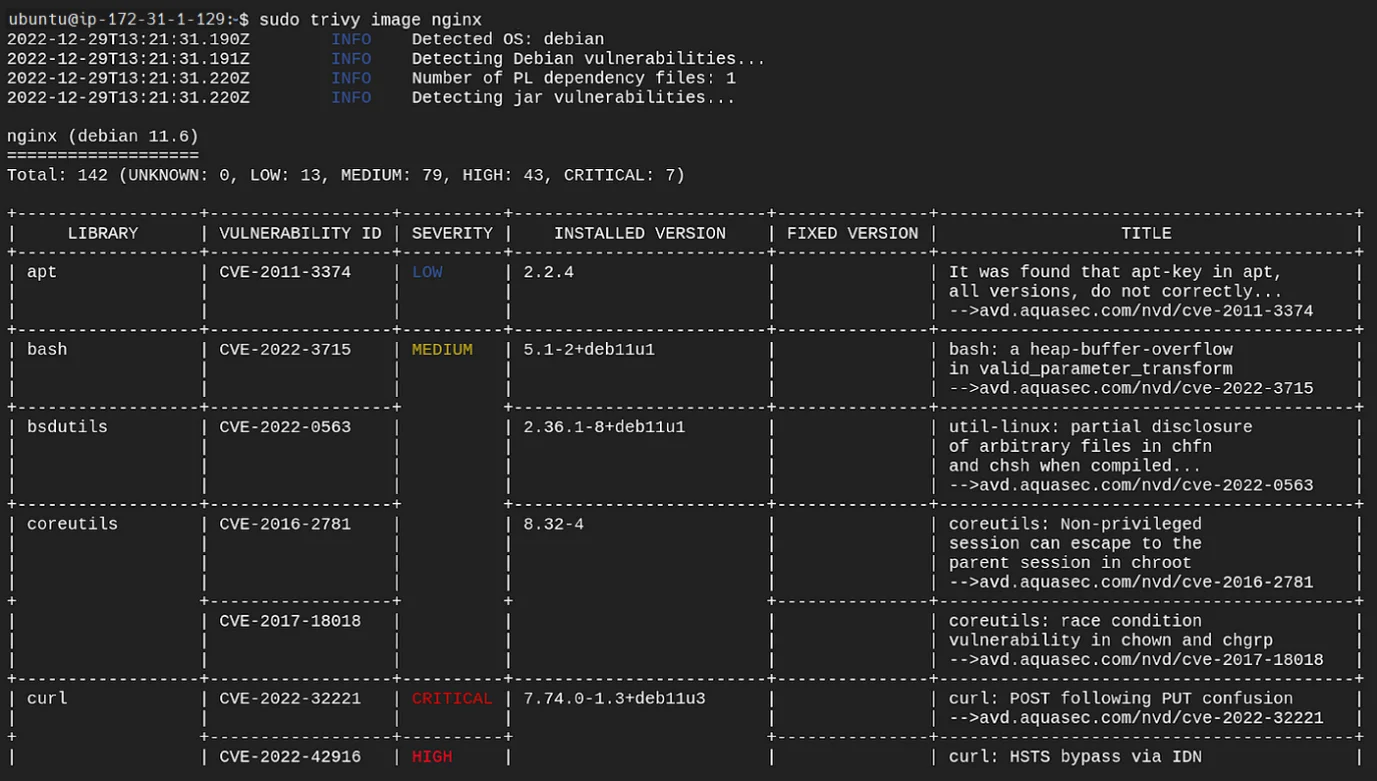
2. Interpreting Scan Results: Trivy provides detailed information about detected vulnerabilities, their severity, and suggested fixes. You can customize scanning by severity level (e.g., critical, high) to prioritize important issues.
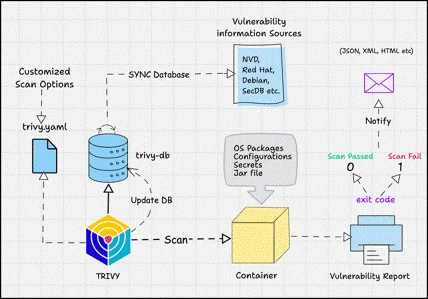
Integrating Trivy with Jenkins
Security scanning is more effective when performed automatically as part of the build process. Jenkins can run Trivy after an image has been created and stop the pipeline when the configured vulnerability threshold is exceeded.
- Create a Jenkins Pipeline: Add a dedicated security scanning stage to the existing pipeline.
- Run the Trivy Check: Execute Trivy against the image produced by the build. For example:
trivy image –exit-code 1 –severity HIGH [image-name]
- Enforce the Security Gate: The exit code can be used by Jenkins to mark the build as failed when high-severity findings are detected. This prevents an image with unacceptable vulnerabilities from continuing toward deployment.
Best Practices for Using Trivy
- Keep the Vulnerability Database Current: Regular database updates improve the likelihood of detecting newly reported issues.
- Scan During CI/CD: Make vulnerability scanning an automated step in the build and release process rather than relying solely on manual checks.
- Define Severity Policies: Establish thresholds such as HIGH or CRITICAL based on the organization’s security requirements.
- Preserve Scan Reports: Store scan results so teams can compare findings over time and track whether recurring vulnerabilities are being resolved.
- Use Ignore Rules Carefully: Known findings may sometimes need to be excluded temporarily. Any ignored vulnerability should have a clear reason and should be reviewed later rather than permanently hidden.
Conclusion
Adding Trivy to a container-based DevOps workflow provides an effective layer of automated security validation. By scanning images before they move into production, teams can discover vulnerable packages and dependencies earlier in the development lifecycle. Combining Trivy with Jenkins also makes security checks repeatable and enforceable, helping organizations reduce the possibility of deploying images with known vulnerabilities.
Drop a query if you have any questions regarding Trivy, and we will get back to you quickly.
Empowering organizations to become ‘data driven’ enterprises with our Cloud experts.
- Reduced infrastructure costs
- Timely data-driven decisions
About CloudThat
FAQs
1. Can Trivy scan images from different registries?
ANS: – Yes. Trivy can scan images from Docker Hub, Amazon ECR, and other private registries.
2. Can Trivy work with images other than standard Docker images?
ANS: – Yes. Trivy can scan OCI-compliant container images in addition to Docker images.
3. When should container images be scanned?
ANS: – Images should be scanned regularly, particularly during CI/CD execution and before deployment, so newly discovered issues can be detected as early as possible.


WRITTEN BY Akshay Acharya
Akshay Acharya works as a Research Associate at CloudThat. He possesses strong analytical thinking and problem-solving skills, knowledge of AWS cloud services, migration, infrastructure setup, and security, as well as the ability to quickly adopt new technologies and learn.


 PREV
PREV












Comments