

 Login
Login


 September 7, 2026
|
Voiced by Amazon Polly |
Introduction
Generative AI is rapidly becoming part of enterprise applications, developer platforms, analytics, and business processes. However, moving from an AI proof of concept to a production workload introduces requirements around security, identity, networking, governance, data protection, monitoring, and cost management.
An AI-based Landing Zone on AWS, more accurately referred to as a Generative AI Landing Zone, extends the traditional AWS multi-account foundation with capabilities required to operate AI workloads securely.
AWS has published reference architectures for integrating Amazon Bedrock into an AWS landing zone, including centralized AI services, controlled network connectivity, IAM policies, VPC Lattice, monitoring, and workload isolation.
Pioneers in Cloud Consulting & Migration Services
- Reduced infrastructural costs
- Accelerated application deployment
Understanding an AI Landing Zone in the Cloud Ecosystem
A Generative AI Landing Zone is not a standalone AWS service. It is an architectural approach that combines AWS landing-zone governance with AI-specific security and operational controls.
A typical architecture separates responsibilities across:
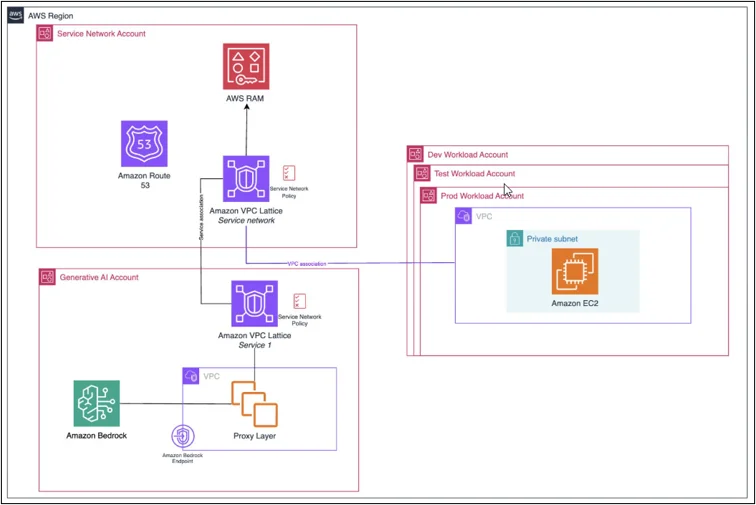
- Service Network Account – provides centralized networking and access policies.
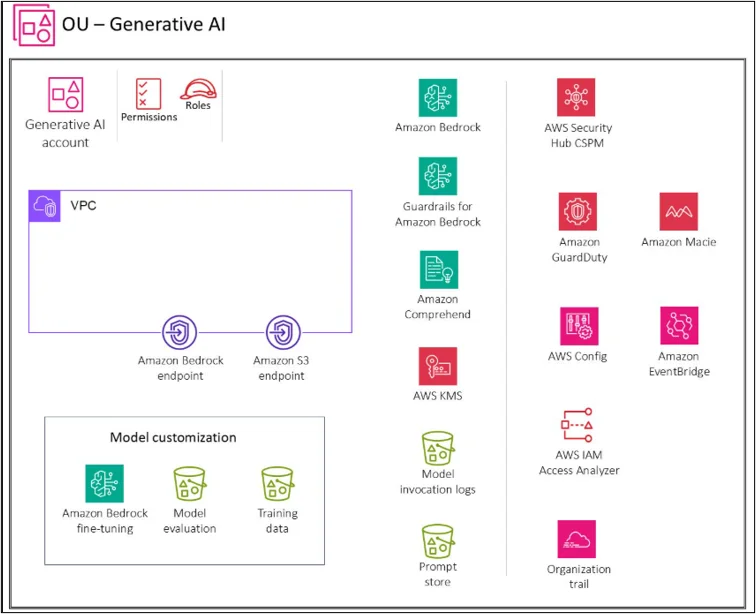
- Generative AI Account – centrally manages Amazon Bedrock capabilities and approved foundation models.
- Workload Accounts – development, test, and production accounts consume approved AI services.
- Security and Logging – provides centralized auditing, monitoring, and governance.
AWS’s Bedrock baseline architecture follows this model, using a service network account, Generative AI account, and separate workload accounts.
Why an AI Landing Zone Matters
Centralized AI Governance
Organizations can centrally control which teams and applications can access AI capabilities and approved foundation models.
Security and Data Protection
AI applications may process sensitive enterprise information through prompts, knowledge bases, or RAG data sources. IAM, encryption, network controls, and guardrails help establish appropriate protection.
Controlled Network Access
Instead of allowing unrestricted access to AI services, organizations can establish controlled connectivity using VPC Lattice, VPC endpoints, and authorization policies.
Cost Visibility
Centralized monitoring enables organizations to understand AI service consumption across teams and applications, supporting more effective cost allocation.
Faster AI Adoption
Reusable AI patterns enable development teams to consume approved capabilities without having to design the complete security and networking architecture for every project.
Core Components
- AWS Organizations and Control Tower
AWS Organizations provides the multi-account foundation. AWS Control Tower can be used to establish and govern the landing zone and apply centralized controls.
- Amazon Bedrock
Amazon Bedrock provides access to foundation models and generative AI capabilities. In a centralized architecture, approved Amazon Bedrock capabilities and model access can be centrally managed from a dedicated Generative AI account.
- IAM and Authorization Policies
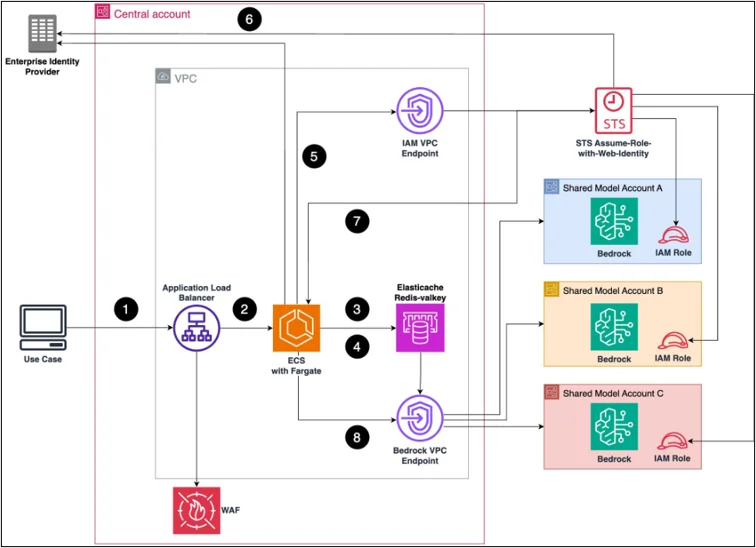
IAM controls identity-based access, while VPC Lattice authorization policies can control access to centralized AI services. This supports a least-privilege approach.
- VPC Lattice and VPC Endpoints
VPC Lattice provides centralized service-to-service connectivity. In the AWS reference architecture, workload accounts connect to a shared service network, while a proxy layer provides controlled access to Amazon Bedrock through VPC endpoints.
- Amazon Bedrock Guardrails
Guardrails can be incorporated into the AI platform to apply organization-defined controls around AI interactions.
- Monitoring and Audit
Amazon CloudWatch, AWS CloudTrail, and VPC Lattice access logs provide visibility into performance, API activity, access attempts, and service usage.
Step-by-Step Implementation
Step 1: Establish the Landing Zone
Create the AWS multi-account foundation, organizational structure, identity model, security controls, and centralized logging.
Step 2: Create the AI Account Structure
Establish a dedicated Generative AI account for centrally managed Amazon Bedrock capabilities and separate development, test, and production workload accounts.
Step 3: Configure Network Connectivity
Connect workload accounts to the centralized service network using VPC Lattice. The architecture can route requests through a controlled proxy layer and VPC endpoints before reaching Amazon Bedrock.
Step 4: Configure Access Controls
Define IAM roles, policies, and VPC Lattice authorization policies to restrict access to approved AI capabilities.
Step 5: Establish AI Guardrails
Configure appropriate controls for the organization’s AI applications, data, and usage requirements.
Step 6: Implement Monitoring
Enable CloudWatch metrics, CloudTrail auditing, and VPC Lattice access logging to monitor AI service usage, performance, and security events.
End-to-End Workflow
A typical request follows this sequence:
- An application runs in a workload account.
- The application authenticates using an approved IAM role.
- The request enters the organization’s-controlled network path.
- VPC Lattice policies evaluate access.
- The request reaches the centralized AI service.
- The approved Amazon Bedrock capability is invoked.
- Configured AI controls are applied.
- The response is returned to the application.
- Monitoring and audit information is captured.
This approach provides centralized control while maintaining separation between workload environments.
Key Use Cases
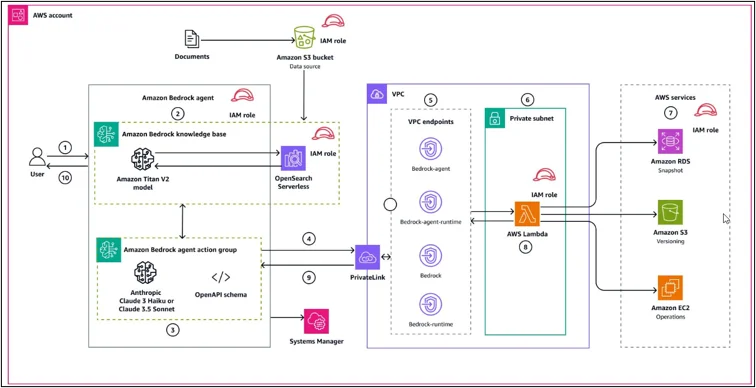
- Enterprise RAG: Internal knowledge assistants and document-based applications.
- AI-powered Applications: Conversational interfaces, summarization, and intelligent automation.
- Developer Productivity: Controlled access to enterprise-approved AI capabilities.
- AI Agents: Applications that use models together with approved tools and services.
- Enterprise AI Platforms: A centralized platform that supports multiple business teams.
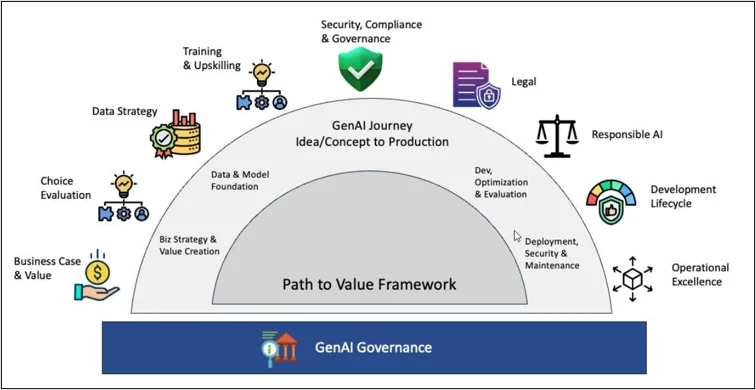
Generative AI LifeCycle
Best Practices
- Use a multi-account architecture.
- Apply least-privilege IAM policies.
- Centrally govern approved AI models.
- Use controlled network connectivity.
- Implement AI guardrails.
- Standardize deployment using Infrastructure as Code.
- Enable centralized logging and monitoring.
- Track AI consumption and cost.
- Separate development, test, and production workloads.
- Validate security and compliance requirements before production deployment.
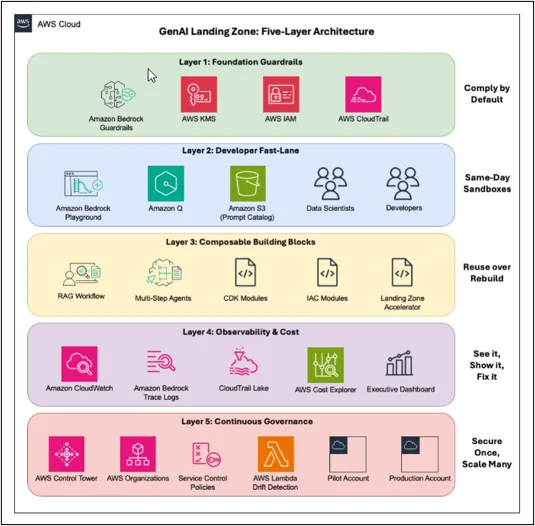
AWS also describes a five-layer GenAI Landing Zone approach incorporating guardrails, reusable blueprints, observability, cost tracking, and continuous governance.
Conclusion
An AI Landing Zone provides a structured foundation for organizations adopting generative AI at enterprise scale. Rather than providing unrestricted access to AI services, it establishes controlled account boundaries, identity policies, network connectivity, monitoring, and governance.
The AWS Bedrock baseline architecture demonstrates how VPC Lattice, VPC endpoints, IAM, centralized AI services, and workload accounts can be combined to provide secure and controlled access to Amazon Bedrock.
The architecture should be adapted to the organization’s security, data, compliance, and operational requirements rather than treated as a one-size-fits-all implementation.
Drop a query if you have any questions regarding the AI Landing Zone, and we will get back to you quickly.
Empowering organizations to become ‘data driven’ enterprises with our Cloud experts.
- Reduced infrastructure costs
- Timely data-driven decisions
About CloudThat
FAQs
1. Is an AI Landing Zone an AWS service?
ANS: – No. It is an architectural framework that combines AWS Landing Zone capabilities with AI-specific controls.
2. Is Amazon Bedrock mandatory?
ANS: – No. The landing zone concept can support different AI architectures. Amazon Bedrock is used here because AWS provides a documented landing-zone reference architecture for it.
3. Why separate AI and workload accounts?
ANS: – Separation enables centralized AI governance while maintaining isolation between development, test, and production workloads.

WRITTEN BY Ayush Agarwal
Ayush Agarwal works as a Subject Matter Expert at CloudThat. He is a certified AWS Solutions Architect Professional with expertise in designing and implementing scalable cloud infrastructure solutions. Ayush specializes in cloud architecture, infrastructure as code, and multi-cloud deployments, helping organizations optimize their cloud strategies and achieve operational excellence. With a deep understanding of AWS services and best practices, he guides teams in building robust, secure, and cost-effective cloud solutions. Ayush is passionate about emerging cloud technologies and continuously enhances his knowledge to stay at the forefront of cloud innovation. In his free time, he enjoys exploring new AWS services, experimenting with technologies, and trekking to discover new places and connect with nature.


 PREV
PREV












Comments