

 Login
Login


 March 17, 2026
|
Voiced by Amazon Polly |
Overview
In this blog, we will explore a new service, Amazon Route 53, that delivers secure, highly available DNS resolution on a global scale. This service, called Global Resolver, allows organizations to resolve DNS queries for both public internet domains and private domains linked to Amazon Route 53 private hosted zones, while using distributed anycast IP addresses globally to provide a unified solution for managing DNS requests from authenticated clients and trusted sources across on-premises data centers, branch offices, and remote locations. In addition, it includes built-in security features such as DNS traffic filtering, support for encrypted queries, and centralized logging, helping organizations streamline DNS operations, reduce administrative overhead, and maintain compliance with security and regulatory standards.
Pioneers in Cloud Consulting & Migration Services
- Reduced infrastructural costs
- Accelerated application deployment
Introduction
Amazon Route 53 Global Resolver simplifies DNS management by handling queries for both public domains and private hosted zones without requiring split-DNS setups. It supports Do53, DoH, and DoT protocols, and uses shared IPv4 anycast addresses to route requests to the nearest AWS Region, reducing latency for distributed users.
Amazon Route 53 Global Resolver processes requests only from authenticated clients. Administrators can restrict access using IP or CIDR allowlists for Do53, DoT, and DoH traffic. For DoH and DoT, token-based authentication adds granular control with configurable expiration and revocation options.
Amazon Route 53 Global Resolver supports DNSSEC validation to verify response authenticity and includes EDNS Client Subnet to provide more accurate location-based DNS responses.
Setting Up and Managing Amazon Route 53 Global Resolver
This guide demonstrates how to set up Amazon Route 53 Global Resolver for an organization operating in the EU-Central and EU-West Regions, enabling seamless resolution of both public internet domains and internal applications hosted within Amazon Route 53 private hosted zones.
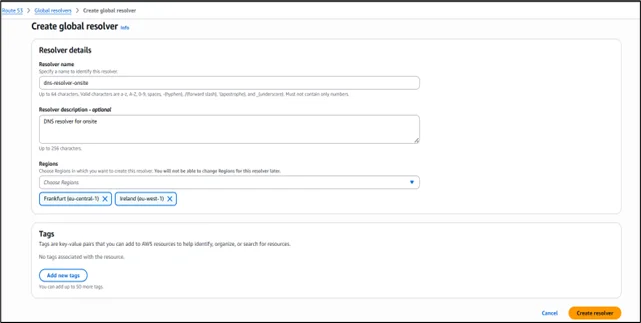
After selecting Create Global Resolver, provide a name for the resolver in the details section, Resolver name dns-resolver-onsite, and optionally include a description. Next, specify the AWS Regions where the resolver should be active, such as Frankfurt (eu-central-1) and Ireland (eu-west-1). With its anycast design, click on Create to send resolver DNS requests to the closest chosen Region for optimal performance.
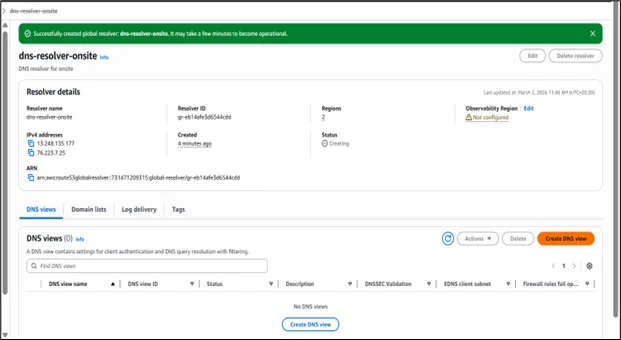
Once the resolver has been successfully provisioned, its details are shown in the console. From there, we can select Create DNS view to set up client authentication and define the DNS resolution configuration.
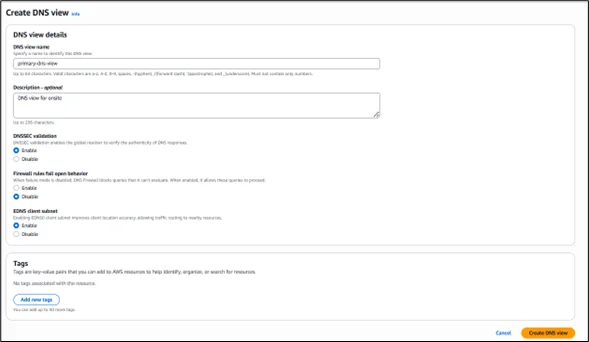
In the Create DNS view section, specify a name such as primary-dns-view and add a description if needed. A DNS view allows you to logically group clients and traffic sources and define how DNS queries are resolved for each group. This approach makes it easier to apply distinct filtering rules and private hosted zone resolution policies for different sets of users within your organization.
Enable DNSSEC validation to ensure responses from public DNS servers are authentic. For firewall fail-open behavior, select Disable to block queries when firewall rules cannot be evaluated. Keep the EDNS client subnet enabled to pass client location details to DNS servers, allowing content delivery networks to deliver more precise geo-based responses, and click on Create DNS view.
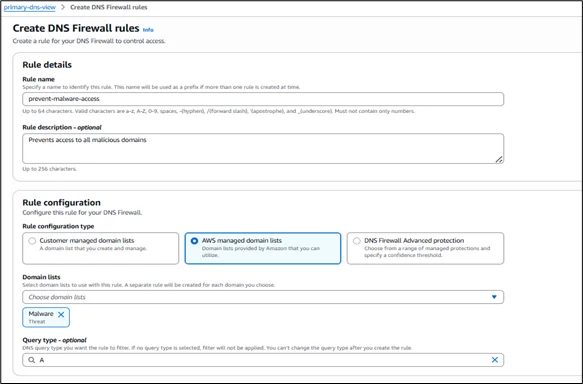
After the DNS view becomes active, you can set up DNS Firewall policies by selecting Create rule to control network traffic. In the rule creation section, provide a name such as prevent-malware-access and, if required, add a description. For the rule configuration, choose between customer-managed domain lists, AWS-managed domain lists, or DNS Firewall Advanced protection.
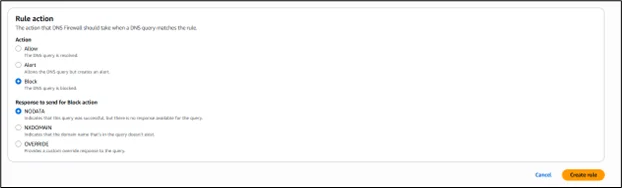
In this example, select AWS managed domain lists, then choose one or more predefined lists, such as Malware under Threat, to block known harmful domains. You may leave the query type unspecified to cover all DNS queries, or select A to limit the rule to IPv4 address lookups. Under rule action, choose Block to stop resolution for matching domains. For the block response, keep NODATA selected to return a successful response with no records, and then complete the setup by selecting Create rule.
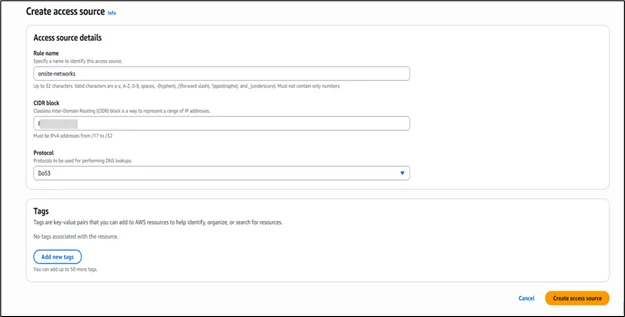
The next step is to define which networks are permitted to send DNS requests to the resolver. Go to the Access sources section in the DNS view, then click Create access source.
Enter a descriptive name, such as onsite-networks, and specify the appropriate IP address range in CIDR format to allow traffic from your office locations. Select Do53 for standard DNS over UDP, or choose DoH or DoT if you want clients to use encrypted DNS protocols. After completing the configuration, select Create access source to grant the defined network permission to query the resolver.
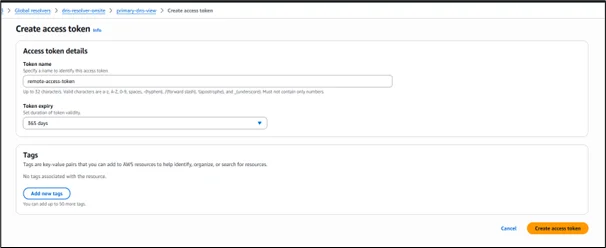
To enable token-based authentication, open the Access tokens tab in the DNS view, then select Create access token. In the token configuration section, provide a name such as remote-access-token. Then choose an appropriate validity period from the expiration dropdown according to your security needs, for example, 365 days for extended access or shorter durations like 30 or 90 days for stricter control. Once the settings are finalized, click Create access token to generate the token, which clients can use to authenticate their DoH or DoT connections to the resolver.
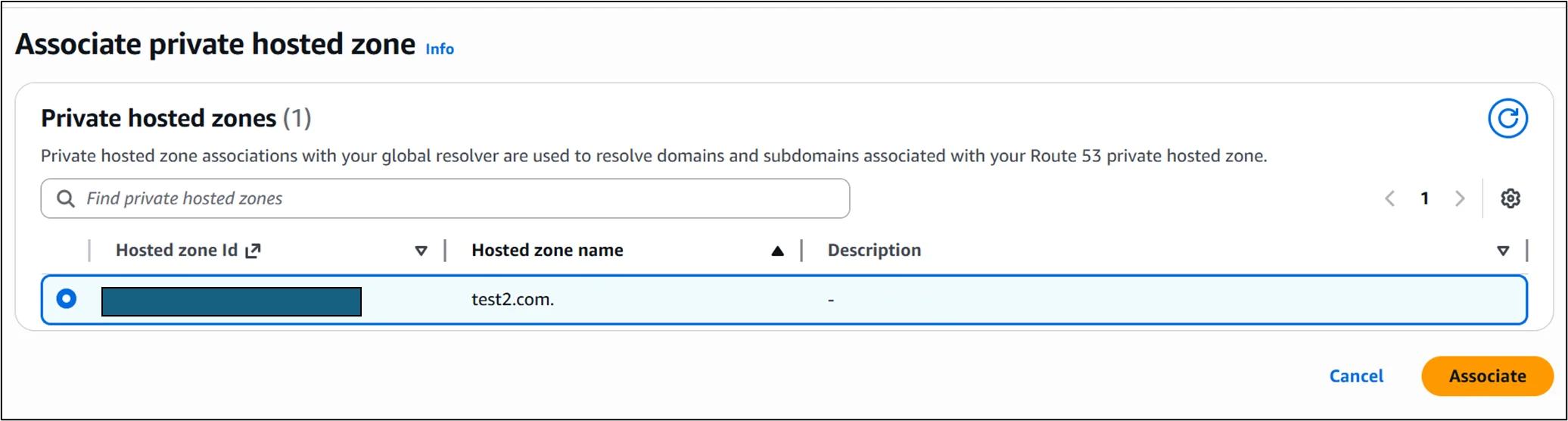
Once the access token has been generated, go to the Private hosted zones tab within the DNS view to link your Amazon Route 53 private hosted zones so the resolver can answer queries for internal application domains. Select the Associate private hosted zone, choose the desired private hosted zone from the available list, and then click Associate to allow the resolver to handle DNS requests for that zone.
Once you have set up the Amazon Route 53 Global Resolver, update your DNS clients so that their queries are directed to the resolver’s anycast IP addresses.
For IP range–based (CIDR allowlist) access: Configure your client systems to forward DNS requests to the anycast IP addresses listed in the Amazon Route 53 Global Resolver configuration. The resolver will accept traffic only from the IP ranges (CIDR blocks) that you have explicitly allowed as access sources.
For authentication using access tokens: Install and configure the required access tokens on your client machines to enable authenticated DNS over HTTPS (DoH) or DNS over TLS (DoT) connections. In addition, ensure that all DNS queries are routed to the anycast IP addresses specified in the Amazon Route 53 Global Resolver details.
Conclusion
Hence, Amazon Route 53 Global Resolver offers a secure, globally scalable DNS solution by combining anycast routing, encrypted DNS (DoH and DoT), DNSSEC validation, and built-in firewall protection. With centralized management for both public and private DNS queries, along with flexible authentication controls, it helps organizations improve performance, strengthen security, and simplify DNS operations across hybrid environments.
Drop a query if you have any questions regarding Amazon Route 53 Global Resolver and we will get back to you quickly.
Empowering organizations to become ‘data driven’ enterprises with our Cloud experts.
- Reduced infrastructure costs
- Timely data-driven decisions
About CloudThat
FAQs
1. What is the main benefit of using Amazon Route 53 Global Resolver?
ANS: – Amazon Route 53 Global Resolver provides a centralized, secure, and highly available DNS resolution service using anycast IP addresses. It enables organizations to resolve both public and private domain queries globally while reducing latency and strengthening security through features such as DNS filtering, DNSSEC validation, and encrypted DNS (DoH and DoT).
2. Can Amazon Route 53 Global Resolver resolve private hosted zones?
ANS: – Yes, it can resolve domains from Amazon Route 53 private hosted zones once they are associated with a DNS view, allowing internal applications to be accessed securely alongside public domains.


WRITTEN BY Abhilasha D
Abhilasha D works as a Research Associate-DevOps at CloudThat. She is focused on gaining knowledge of the cloud environment and DevOps tools. Abhilasha is interested in learning and researching emerging technologies and is skilled in dealing with problems in a resourceful manner.


 PREV
PREV










Comments