

 Login
Login


 March 17, 2026
|
Voiced by Amazon Polly |
Introduction
Modern containerized applications demand deployment strategies that minimize downtime, reduce risk, and maintain application availability during releases. In Amazon ECS environments, blue/green deployments have become a widely adopted pattern for safe, controlled production rollouts.
With Terraform as the infrastructure management tool, implementing blue/green deployments on Amazon ECS can be approached in two different ways. You can either use Amazon ECS-native blue/green capabilities, where deployment orchestration is handled directly by Amazon ECS, or you can use AWS CodeDeploy to manage traffic shifting and rollout strategies.
Each approach offers distinct advantages. Amazon ECS-native blue/green focuses on simplicity, built-in rollback mechanisms, and reduced architectural complexity. AWS CodeDeploy, on the other hand, provides advanced traffic-shifting strategies, such as canary and linear deployments, along with deeper orchestration capabilities.
This guide explores how blue/green deployments work on Amazon ECS using Terraform, compares Amazon ECS-native and AWS CodeDeploy approaches, and helps you determine which model best fits your production requirements.
Pioneers in Cloud Consulting & Migration Services
- Reduced infrastructural costs
- Accelerated application deployment
Amazon ECS-Native vs AWS CodeDeploy Approach
When deploying blue/green on Amazon ECS using Terraform, you have two architectural options:
- Amazon ECS-Native Blue/Green
- AWS CodeDeploy-Driven Blue/Green
Both achieve zero-downtime deployments, but they differ significantly in complexity and traffic shifting behavior.
Option 1: Amazon ECS-Native Blue/Green (Terraform)
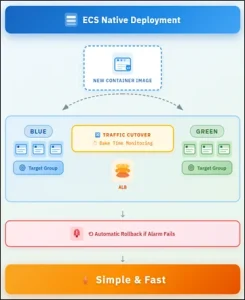
In Amazon ECS-native deployment:
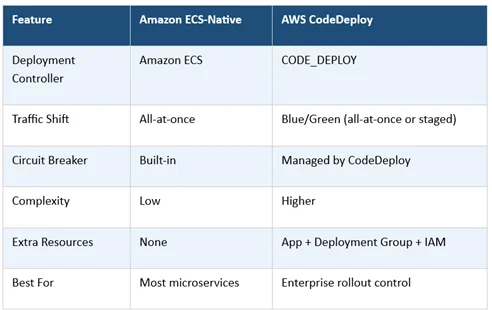
- Deployment controller = Amazon ECS
- Traffic switches all at once
- Circuit breaker handles rollback
- No AWS CodeDeploy resources required
- Simpler architecture
|
1 2 3 4 5 6 7 8 9 10 11 12 13 14 15 16 17 18 19 20 21 22 23 |
Key Terraform Configuration resource "aws_ecs_service" "app" { name = "my-app" cluster = aws_ecs_cluster.main.id task_definition = aws_ecs_task_definition.app.arn desired_count = 2 deployment_controller { type = "ECS" } deployment_circuit_breaker { enable = true rollback = true } load_balancer { target_group_arn = aws_lb_target_group.blue.arn container_name = "app" container_port = 8080 } } |
Behaviour:
- Amazon ECS creates a new task set
- Registers it with the alternate target group
- Switches traffic immediately
- Monitors health
- Rolls back automatically if alarms fail
This is clean, minimal, and recommended for most workloads.
Option 2: AWS CodeDeploy Blue/Green (Terraform)
If you need:
- Staged blue/green deployments with controlled traffic shifting
- Approval gates
- Multi-stage orchestration
- AWS CodePipeline integration
Then you must use AWS CodeDeploy.
In Terraform, this requires additional resources.
Step 1: Change Deployment Controller
|
1 2 3 4 5 6 7 8 9 10 11 12 13 14 15 16 |
resource "aws_ecs_service" "app" { name = "my-app" cluster = aws_ecs_cluster.main.id task_definition = aws_ecs_task_definition.app.arn desired_count = 2 deployment_controller { type = "CODE_DEPLOY" } load_balancer { target_group_arn = aws_lb_target_group.blue.arn container_name = "app" container_port = 8080 } } |
Step 2: Create Deployment Group
|
1 2 3 4 5 6 7 8 9 10 11 12 13 14 15 16 17 18 19 20 21 22 23 24 25 26 27 28 29 30 |
resource "aws_codedeploy_deployment_group" "app" { app_name = aws_codedeploy_app.app.name deployment_group_name = "my-app-dg" service_role_arn = aws_iam_role.codedeploy.arn deployment_config_name = "CodeDeployDefault.ECSAllAtOnce" ecs_service { cluster_name = aws_ecs_cluster.main.name service_name = aws_ecs_service.app.name } blue_green_deployment_config { deployment_ready_option { action_on_timeout = "CONTINUE_DEPLOYMENT" } terminate_blue_instances_on_deployment_success { action = "TERMINATE" termination_wait_time_in_minutes = 5 } } load_balancer_info { target_group_pair_info { prod_traffic_route { listener_arns = [aws_lb_listener.app.arn] } target_group { name = aws_lb_target_group.blue.name } target_group { name = aws_lb_target_group.green.name } } } } |
What Happens with AWS CodeDeploy?
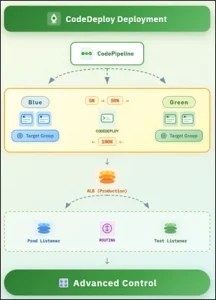
Instead of Amazon ECS switching traffic instantly, AWS CodeDeploy provides structured blue/green deployment control:
- AWS CodeDeploy routes traffic from the blue (live) environment to the green (new) environment
- A configurable wait period allows validation before full cutover
- Amazon CloudWatch alarms are monitored throughout the deployment
- Rolls back automatically if alarm thresholds are breached
This is more controlled but more complex.
Architectural Comparison (Terraform View)
Which Should You Use?
Use Amazon ECS-Native if:
- You want a simpler architecture
- All-at-once traffic shift is acceptable
- You prefer fewer AWS services
- You manage infra fully with Terraform
Use AWS CodeDeploy if:
- You need a percentage-based rollout
- You require staged exposure
- You need pipeline approvals
- You manage coordinated multi-service releases
With Terraform, both options are fully supported.
However:
Amazon ECS-native blue/green is now the recommended default for most workloads.
AWS CodeDeploy remains powerful for advanced traffic control scenarios.
Conclusion
Choosing between Amazon ECS-native blue/green and AWS CodeDeploy-driven blue/green in Terraform depends on your deployment requirements, risk tolerance, and operational model.
AWS CodeDeploy, however, remains valuable when you need advanced deployment controls such as canary or linear traffic shifting, staged rollouts, manual approvals, or coordinated releases across multiple services. While it introduces additional configuration and operational overhead, it offers greater flexibility for enterprise environments that require structured governance and progressive exposure of new releases.
For most modern Terraform-driven infrastructures, Amazon ECS-native blue/green should be the default choice. AWS CodeDeploy should be selected only when advanced traffic management capabilities are essential.
Drop a query if you have any questions regarding Amazon ECS and we will get back to you quickly.
Empowering organizations to become ‘data driven’ enterprises with our Cloud experts.
- Reduced infrastructure costs
- Timely data-driven decisions
About CloudThat
FAQs
1. Does Amazon ECS-native blue/green support canary or percentage-based traffic shifting?
ANS: – No. Amazon ECS-native blue/green performs an all-at-once traffic switch followed by a configurable bake period. If you require gradual traffic shifting, such as deploying to 10% of users before a full rollout, you must use AWS CodeDeploy.
2. Can I migrate from AWS CodeDeploy-based deployments to Amazon ECS-native using Terraform?
ANS: – Yes. Migration is possible by changing the Amazon ECS service deployment controller from CODE_DEPLOY to Amazon ECS and removing the associated AWS CodeDeploy resources. Before migrating, ensure that your deployment process does not depend on progressive traffic shifting strategies or advanced pipeline integrations.
3. Is Amazon ECS-native blue/green suitable for production environments?
ANS: – Yes. Amazon ECS-native blue/green supports zero-downtime deployments, deployment circuit breakers, Amazon CloudWatch alarm-based rollback, and load balancer health checks. For most production workloads, it provides a stable, simplified deployment model with fewer operational dependencies than AWS CodeDeploy.


WRITTEN BY Deepika N
Deepika N works as a Senior Research Associate - DevOps and holds a Master’s degree in Computer Applications. She is passionate about DevOps and related technologies. Deepika has strong expertise in AWS and Azure DevOps, Kubernetes (EKS), Terraform, and CI/CD pipelines. She is proficient in infrastructure as code, automation, monitoring, security enforcement, and multi-cloud deployment strategies. Skilled in version control, infrastructure documentation, cloud-native technologies, and managing production workloads, container platforms, and DevSecOps practices, Deepika brings comprehensive hands-on experience to her role.


 PREV
PREV












Comments