

 Login
Login


 March 18, 2026
|
Voiced by Amazon Polly |
As organizations scale their workloads on Microsoft Azure, cloud costs can quickly become unpredictable if left unchecked. Pay-as-you-go pricing offers flexibility, but without proper visibility and controls, expenses can spiral out of control. Fortunately, Azure provides a rich set of tools, such as Azure Cost Analysis, budgets and alerts, Logic Apps, and Function Apps, that help teams monitor, control, and even automate cost management. When used together, these services form a powerful cost-optimization strategy.
Start Learning In-Demand Tech Skills with Expert-Led Training
- Industry-Authorized Curriculum
- Expert-led Training
Understanding Azure Cost Analysis
Azure Cost Analysis, part of Azure Cost Management + Billing, is the foundation of cost visibility. It allows teams to track spending across subscriptions, resource groups, services, and even individual resources. With built-in dashboards, you can analyze historical usage, identify cost trends, and pinpoint the services driving the highest spend.
Cost Analysis also supports filtering and grouping by tags, which is critical for organizations that allocate costs by department, project, or environment (e.g., dev, test, and production). This level of granularity helps decision-makers understand where optimization efforts will have the most impact.
Using Budgets and Cost Alerts
Budgets are one of the most effective ways to prevent cost overruns. Azure allows you to define budgets at the subscription or resource group level and configure alerts based on actual or forecasted spend. For example, you can trigger alerts when costs reach 70%, 90%, or 100% of a defined budget.
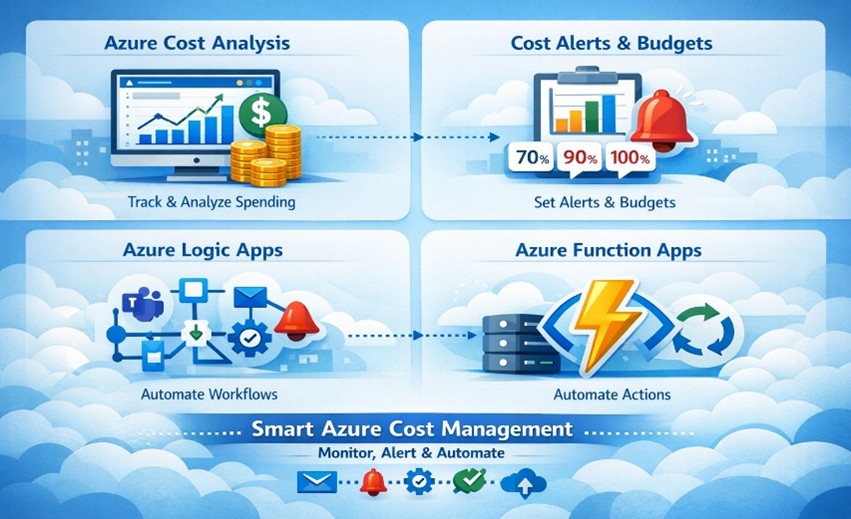
Fig 1: Azure budgets and automated cost alerts.
These alerts are more than just notifications. They can send emails to stakeholders, publish messages to Azure Monitor, or trigger automation workflows. This proactive approach ensures that teams are warned early, before costs exceed expectations, rather than reacting after the fact.
Automating Responses with Azure Logic Apps
Azure Logic Apps enables low-code workflow automation, making it ideal for responding to cost alerts. When a budget alert is triggered, a Logic App can automatically execute a predefined workflow. For instance, it can send messages to Microsoft Teams or Slack, create a ticket in a service management tool, or notify finance and engineering teams simultaneously.
More advanced workflows can include approval processes, such as requesting sign-off before allowing further scaling of a resource. Logic Apps integrate seamlessly with hundreds of connectors, allowing organizations to embed cost governance directly into their operational processes.
Taking Action with Azure Function Apps
While Logic Apps excel at orchestration, Azure Function Apps are ideal for executing custom logic. When paired with cost alerts, Function Apps can automatically take corrective actions. For example, a function can identify underutilized virtual machines and shut them down outside business hours, scale down oversized resources, or enforce tagging policies on newly created resources.
Function Apps are event-driven and serverless, meaning they run only when triggered and incur minimal cost. This makes them a cost-effective choice for automated governance and optimization tasks.
Combining Alerts and Automation for Smart Cost Control
The real power lies in combining Azure Cost Analysis, alerts, Logic Apps, and Function Apps into a cohesive system. Cost Analysis provides visibility, budgets define boundaries, alerts detect risks, and automation enforces policies. Together, they enable a shift from reactive cost management to proactive and automated control.
For example, an organization can set a monthly budget, trigger alerts at predefined thresholds, notify teams via Logic Apps, and automatically remediate issues using Function Apps. This not only reduces waste but also encourages a culture of cost accountability across teams.
Proactive Cost Optimization
Managing Azure costs is not a one-time task; it’s an ongoing discipline. By leveraging Azure’s native cost analysis tools, setting up meaningful alerts, and automating responses with Logic Apps and Function Apps, organizations can maintain control over their cloud spending without sacrificing agility. With the right strategy in place, Azure cost management becomes less about firefighting and more about smart, sustainable optimization.
Upskill Your Teams with Enterprise-Ready Tech Training Programs
- Team-wide Customizable Programs
- Measurable Business Outcomes
About CloudThat


WRITTEN BY Naved Ahmed Khan
Naved Ahmed Khan is a Research Associate with over 5+ years of experience in Cloud. He is an MCT and also the winner of Top 100 MCT Quality Awards Winner for 2024-25. Naved is known for adding humor into his training making it engaging and fun. He has a passion for IoT services because of his roots in Electrical & Electronics Engineering and his habit of reading fictional novels add an imaginative punch into his training method. With 12 certifications in Azure, he has trained over 1000+ individuals across different verticals like Infra & Architect, Security, Data and AI. His core skillset lies in Networking, Security, Python and Powershell.


 PREV
PREV











Comments