

 Login
Login


 July 14, 2026
|
Voiced by Amazon Polly |
Introduction
Quick Answer: Before you start AWS DevOps training and jump into CI/CD pipelines, you need Linux basics, Git version control, at least one AWS associate-level certification or equivalent hands-on experience, scripting knowledge in Bash or Python, and a working understanding of networking fundamentals. Without these, the tooling in a DevOps training program will not click properly. Most people who struggle in AWS devops training are not struggling with DevOps. They are struggling with the gaps underneath it.
Here is something most AWS DevOps training programs do not say upfront.
If you sit down to build a CI/CD pipeline without knowing how Linux permissions work, what a VPC is, or how Git branching actually behaves under merge conflicts, you will get through the labs but not really understand them. And in a job, that difference shows up immediately.
This blog is about the layer underneath the tools. What you should know before AWS devops training, what to expect once you are in it, and what the training should actually cover if it is worth your time and money.
Become an AI Engineer with AWS GenAI Training
- Mock Interviews
- AWS Expert Trainers
- Career Support
Why Prerequisites Matter More Than People Admit
Most people who look up AWS DevOps training are not beginners to tech. They are developers, sysadmins, or cloud engineers who already have some background and want to level up into DevOps roles specifically on AWS.
The problem is that DevOps pulls from multiple disciplines at once. A CI/CD pipeline involves source control, build automation, artifact management, deployment strategies, and environment configuration, all in a single workflow. If any of those underlying concepts are shaky, the pipeline breaks and you do not know why.
That is not a DevOps problem. It is a prerequisites problem.
No training program fixes weak foundations by going faster through advanced content. The right move is to check your gaps before you start, fill them, and then go into DevOps training with the confidence that what you are learning will actually stick.
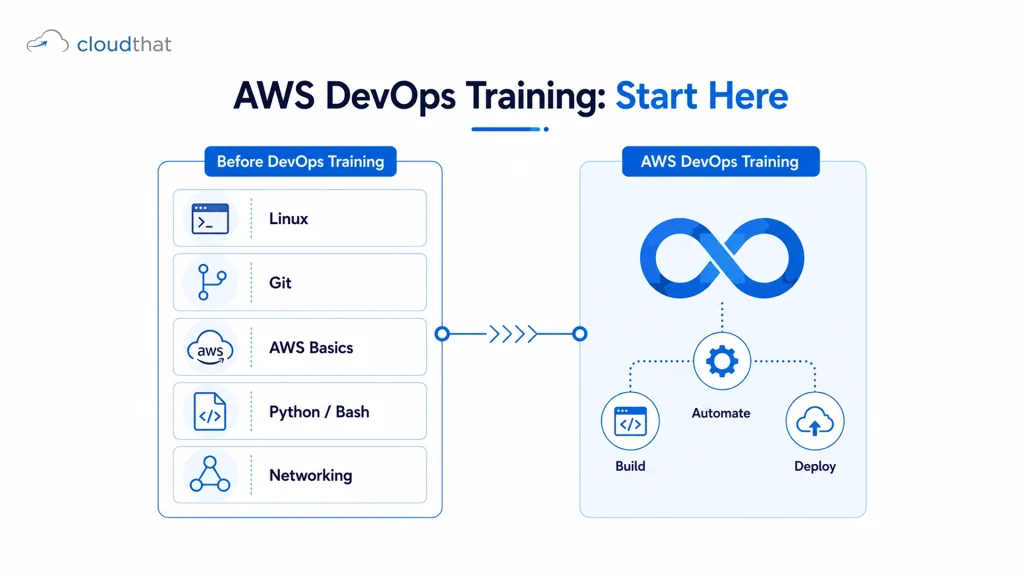
Linux and Scripting: The Non-Negotiables
Every AWS DevOps tool you will use assumes you are comfortable with a terminal.
CloudWatch logs are read from the command line. Systems Manager runs shell commands on EC2 instances remotely. CodeBuild buildspec files use shell syntax. Terraform outputs are parsed in bash scripts. Kubernetes troubleshooting happens in a terminal.
You do not need to be a Linux expert. But you do need to be comfortable with:
- File system navigation and permissions (chmod, chown, directory structures)
- Process management (ps, kill, systemctl)
- Text manipulation (grep, awk, sed, tail on logs)
- Writing and reading shell scripts with conditionals and loops
- Environment variables and how they behave across sessions
For scripting, Python is increasingly useful in AWS DevOps contexts, especially for writing Lambda functions that integrate with pipelines, automating resource tagging, or building custom CloudWatch metrics. But Bash comes first. If you cannot write a shell script that checks whether a service is running and restarts it if not, add that skill before your devops training starts.
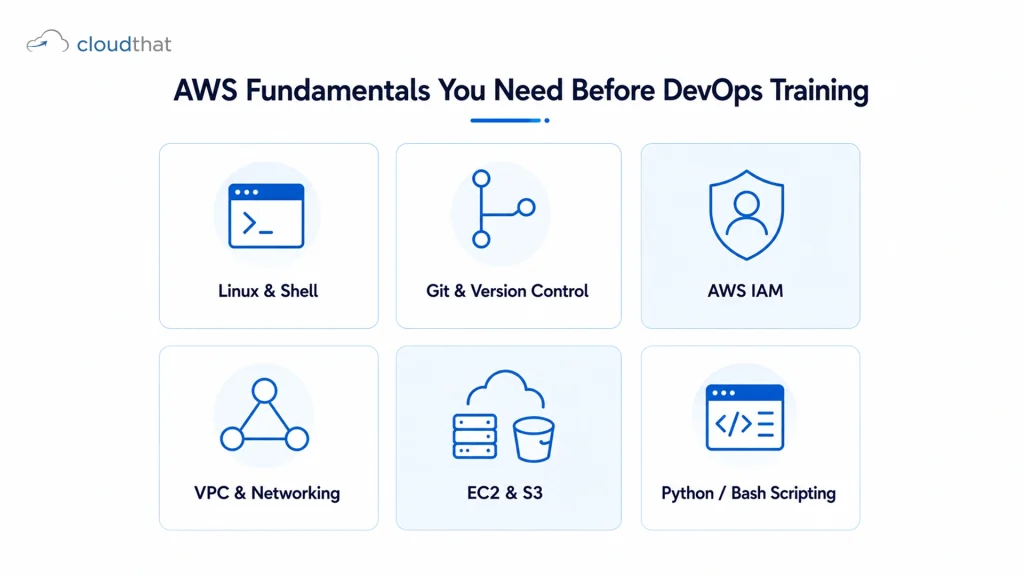
AWS Fundamentals You Need Before DevOps Training
This is the most skipped prerequisite and the most consequential.
AWS DevOps training assumes you already understand the services that DevOps workflows sit on top of. If you are building a pipeline that deploys to ECS, you need to already understand containers, task definitions, and cluster configurations. If your pipeline uses Secrets Manager, you need to know how IAM policies control access to it.
The core AWS knowledge you need before devops training:
- IAM: Users, roles, policies, permission boundaries, and how cross-account access works. IAM is involved in almost every DevOps tool on AWS.
- EC2 and Auto Scaling: How instances are launched, how AMIs work, what user data scripts do, and how Auto Scaling groups behave under load.
- VPC and networking: Subnets, route tables, security groups, NACLs, NAT gateways, and VPC peering. Deployment failures are often networking failures in disguise.
- S3: Bucket policies, versioning, lifecycle rules, and using S3 as an artifact store in pipelines.
- RDS and database basics: Enough to understand how applications connect to databases and why blue/green deployments need careful database migration planning.
If you have an AWS Solutions Architect Associate or AWS SysOps Administrator Associate certification, you have most of this. If you do not, work through those fundamentals before starting devops training. The AWS Certified Solutions Architect Associate training at CloudThat is a practical way to build that foundation with instructor-led labs rather than self-study alone.
Networking Basics That Actually Come Up in DevOps Work
This one surprises people.
Networking shows up constantly in DevOps work. A pipeline that cannot reach its artifact repository is a networking problem. A container that cannot communicate with its database is a networking problem. A CodeDeploy agent that cannot pull deployment instructions from the CodeDeploy endpoint is a networking problem.
You do not need to be a network engineer. But you do need to understand:
- How DNS resolution works and what happens when it fails
- TCP/IP basics and what ports actually are
- How load balancers route traffic and what health checks do
- What TLS/SSL certificates are and how they get attached to services
- How security groups and NACLs interact in an AWS VPC
According to the AWS Well-Architected Framework, reliability and security in cloud environments both depend heavily on correctly configured networking. DevOps engineers who cannot diagnose network issues become blockers during incident response.
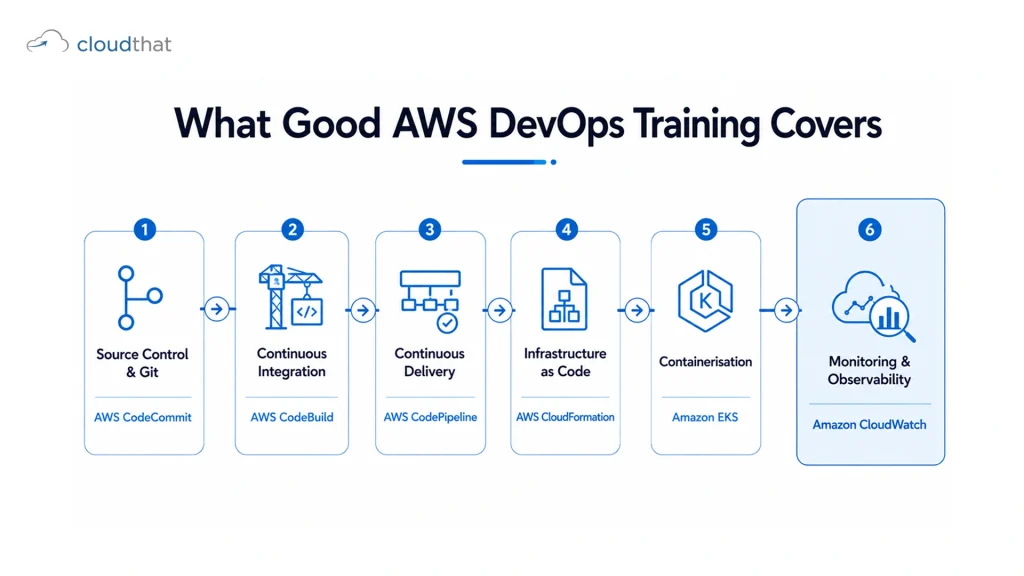
What Good AWS DevOps Training Covers
Once your prerequisites are solid, here is what a well-structured AWS devops training program should take you through, in this order.
Source control and branching strategies Git workflows for teams, feature branching, pull request reviews, and how branching strategies affect deployment frequency and rollback options.
Continuous integration with CodeBuild and Jenkins Writing buildspec files, running automated tests in pipelines, managing build artifacts, and handling build failures without breaking deployment pipelines.
Continuous delivery with CodePipeline and CodeDeploy Building multi-stage pipelines that move code from commit to production with approval gates, rollback triggers, and deployment configuration options like canary and blue/green.
Infrastructure as Code with CloudFormation and Terraform Writing reusable templates, managing state, handling drift detection, and using parameters and conditions to deploy across environments without duplicating code.
Containerisation with Docker and ECS or EKS Building Docker images, pushing to Amazon ECR, writing task definitions for ECS, and managing Kubernetes workloads on EKS with rolling updates and health probes.
Monitoring, logging, and alerting Setting up CloudWatch dashboards, writing custom metrics, configuring alarms, using X-Ray for distributed tracing, and building runbooks for common operational issues.
The DevOps Mastery Pass from CloudThat covers all of these areas with instructor-led sessions and hands-on labs making up the majority of training time. Every module connects directly to how these tools behave in production, not just how they behave in sandboxed demos.
Where Hands-On Labs Fit Into This
Reading about CI/CD pipelines does not teach you CI/CD pipelines. Building one that breaks and figuring out why it broke does.
The single biggest predictor of whether AWS devops training transfers into job performance is the ratio of hands-on lab time to lecture time. A good training program runs at 50 percent or more in lab time. Anything less and you are essentially memorising slides.
What hands-on labs should include in a devops training context:
- Breaking a pipeline intentionally and debugging it back to working
- Deploying to multiple environments from a single pipeline with environment-specific configs
- Rolling back a failed deployment and understanding what triggered the rollback
- Writing an IaC template from scratch, not filling in a pre-built one
- Setting up monitoring for an application and responding to a simulated incident
This is what separates engineers who can talk about DevOps from engineers who can do it under pressure. According to a Skillsoft IT Skills and Salary Report, hands-on labs and project-based learning consistently rank as the top factors in certification preparation success among working professionals.
Why CloudThat Gets Cloud Engineers Job-Ready for DevOps
CloudThat is an AWS Premier Tier Training Partner. That distinction matters here because the trainers delivering AWS DevOps training sessions are the same engineers running live cloud migrations, DevSecOps implementations, and container modernization projects for enterprise clients. The content is not written from certification guides. It comes from what is actually happening in production environments.
The Job Ready Cloud Operations Engineer Program is specifically designed for engineers who want to move into cloud operations and DevOps roles, with a structured path from prerequisites to job assistance. It does not assume you already have every foundation covered. It builds it as part of the program.
For engineers who already have associate-level AWS knowledge and want to go straight into DevOps tooling, the Cloud and DevOps Expert Program takes you through CI/CD pipelines, IaC, containerization, and monitoring with 50 to 60 percent of training time in hands-on labs. CloudThat has also been recognized with three consecutive AWS awards in the same category, a global first, as covered by Business Standard, which reflects the quality of training delivery at scale.
Conclusion
Most people who struggle in AWS DevOps training are not struggling because DevOps is hard. They are struggling because they started without the right foundation. Get Linux and scripting solid first. Make sure your AWS fundamentals are real, not theoretical. Understand enough networking to diagnose a connectivity issue. Then go into DevOps training and build things that break, because that is where the real learning happens.
Key Takeaways
- Linux command line and shell scripting are non-negotiable prerequisites for AWS DevOps training, not optional extras.
- IAM, VPC, EC2, and S3 knowledge must be solid before CI/CD content will make sense in context.
- Networking fundamentals show up in nearly every DevOps failure scenario, including deployments, containers, and pipeline connectivity.
- A structured AWS DevOps training program covers source control, CI/CD, IaC, containerization, and monitoring in that order.
- Hands-on lab time above 50 percent is the strongest predictor of both exam pass rates and job readiness.
- Building pipelines that break and debugging them back to working order is more valuable than any number of hours of watched video.
- DevOps is not being replaced by AI. The demand for engineers who govern and troubleshoot automated delivery systems is growing.
- The AWS Certified DevOps Engineer Professional is a Professional-level exam that requires real hands-on AWS experience, not just study materials.
- Skipping prerequisites and jumping into DevOps training directly is the most common reason people stall, get confused, or fail the exam.
- The right training program builds on your existing AWS knowledge rather than assuming you either know everything or nothing.
Want to start in the right place? The Job Ready Cloud Operations Engineer Program builds from foundation to job-readiness with structure and support built in. Or explore the Cloud and DevOps Expert Program if you already have your AWS basics covered and are ready to go deep into DevOps tooling.
Launch Your AI Career with AWS GenAI Training
- Interview Guarantee
- Up to 75% Money Back
- Real-World Learning
About CloudThat
FAQs
1. Can I learn DevOps in 3 months?
ANS: – If you already have Linux, Git, and AWS associate-level knowledge, 3 months of structured training is a realistic timeline for the core DevOps toolset. If you are starting from scratch, 3 months is not enough to do it properly.
2. Which AWS certificate is best for DevOps?
ANS: – The AWS Certified DevOps Engineer Professional is the most recognised and role-specific credential. For engineers who do not yet have associate-level AWS knowledge, the AWS Solutions Architect Associate or SysOps Administrator Associate is the right starting point before the DevOps Professional exam.
3. Is DevOps still in demand in 2026?
ANS: – Yes. The role is evolving, not disappearing. AI is automating some repetitive tasks inside DevOps workflows, but it is increasing demand for engineers who can design, govern, and troubleshoot automated delivery systems, which is the core of what DevOps engineers actually do.
4. Is the AWS DevOps certification worth it?
ANS: – Yes, for engineers targeting cloud operations, platform engineering, or SRE roles at companies running on AWS. The AWS Certified DevOps Engineer Professional signals that you can work with CI/CD, IaC, and AWS-native tooling at a level detailed enough to pass a demanding scenario-based exam.
5. How long does it take to learn AWS DevOps?
ANS: – With solid AWS fundamentals already in place, structured devops training takes 3 to 4 months to reach job-ready level. Starting with gaps in Linux or AWS basics adds 2 to 3 months. Consistency matters more than weekly hours.
6. Is AWS or DevOps easier to learn?
ANS: – AWS and DevOps are not comparable categories. AWS is a cloud platform. DevOps is a set of practices. AWS DevOps training combines both. Most people find the AWS services more learnable independently. The hard part is integrating them into working pipelines and understanding failure modes.
7. Is AWS DevOps hard to learn?
ANS: – It has a real learning curve, especially if your background is not in systems or operations. The tools themselves have documentation. What is hard is knowing how they connect under pressure, which is a function of hands-on practice, not study time alone.

WRITTEN BY Himisha Raval
Himisha Raval is a Digital Marketing Manager at CloudThat with a strong command of search engine optimization, web analytics, link building, and content strategy. She brings a data-driven approach to digital marketing, helping IT companies strengthen their online presence, improve search rankings, and generate consistent leads across channels. Beyond execution, she plays an active role in ideation, campaign strategy, and website performance optimization. Outside of work, she balances her analytical side with a love for travel, nature painting, and dancing.


 PREV
PREV












Comments