

 Login
Login


 June 26, 2026
|
Voiced by Amazon Polly |
Microsoft Copilot Studio is a low-code, graphical tool for creating agents and agent flows. Using prebuilt or custom connections to connect to other data sources is one of Copilot Studio’s best features. Agent-driven vision for the Power Platform and Microsoft 365 is of primary focus, and the Copilot studio helps you develop and coordinate complex logic with this flexibility, guaranteeing that your agent experiences are clear and powerful.
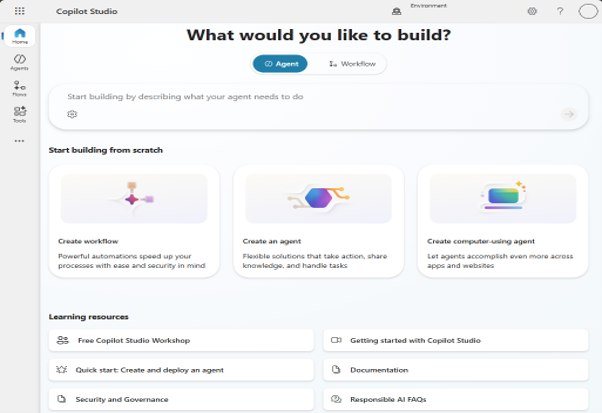
Fig. 1: Copilot Studio
Start Learning In-Demand Tech Skills with Expert-Led Training
- Industry-Authorized Curriculum
- Expert-led Training
What is an Agent?
An agent is an AI companion capable of managing many activities through conversations. It can solve issues that require making context- and instruction-based decisions (Fig. 1). To achieve the objectives, it coordinates language models with instructions, context, documents, knowledge sources, themes, tools, inputs, and triggers.
About Agent Evaluation
Reliable, repeatable testing is crucial as AI agents play crucial roles in business operations. You can create tests for your agent that mimic real-world situations through agent evaluation. Compared to manual, case-by-case testing, these tests cover more questions and interactions more quickly. Based on the data the agent has access to, you can then assess the relevancy, applicability, and accuracy of responses from your agent’s interactions. You can optimize your agent’s behavior and confirm that it validates your business and quality requirements by using the test set findings.
What Makes Automated Testing Useful?
Automated, structured testing is made possible by agent evaluation. It lowers the possibility of incorrect responses, helps identify issues early, and preserves quality as the agent develops. This procedure gives agent testing an automated, repeatable method of quality control. It ensures that the agent meets your company’s accuracy and dependability requirements and provides transparency into its performance. Compared to testing using the test conversation, it has various advantages. Using the Copilot Studio interface, Power Platform REST APIs, or adding actions to tools, processes, or Power Automate, you can run evaluations and view the results. Agent evaluation focuses on performance and accuracy rather than on AI ethics or safety issues. Even if an agent passes every assessment test, they may nevertheless, for instance, provide an incorrect response to a query. Evaluations do not replace responsible AI checks and content safety controls, which customers should continue to use.
How is Agent Assessment Conducted?
For every agent evaluation, Copilot Studio employs a test case. A single interaction that mimics a user’s interaction with your agent is called a test case. A single inquiry or a full discussion can constitute the engagement. The response you anticipate from your agent can also be included in a test case. For instance: What are your business hours? The anticipated response: We are open Monday through Friday from 9 a.m. to 5 p.m.
You can create, import, or manually develop a set of test cases utilizing agent evaluation. A test set is this collection of test scenarios. With a test set, you can:
- Instead of asking your agent one question at a time, run several test cases covering a wide variety of capabilities simultaneously.
- Examine your agent’s performance using a comprehensible aggregate score and focus on specific test scenarios
- To quantify and compare performance changes, test modifications to your agents on the same test set.
- To accommodate evolving agent capabilities or requirements, quickly generate new test sets or alter current ones.
Multiple test methods can be used simultaneously to evaluate your agent in each test set.
To operate as the stimulated user, you can also select a user profile. The agent may be configured to respond differently to different users or to grant access to resources in different ways. Copilot Studio delivers the questions in the test cases, logs the agent’s answers, compares those answers to expected responses or a quality standard, and provides a score to each test case when you choose a test set and perform an agent evaluation. Each test case’s details, transcript, activity map, and the resources your agent utilized to generate the response are all visible to you.
Integrate Assessments in Automated Processes
Automation is enabled by agent evaluation, allowing makers to run tests without human intervention. You can programmatically initiate assessment runs and incorporate testing into automated processes, such as continuous integration and continuous deployment (CI/CD) pipelines, using REST APIs or Power Platform connections. This method eliminates the need for manual execution in Copilot Studio, allowing you to run test sets at scale and verify agent behavior as changes are made.
Test Chat as Compared to Agent Evaluation
You can learn different things about your agent’s characteristics and behavior with each testing method. Hence,
Test chat:
Takes one question at a time and answers it. Repeating the same tests several times is challenging. Enables you to test a complete session with several messages. Enables you to use a chat interface to communicate with your agent.
Evaluation of Agents
Can use a test set to generate and execute several test cases simultaneously. Using the same test set allows tests to be repeated. One question and one answer, or one dialogue, can be tested for each test scenario. But compared to using the test chat, you have less control over the conversations. To mimic several users without completing the interactions yourself, select different user profiles. For a full picture of your agent, use both the agent assessment and the test chat.
Improve AI Quality
An important quality assurance stage in Copilot Studio is Agent Evaluation, which guarantees that your AI agent operates precisely, consistently, and dependably both before and after deployment. To put it briefly, it uses real-world scenarios to automatically test your agent. It facilitates performance measurement (accuracy, relevance, completeness). It enables you to find and address problems early. It encourages ongoing development through frequent testing.
Upskill Your Teams with Enterprise-Ready Tech Training Programs
- Team-wide Customizable Programs
- Measurable Business Outcomes
About CloudThat


WRITTEN BY Sushma Uday Kamat
Sushma is a recognized Microsoft Certified Trainer (MCT) and Subject Matter Expert with a strong track record in Power Platform trainings. With a background in Electronics and Communication Engineering, she has delivered high-impact training to over 1000 professionals across Fortune 500 companies. Her expertise spans Microsoft Power Platform, and she brings real-world experience as a Developer for various projects related to her domain. She was honored with the Top 100 MCT Quality Award 2025 globally in All Courses, reflecting her excellence in technical enablement.


 PREV
PREV












Comments