

 Login
Login

 March 12, 2026
|
Voiced by Amazon Polly |
In modern cloud environments, data protection is not just about taking backups; it is about ensuring consistency, security, scalability, and recoverability at scale. Azure Backup is designed as a fully managed, cloud-native service that abstracts much of the operational complexity from administrators. While enabling backup for an Azure Virtual Machine appears simple from the Azure portal, a sophisticated architecture operates behind the scenes to protect data efficiently and securely.
As trainers, it is important to go beyond portal-level configuration and understand how Azure Backup actually works internally. This conceptual understanding helps professionals troubleshoot issues, design resilient solutions, and confidently explain Azure Backup in real-world and certification scenarios.
Start Learning In-Demand Tech Skills with Expert-Led Training
- Industry-Authorized Curriculum
- Expert-led Training
Azure Backup as a Cloud-Native Service
Azure Backup is not a traditional backup product installed and managed by users. It is a platform-managed service tightly integrated with Azure infrastructure. This means Microsoft handles scaling, availability, security, and maintenance, while customers focus on defining policies and recovery requirements.
At its core, Azure Backup relies on three fundamental pillars:
- Centralized backup management
- Storage-efficient data protection
- Built-in security and compliance
These pillars are implemented through services such as the Recovery Services Vault, VM extensions, Azure Storage, and Azure security controls.
Role of the Recovery Services Vault
The Recovery Services Vault is the backbone of Azure Backup. It acts as the centralized management and storage entity for backup operations. Rather than storing only raw data, the vault maintains critical metadata, including backup policies, job history, recovery points, and restore configurations.
From a conceptual standpoint, the vault separates control-plane operations (policies, schedules, permissions) from data-plane operations (snapshots and recovery data). This separation allows Azure Backup to scale across thousands of workloads while maintaining consistency and reliability.
The vault also enforces security boundaries, ensuring that backup data remains isolated from the production environment.
Backup Policies and Automation
Azure Backup operates entirely on policy-driven automation. Once a policy is associated with a workload, backups occur automatically without manual intervention. Policies define not only when backups occur, but also how long recovery points are retained.
Behind the scenes, Azure Backup continuously evaluates these policies and triggers backup jobs accordingly. Retention management is fully automated- older recovery points are cleaned up according to policy rules, ensuring optimal storage utilization without administrator involvement.
This policy-based model is critical in enterprise environments, where consistency and governance matter more than individual backup jobs.
VM Backup Extension and Data Consistency
A key behind-the-scenes component of Azure VM Backup is the VM backup extension. This extension is automatically installed inside the virtual machine when backup is enabled. Its role is to coordinate backup operations with the operating system and applications.
Rather than blindly copying disk data, Azure Backup aims for application-consistent backups whenever possible. On Windows systems, this is achieved through Volume Shadow Copy Service (VSS), while Linux systems rely on filesystem freeze and thaw mechanisms.
If application consistency cannot be achieved, Azure Backup intelligently falls back to file-system-consistent or crash-consistent backups, ensuring that data protection continues without failing the entire operation.
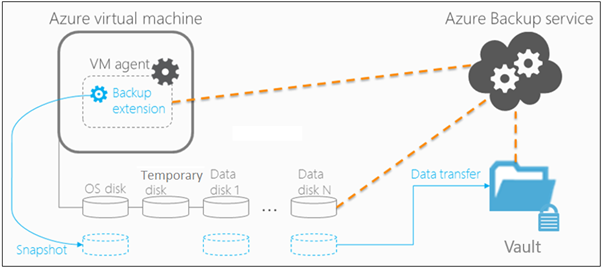
Fig 1: Azure VM Backup extension
Snapshot-Based Backup Architecture
One of the most important architectural aspects of Azure Backup is its reliance on managed disk snapshots. Azure does not copy the entire virtual machine data during every backup. Instead, it creates incremental snapshots that capture only changed blocks since the last backup.
This snapshot-based approach offers multiple benefits:
- Faster backup operations
- Reduced storage consumption
- Minimal impact on VM performance
Snapshots are initially stored in Azure Storage near the source workload, improving efficiency and reliability. Over time, selected recovery points are transferred to the Recovery Services Vault for long-term retention.
Secure Data Movement and Storage
Security is deeply embedded in Azure Backup’s design. All data transfers occur over encrypted channels, and backup data is encrypted at rest using Azure-managed keys or customer-managed keys, depending on configuration.
Azure Backup storage is isolated from production workloads, meaning attackers compromising a virtual machine cannot directly access its backups. Additionally, backup data is protected from accidental or malicious deletion through multiple safeguards.
From a behind-the-scenes perspective, Azure Backup integrates closely with Azure’s identity and access management framework to enforce strict access controls.
Built-in Protection Against Data Loss and Attacks
Azure Backup includes multiple security features that work automatically without additional configuration. Soft Delete ensures that even if backups are deleted, recovery points remain available for a retention window, protecting against ransomware and insider threats.
Critical operations such as disabling backup or deleting recovery data require multi-factor authentication. Role-based access control further ensures that users can perform only authorized actions.
These protections make Azure Backup resilient not only to infrastructure failures, but also to human errors and security incidents.
Restore Operations and Recovery Intelligence
Backup is only valuable if restore works reliably. Azure Backup maintains detailed metadata for every recovery point, allowing flexible restore options such as full VM restore, disk restore, or file-level recovery.
During a restore operation, Azure rehydrates data from snapshots and vault storage to create new disks or virtual machines. This process is non-destructive by default, ensuring that original workloads are not overwritten unintentionally.
The restore architecture is designed to be predictable and repeatable, which is essential for disaster recovery testing and compliance audits.
Monitoring, Logging, and Reliability
Azure Backup continuously tracks job execution, failures, retries, and performance metrics. These insights are available through the Recovery Services Vault, Azure Monitor, and Log Analytics.
From an architectural viewpoint, backup jobs are resilient by design. Transient failures are retried automatically, and administrators can configure alerts for proactive monitoring. This ensures backup reliability without constant manual supervision.
Why This Internal Understanding Matters
Understanding how Azure Backup works behind the scenes empowers cloud professionals to:
- Design effective backup and retention strategies
- Troubleshoot failures with confidence
- Explain backup concepts clearly in interviews and classrooms
- Avoid common misconceptions, such as treating backup as a full disaster recovery solution
For certification exams like AZ-104 and AZ-305, this conceptual clarity is far more valuable than memorizing portal steps. To learn and earn an Azure certification, use trusted platforms such as CloudThat.
Reliable Cloud Data Protection
Azure Backup is a sophisticated, policy-driven, and secure service built on snapshots, automation, and deep integration with Azure infrastructure. While the user experience is intentionally simple, the underlying architecture ensures scalability, security, and reliability at enterprise scale.
For trainers and cloud professionals, understanding what happens behind the scenes transforms Azure Backup from a checkbox feature into a well-designed data protection solution that can be confidently explained, implemented, and trusted.
Upskill Your Teams with Enterprise-Ready Tech Training Programs
- Team-wide Customizable Programs
- Measurable Business Outcomes
About CloudThat


WRITTEN BY Kunal Khadke
Kunal Khadke is a Subject Matter Expert and Microsoft Certified Trainer at CloudThat, with a strong focus on Microsoft Azure Infrastructure and security. With 10+ years of experience in cloud, he has trained over 5000 professionals. Kunal has a strong passion for empowering IT professionals and organizations on their cloud journey. He has hands-on experience in cloud architecture, deployment, and security. He delivers practical, real-world training that bridges the gap between certification and implementation. Kunal has trained professionals across industries, helping them master Azure services such as Virtual Networks, Azure Active Directory, Security, Networking, and more. Known for his clear teaching style and deep technical knowledge, Kunal is dedicated to shaping the next generation of cloud experts.


 PREV
PREV












Comments