

 Login
Login


 March 6, 2026
|
Voiced by Amazon Polly |
Introduction
Modern software teams are expected to deliver features quickly without compromising on quality. In this environment, developer productivity is no longer a “nice to have”; it is a business requirement. This is where GitHub Copilot fits naturally into a developer’s daily workflow.
Rather than replacing developers, Copilot works alongside them, offering contextual code suggestions directly inside the IDE. In this blog, we will explore how GitHub Copilot works, where it adds real value, and how developers and DevOps engineers can use it responsibly to improve day-to-day coding efficiency.
Start Learning In-Demand Tech Skills with Expert-Led Training
- Industry-Authorized Curriculum
- Expert-led Training
What Is GitHub Copilot and How Does It Work?
GitHub Copilot is an AI-powered coding assistant that provides real-time code suggestions as you type. It understands the context of your file, comments, and surrounding code to generate relevant snippets, functions, or even small logic blocks.
Unlike traditional autocomplete tools, Copilot goes beyond syntax completion. It analyzes patterns in your codebase and adapts its suggestions based on the programming language, framework, and style you use. This makes it especially useful for repetitive coding tasks, boilerplate generation, and quick prototyping.
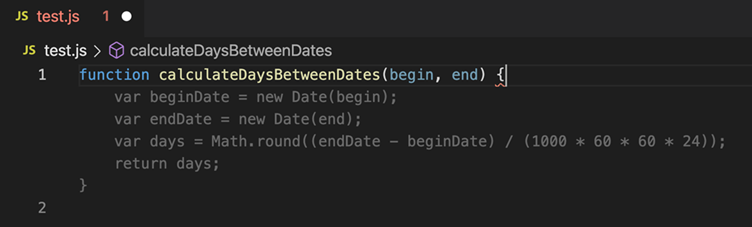
The screenshot above shows GitHub Copilot generating a JavaScript function directly inside VS Code. Based on the function name and context, Copilot suggests the complete logic inline, allowing developers to review and accept the code instantly.
Why GitHub Copilot Matters for Developer Productivity
Developer time is often wasted on repetitive tasks such as writing similar functions, configuring systems, or searching for syntax examples. With AI code completion, Copilot helps reduce this friction by keeping developers focused on problem-solving rather than syntax recall.
For experienced engineers, Copilot acts as a productivity multiplier. For beginners, it provides guided exposure to best practices and common patterns. However, its real strength lies in speeding up routine tasks while leaving architectural decisions firmly in human hands.
This balance makes Copilot particularly effective in fast-moving environments such as DevOps pipelines, cloud automation, and microservices-based development.
Using GitHub Copilot in Real-World Development Scenarios
Application Development
When working on application logic, Copilot can generate helper functions, API handlers, and data transformation code based on comments or function names. This is especially helpful during early development stages, where speed matters more than perfection.
Developers should still review suggestions carefully. Copilot accelerates writing code, but correctness, security, and performance remain the developer’s responsibility.
DevOps and Automation
In DevOps workflows, developer productivity often depends on how quickly infrastructure scripts and pipelines can be created and updated. Copilot can assist in writing YAML pipelines, Terraform snippets, shell scripts, and Kubernetes manifests.
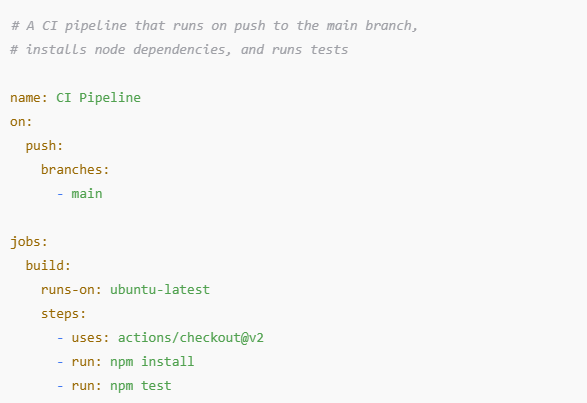
This snippet shows how a simple, human-written comment guides GitHub Copilot to generate a complete CI pipeline. Based on the intent described in the comment, Copilot suggests a GitHub Actions workflow that automatically runs on every push to the main branch, installs dependencies, and executes tests-saving time on repetitive CI/CD setup while still requiring developer review.
This is where teams trained in modern DevOps practices gain the most value, as they can quickly validate and refine AI-generated configurations.
A Real-World DevOps Example with GitHub Copilot
Consider a DevOps engineer creating a CI/CD pipeline for a microservices application. Instead of manually writing repetitive YAML syntax, the engineer adds a simple comment describing the intent of the pipeline stage. GitHub Copilot then suggests a complete pipeline step, including build, test, and artifact publishing tasks.
This does not eliminate the need for expertise. The engineer still validates security settings, environment variables, and deployment targets. However, Copilot significantly reduces setup time and helps maintain consistency across pipelines. In fast-paced DevOps teams, this time-saving directly translates into faster delivery and reduced cognitive load.
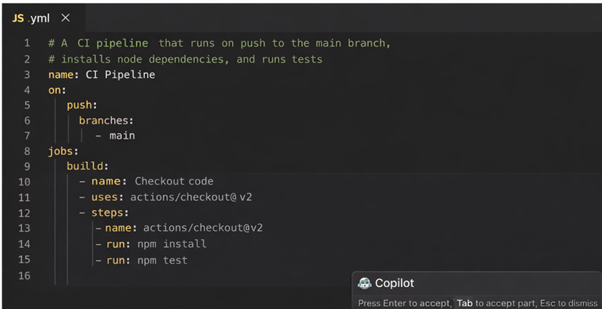
This screenshot illustrates how intent-driven comments influence GitHub Copilot’s output. By describing the purpose of a pipeline step in plain language, the developer enables Copilot to generate relevant YAML automatically. Clear comments lead to more accurate suggestions, reducing manual effort while keeping control firmly in the engineer’s hands.
Best Practices for Using GitHub Copilot Effectively
While Copilot is powerful, it delivers the best results when used thoughtfully.
- Write clear comments before expecting meaningful suggestions. Copilot relies heavily on intent.
- Treat suggestions as drafts, not final answers. Always review and test generated code.
- Avoid blindly accepting large blocks of code without understanding them.
These practices ensure that AI-powered development enhances skills rather than weakening them.
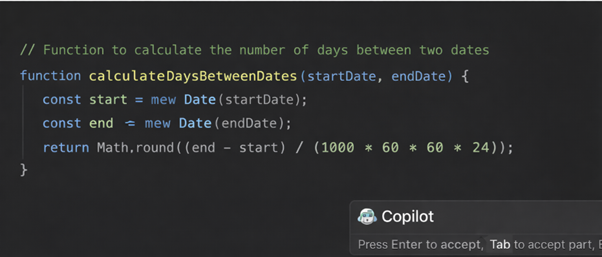
In this example, the developer begins with a clear comment describing the function’s purpose. GitHub Copilot uses this context to suggest the complete function logic, including date parsing and calculation. Well-written comments help Copilot generate more accurate and meaningful code, while developers retain full control by reviewing and refining the suggestion.
Learning GitHub Copilot as Part of a Broader Skill Set
GitHub Copilot is most effective when developers already understand core concepts such as version control, cloud platforms, CI/CD, and infrastructure automation. This is why Copilot adoption works best alongside structured learning.
Limitations You Should Be Aware Of
Despite its strengths, GitHub Copilot is not a replacement for sound engineering judgment. It may occasionally suggest outdated patterns or insecure logic if prompts are vague. Understanding system design, security principles, and performance considerations remains critical.
Copilot should be viewed as an assistant, not an authority.
AI-Assisted Coding Future
GitHub Copilot is changing how developers write code by reducing repetitive effort and supporting faster development cycles. When used responsibly, it improves developer productivity, supports AI code completion, and fits naturally into modern AI-powered development workflows.
The real value of Copilot emerges when skilled developers use it as a support tool rather than a shortcut. Combined with strong fundamentals and structured training, it becomes a powerful ally in today’s fast-paced software and DevOps environments.
Upskill Your Teams with Enterprise-Ready Tech Training Programs
- Team-wide Customizable Programs
- Measurable Business Outcomes
About CloudThat


WRITTEN BY Sirin Kausar Isak Ali
Sirin Ali is a seasoned corporate trainer and Subject Matter Expert with 11+ years of experience in cloud infrastructure, DevOps automation and Kubernetes. She has extensive real-time project experience in designing enterprise-grade CI/CD pipelines, automating containerized microservices deployments and implementing GitOps practices with advanced observability solutions. Skilled across diverse Kubernetes distributions, she brings hands-on expertise in transforming infrastructure and applications using industry best practices. Sirin has trained over 1500+ professionals worldwide and holds multiple certifications including CKA, Terraform Associate, Azure AI Engineer, GCP ACE, MCP, CCNA and MCT. Her practical, real-world approach simplifies complex DevOps concepts, empowering learners to confidently build production-ready solutions.


 PREV
PREV












Comments