

 Login
Login

 September 24, 2026
|
Voiced by Amazon Polly |
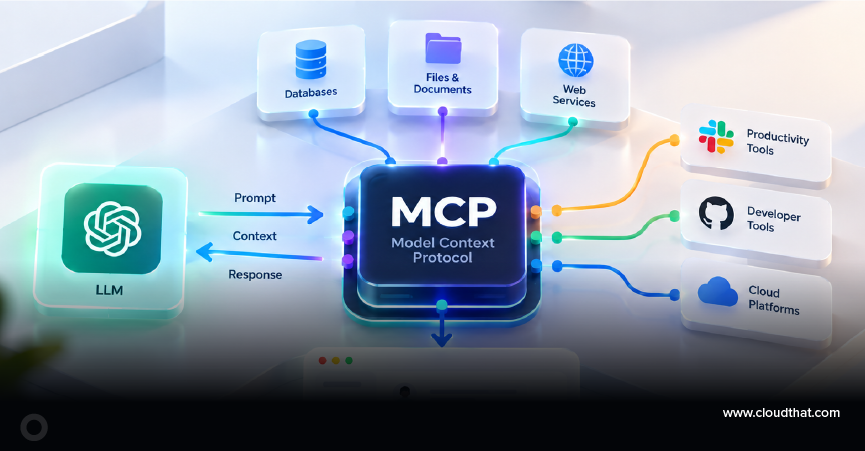
The Model Context Protocol is an open standard that lets any AI application connect to any external tool or data source through one common interface, instead of a custom integration for every pair. Anthropic released it in November 2024, and it has since become the default way agents reach the outside world. This post covers what it is, how the pieces fit, and what the current specification changed.
Start Learning In-Demand Tech Skills with Expert-Led Training
- Industry-Authorized Curriculum
- Expert-led Training
Why did AI agents need a protocol at all?
AI agents need a protocol because connecting every agent to every tool individually becomes increasingly complex and expensive. Three AI applications that each need four tools means twelve separate connectors, each written differently. Add a fourth application, and you are at sixteen.
If you have been following the posts on agentic AI and how agents reason and act, you already know the loop: the agent reasons, picks a tool, acts, and repeats. But then you go build one for real. It needs to read files, query a database, hit a couple of internal APIs, and maybe check some messages in Slack. Each of those gets implemented independently, with custom code. Now imagine ten tools, three LLM providers, and five teams. Every API has its own wrapper. Every team reinvents the same plumbing. Nobody planned this mess. It just got accumulated.
Visual Representation
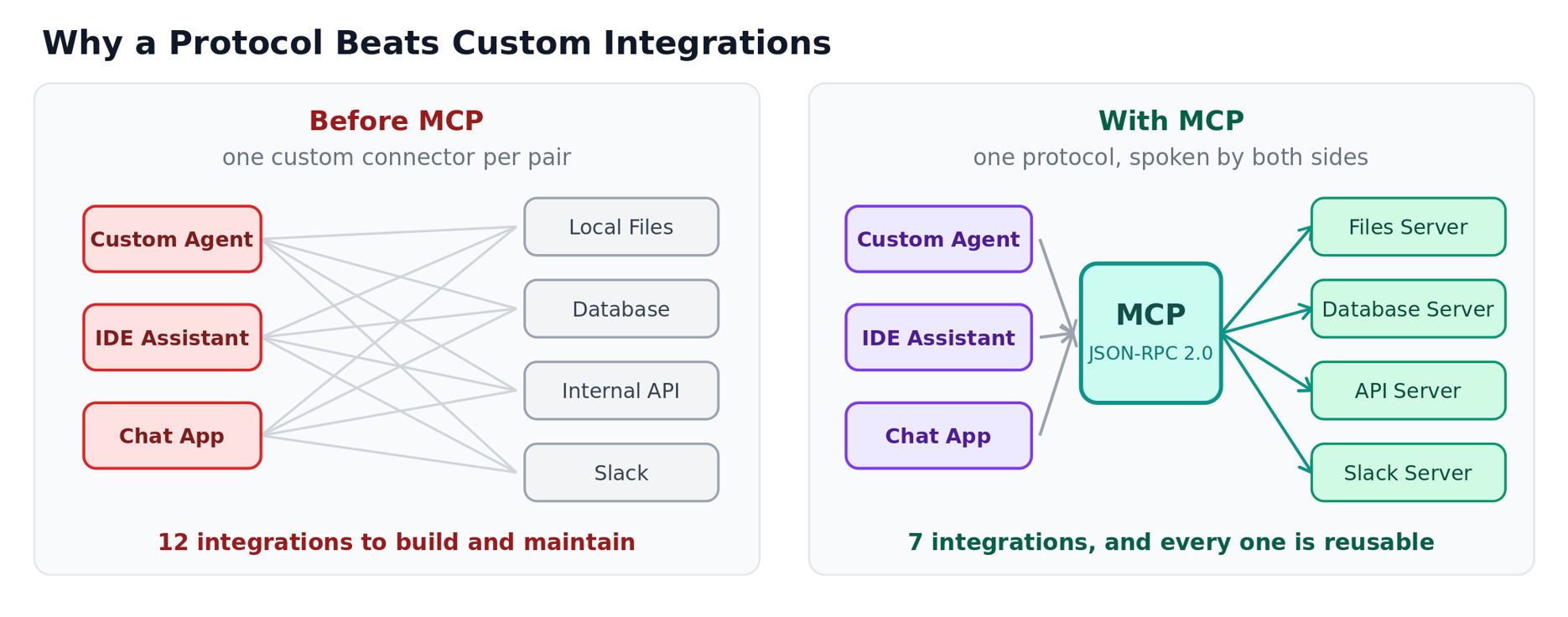
Fig 1: MCP simplifies AI integrations through a reusable standard protocol.
What is MCP, in one sentence?
MCP is a standard protocol that lets AI applications connect to tools and data through a common interface, such as USB-C. Before USB-C, every device had its own cable. Instead of every tool, every LLM, and every agent getting wired together differently, you get one protocol that any AI application can speak and any tool can expose itself through.
Concretely, it connects AI applications to three kinds of things: data sources like local files and databases, tools like search engines and internal APIs, and prompts, reusable templates that structure how the model approaches a task.
One protocol, any tool, any LLM. That is the pitch, and so far it holds up. The maintainers reported close to half a billion monthly downloads across the four Tier 1 SDKs in their 2026-07-28 specification release post, with TypeScript and Python each past a billion in total.
Who talks to whom in the Model Context Protocol architecture?
The host runs the AI application, the client manages the connection, and the server provides the tools, resources, or prompts the AI can use.
The MCP Host is the AI application itself: Claude Desktop, VS Code, or a custom agent you have built. It coordinates everything. The MCP Client lives inside the host and maintains one dedicated connection per server. If your host talks to five servers, it spins up five clients. The MCP Server is the program that actually hosts the tools, resources, and prompts, and it can run locally on your machine or remotely on a VM.
One detail worth sitting with: the LLM never talks to a tool directly. It reasons that the client handles communication, and the server executes. Three jobs, three owners, no crossed wires.
Visual Representation
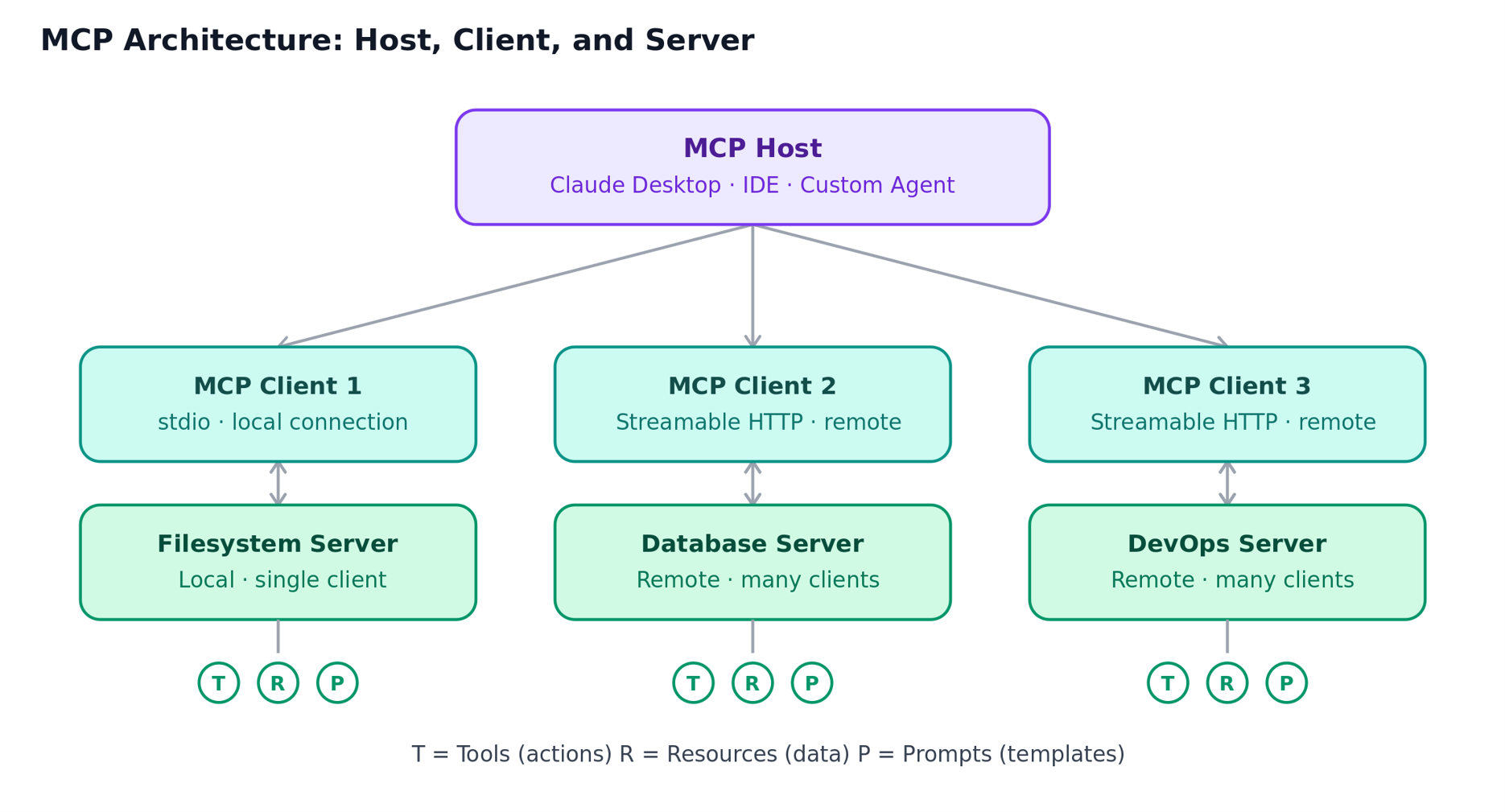
Fig 2: How MCP enables communication between AI applications, clients, and tool servers.
Should an MCP server run locally or remotely?
Run an MCP server locally for single-machine use, and remotely when multiple clients or applications need to access the same server. Picking the wrong one is a common early mistake.
A local server runs on the same machine as the client, communicates over stdio (standard input/output) or Streamable HTTP, and usually serves a single client. A filesystem server that Claude Desktop launches on your laptop is the textbook example. A remote server runs independently on a VM or in a container, talks over Streamable HTTP, and serves many clients at once. Sentry’s own MCP server is the kind of thing you would reach for here.
Under the hood, MCP splits this into two layers. The data layer uses the JSON-RPC 2.0 protocol to do the actual work. The transport layer is just how those messages move, stdio for local speed and HTTP for remote reach. Same message format either way. Only the plumbing changes.
What are the three things an MCP server can offer?
An MCP server can provide three things: tools, resources, and prompts. If there is one takeaway from this post, remember this breakdown, because it is the mental model on which the whole protocol is built.
Tools are executable actions: file operations, API calls, and database queries. The client invokes them with a tools/call request.
Resources are read-only context: file contents, database records, log files, anything an LLM might need to know rather than do.
Prompts are reusable templates, fetched with prompts/get, that structure a conversation before it starts. If you have worked through advanced prompting techniques for communicating with AI, this is the same craft, packaged so a server can hand it to any client.
Let us understand this with an example. A data science team might expose SQL querying and visualization tools through MCP. Instead of writing queries, exporting data, and building charts by hand, you simply ask, “Analyze customer churn and show me the top factors influencing it.” The pattern repeats: wrap whatever your team already has as a tool, and any MCP-speaking AI app can use it.
You might also wonder how the client knows which tools exist. Discovery is dynamic. It calls tools/list, gets back names, descriptions, and schemas, and, if the catalog changes later, it detects the change without polling.
What changed in the 2026-07-28 Model Context Protocol spec?
The MCP protocol core became stateless, making it easier to scale and deploy across distributed environments.. The initialize handshake and the Mcp-Session-Id header are gone, so any request can now land on any server instance behind a plain round-robin load balancer, with no sticky routing and no shared session store.
Three other changes matter if you are building this quarter:
- Every request is self-describing. Protocol version, client identity, and capabilities travel in _meta on each call, with an optional server/discover RPC for clients that want them up front.
- Method and tool names moved into HTTP headers. Mcp-Method and Mcp-Name are now required on Streamable HTTP requests, so your gateway can route on headers instead of parsing JSON bodies.
- List results are cacheable. tools/list and friends return ttlMs and cacheScope, keeping tool catalogs and upstream prompt caches stable across reconnects.
Some things are on the way out: Dynamic Client Registration, in favor of Client ID Metadata Documents, as well as Roots, Sampling, Logging, and the legacy HTTP+SSE transport. All of them will keep working for at least 12 months under the new depreciation policy. Plan the migration, do not panic about it.
Is MCP secure enough for production?
MCP is not secure by default; production security largely depends on how the client handles authentication, authorization, consent, and tool access. A March 2026 threat-modeling study identified tool poisoning as the most prevalent and impactful client-side MCP vulnerability: malicious instructions hidden in tool metadata that the model then interprets as instructions. The authors tested seven major MCP clients and found that most accept server-supplied tool descriptions without any static validation. OWASP now tracks it as a named attack pattern.
Three things to do before you connect a server you did not write:
- Read the tool descriptions yourself, not just the tool names, and diff them after every server update.
- Pin the server version. A server can change its own toolset at runtime, so a tool you approved last month can describe itself differently today.
- Scope each server’s credentials to exactly what it needs. The 2026-07-28 spec binds credentials to the issuer that minted them, so cross-server reuse is no longer possible even by accident.
None of this is a reason to avoid MCP. It is a reason to treat a public MCP server the way you treat any third-party dependency with network access.
Should you actually build an MCP server?
Not always; build one when a standard, reusable interface to your tools or data provides clear value. If you are the only person using a handful of tools in a small project, wiring them directly into your application is the simpler choice. There is no need to introduce MCP just because everyone is talking about it.
It starts to make sense when multiple teams need the same tools, multiple AI applications need to access them, or you are tired of writing the same integration over and over. For a weekend prototype, skip it.
Even then, you do not have to build everything yourself. The official MCP Registry surpassed 2,000 entries within three months of launch, a 407% jump from its initial batch, and directories like mcp.so, glama.ai, and smithery.ai list thousands more. Check whether the integration you need already exists before you start coding. CloudThat’s agentic AI enablement work covers this decision, as well as building multi-agent systems that coordinate across servers.
So, what’s next?
MCP is still young, and the ecosystem is moving fast. But the core idea remains stable: a single protocol connecting any AI application to any external system. That kind of standardization tends to stick once it takes hold, especially as agent-to-agent communication starts to matter as much as agent-to-tool communication. The signal is already in production telemetry. Honeycomb reported that nearly 20% of its monthly interactive queries now come from agents rather than humans.
So, here is a small exercise worth doing this week. Pick one integration your team has already hand-wired into an agent and check the public directories for a server that does the same job. Compare it against your custom wrapper: the tool descriptions, the auth model, and how it handles errors. You will learn more from that one comparison than from any amount of reading.
Tool calling taught our agents how to act. MCP makes sure they all speak the same language.
Upskill Your Teams with Enterprise-Ready Tech Training Programs
- Team-wide Customizable Programs
- Measurable Business Outcomes
About CloudThat
FAQs
1. What is the Model Context Protocol used for?
ANS: – It connects AI applications such as chat assistants, IDE copilots, and custom agents to external tools and data sources through one standard interface. Without it, every application-to-tool pairing needs its own custom integration code, which is why the number of connectors grows by multiplication rather than addition.
2. What is the difference between an MCP host, an MCP client, and an MCP server?
ANS: – The host is the AI application itself, such as Claude Desktop or VS Code, and it coordinates everything. The client lives inside the host and maintains one connection per server, so a host talking to five servers runs five clients. The server is the separate program that holds the tools, resources, and prompts and executes the work.
3. Do I need to build my own MCP server?
ANS: – Usually not. The official MCP Registry and directories such as mcp.so and smithery.ai already list thousands of public servers, so the integration you need may already exist. Building your own makes sense when several teams or several AI applications need the same internal tools.
4. Is MCP the same thing as function calling?
ANS: – No. Function calling is how a single model is told a tool exists and invokes it. MCP is the transport and discovery layer underneath, letting any client find, describe, and call tools from any server without hardcoding them, so the same server works across different models and applications.


WRITTEN BY Arun M
Arun M is a Subject Matter Expert at CloudThat Technologies, specializing in artificial intelligence, machine learning, deep learning, computer vision, and embedded systems. With over 16 years of teaching and mentoring experience, he has helped students, early-career professionals and industry practitioners develop strong skills in AI, programming, data structures and embedded systems. He explains topics easily using simple real-life examples. Outside of work, he enjoys reading, music and traveling.


 PREV
PREV












Comments