

 Login
Login


 September 24, 2026
|
Voiced by Amazon Polly |
Fine-grained access control helps secure AWS data lakes by restricting access to data at the database, table, column, row, and tag levels. This article explains how AWS Lake Formation extends AWS IAM with centralized data-level authorization and how to implement scalable access policies.
As organizations centralize analytics, machine learning, and business intelligence in AWS data lakes, precise access control becomes essential. While AWS Identity and Access Management (IAM) secures AWS resources, it cannot enforce permissions at the database, table, row, or column level.
This article explains how fine-grained access control can be implemented for AWS data lakes using AWS Lake Formation, covering IAM limitations, Lake Formation governance capabilities, and scalable least-privilege practices.
Start Learning In-Demand Tech Skills with Expert-Led Training
- Industry-Authorized Curriculum
- Expert-led Training
Why do AWS data lakes need fine-grained access control?
Fine-grained access control restricts access to data at the database, table, column, and row levels. It protects sensitive information, supports compliance, and enables teams to securely share a common analytics platform.
Organizations may consolidate data from finance, sales, marketing, and operations into a shared Amazon S3 data lake. While this improves collaboration and reduces duplication, storage-level permissions alone can expose data beyond what users require.
For example, a retail data lake may contain customer transactions, employee payroll, and supplier data. Since each department needs only specific information, broad Amazon S3 bucket permissions can expose confidential data and increase security and compliance risks.
Fine-grained access control addresses these challenges by enforcing permissions at multiple levels:
- Database – Restrict access to entire databases.
- Table – Allow users to query only authorized tables.
- Column – Protect sensitive attributes such as salaries, Personally Identifiable Information (PII), or financial data.
- Row – Filter records based on business rules, such as region or department.
- LF-Tags – Simplify permission management through metadata-based authorization.
These capabilities can help organizations implement access controls required by internal governance policies and applicable regulatory requirements for sensitive data.
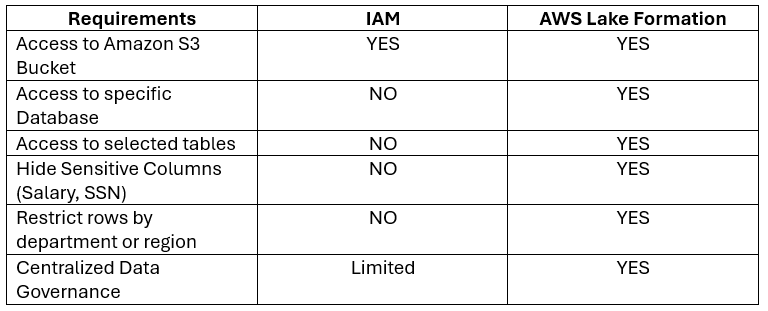
For example, an HR analyst may need employee names and departments but not salary details or records from other regions. Enforcing such restrictions with IAM alone may require duplicate datasets or custom application logic, increasing operational complexity.
AWS Lake Formation overcomes this limitation by integrating with the AWS Glue Data Catalog to enforce centralized authorization. Instead of securing only storage resources, it governs data access consistently across services such as Amazon Athena, Amazon Redshift Spectrum, Amazon EMR, and AWS Glue, enabling scalable row-level, column-level, and tag-based access control.
What is AWS Lake Formation, and how does it secure data lakes?
AWS Lake Formation is a fully managed service for creating, securing, and governing AWS data lakes. It extends AWS Identity and Access Management (IAM) with fine-grained access control at the database, table, column, and row levels, enabling centralized access management across analytics services.
As data lakes grow, managing permissions through Amazon S3 bucket policies or IAM roles alone becomes more complex. AWS Lake Formation provides a centralized governance layer that applies access policies to metadata in the AWS Glue Data Catalog. When users query data, Lake Formation evaluates these policies before granting access.
This centralized authorization model ensures consistent access control across multiple AWS analytics services, including:
- Amazon Athena – Executes SQL queries while enforcing Lake Formation permissions.
- AWS Glue – Applies centralized permissions during ETL processing and metadata management.
- Amazon Redshift Spectrum – Queries data stored in Amazon S3 without bypassing Lake Formation policies.
- Amazon EMR – Enables secure access to shared datasets for big data processing.
By separating authentication from data authorization, AWS Lake Formation helps organizations implement the principle of least privilege while simplifying governance and reducing the operational overhead of managing complex IAM policies.
What permissions can AWS Lake Formation control?
AWS Lake Formation enables administrators to enforce fine-grained access control at the database, table, column, row, and metadata levels. Instead of granting unrestricted access to an entire Amazon S3 bucket, organizations can provide users access only to the data required for their roles.
The table below summarizes the permission levels supported by AWS Lake Formation and their common enterprise use cases.
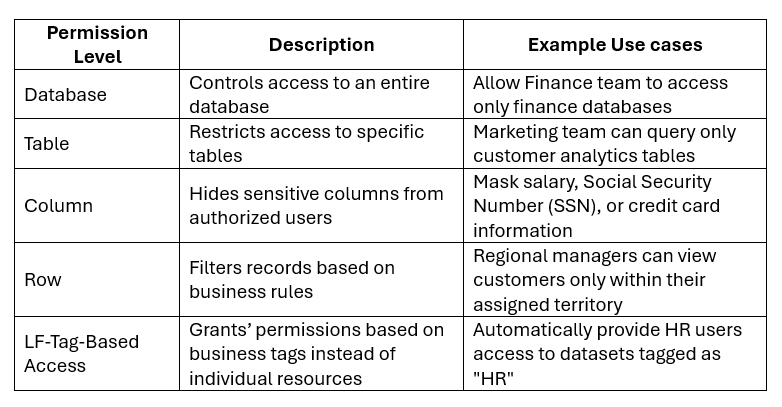
These permission models can reduce the need for duplicate datasets. For example, a global retailer can store sales data in a single Amazon S3 data lake while using row-level filters for regional access and column-level permissions to protect sensitive customer data. This approach strengthens security, simplifies governance, and enables consistent policy enforcement across AWS analytics services.
How do LF-Tags simplify permission management in AWS Lake Formation?
LF-Tags (Lake Formation Tags) simplify access management by applying permissions based on business metadata rather than individual resources. Administrators define tag-based policies that AWS Lake Formation applies automatically to matching datasets.
As data lakes expand, managing permissions at the individual resource level becomes complex. LF-Tags classify datasets using attributes such as Department, Sensitivity, Region, and Data Owner, enabling scalable and consistent access control.
For example, assigning Department = HR and Sensitivity = Confidential to a new payroll table can automatically grant access to authorized HR users without creating additional policies.
Key benefits include:
- Reduces repetitive permission updates.
- Provides consistent access policies across datasets and analytics services.
- Scales across large data lakes.
- Simplifies governance and compliance audits through metadata-based authorization.
For data mesh or domain-oriented architectures, LF-Tags support decentralized data ownership while maintaining centralized governance.
How can you implement fine-grained access control in AWS Lake Formation?
Implementing fine-grained access control in AWS Lake Formation involves registering the data lake, cataloging datasets, defining permissions, validating access, and auditing policies. A structured approach helps establish secure and scalable data governance.
Step 1: Register the data lake
Register the Amazon S3 location containing the data lake with AWS Lake Formation to establish centralized governance.
Step 2: Build the metadata catalog
Use AWS Glue Crawlers or create metadata manually in the AWS Glue Data Catalog to organize datasets into databases and tables.
Step 3: Configure data lake administrators
Assign trusted Data Lake Administrators to manage permissions, data locations, and governance policies while following least privilege.
Step 4: Grant fine-grained permissions
Define access based on business requirements using database-, table-, column-, row-, and LF-Tag-level permissions.
Step 5: Validate access
Test permissions using services such as Amazon Athena or Amazon Redshift Spectrum to verify that users can access only authorized data.
Step 6: Monitor and audit permissions
Use AWS CloudTrail to monitor administrative activity and regularly review permissions for excessive privileges or policy changes.
These steps provide centralized governance while allowing analysts to use familiar analytics services with AWS Lake Formation and enforce access policies.
For enterprise-scale implementations, the Architecting on AWS program provides practical guidance on secure and governed cloud architectures.
What are the AWS best practices for implementing fine-grained access control?
AWS fine-grained access control best practices include enforcing least privilege, using LF-Tags for scalable permissions, applying row- and column-level security, centralizing metadata governance, auditing access regularly, integrating enterprise identities, and validating policies before production.
- Follow the Principle of Least Privilege
Grant users only the permissions required for their roles. Prefer database-, table-, column-, or row-level access over broad permissions. - Use LF-Tags for Scalable Access Control
Use LF-Tags such as Department, Region, and Data Classification to implement scalable Attribute-Based Access Control (ABAC) and maintain consistent policies. - Protect Sensitive Data
Use column-level permissions for sensitive data such as PII, salaries, and financial records. Apply row-level filters based on department, business unit, or region. - Centralize Metadata Management
Maintain metadata in the AWS Glue Data Catalog with consistent naming conventions to simplify governance and permission management. - Audit Permissions Regularly
Use AWS CloudTrail, AWS IAM Access Analyzer, and AWS Config to identify excessive privileges, inactive users, and risky policy changes. - Integrate with Enterprise Identity Providers
Integrate AWS Lake Formation with AWS IAM Identity Center to manage permissions through groups or roles rather than individual users. - Validate Permissions Before Production
Test authorization policies using representative users and services, such as Amazon Athena and Amazon Redshift Spectrum, before production deployment.
These practices help build secure, scalable data lakes while supporting the Security and Operational Excellence pillars of the AWS Well-Architected Framework.
What common mistakes should you avoid when securing AWS data lakes?
Common mistakes include relying only on IAM, assigning permissions to individual users, granting excessive privileges, skipping permission audits, and deploying access policies without validation.
Common mistakes include:
- Relying solely on IAM – IAM secures AWS resources but does not provide data-level controls such as row- or column-level permissions. Use AWS Lake Formation for fine-grained data access control.
- Assigning permissions to individual users – Avoid user-specific permissions. Use IAM roles, groups, or LF-Tags to simplify administration and improve scalability.
- Granting excessive privileges – Avoid broad administrative access. Follow the principle of least privilege and grant only the permissions required for each role.
- Skipping permission audits – Regularly review access policies using AWS CloudTrail and AWS Config to identify excessive or outdated permissions.
- Deploying without validation – Test row-, column-, and tag-based permissions before granting production access to ensure users can access only authorized data.
Avoiding these mistakes helps maintain secure, scalable, and manageable AWS data lakes while supporting governance and compliance requirements.
How can organizations secure AWS data lakes with fine-grained access control?
Fine-grained access control is essential for securing AWS data lakes while supporting governance and compliance. While AWS IAM provides authentication and infrastructure-level security, AWS Lake Formation adds centralized, data-level authorization through database-, table-, column-, row-, and tag-based permissions.
As data lakes grow, LF-Tags, the AWS Glue Data Catalog, and integrated access control across analytics services simplify permission management while supporting least privilege.
When building or modernizing a data lake, protect sensitive datasets with fine-grained access control, adopt tag-based authorization, and regularly review access policies. These practices support secure and scalable data lakes for analytics, machine learning, and data-driven decision-making.
Upskill Your Teams with Enterprise-Ready Tech Training Programs
- Team-wide Customizable Programs
- Measurable Business Outcomes
About CloudThat
FAQs
1. What is fine-grained access control in AWS Lake Formation?
ANS: – Fine-grained access control enables administrators to restrict access at the database, table, column, row, and tag levels within an AWS data lake. This ensures users access only the data required for their roles while supporting governance and regulatory compliance.
2. Can AWS IAM replace AWS Lake Formation?
ANS: – No. AWS IAM manages authentication and access to AWS resources, while AWS Lake Formation provides data-level authorization, including row-, column-, and tag-based permissions.
3. Which AWS services integrate with AWS Lake Formation?
ANS: – AWS Lake Formation integrates with Amazon Athena, AWS Glue, Amazon Redshift Spectrum, Amazon EMR, and the AWS Glue Data Catalog, enabling centralized access control across AWS analytics services.


WRITTEN BY Mandar Bhalekar
Mandar Madhukar Bhalekar is a Subject Matter Expert at CloudThat, specializing in AWS Architecting. With 13 years of experience in Training and Consultancy, he has trained over 2000 professionals/students to upskill in Multiple Technologies. Known for simplifying complex concepts and delivering interactive, hands-on sessions, he brings deep technical knowledge and practical application into every learning experience. Mandar's passion for public speaking and continuous learning reflects in his unique approach to learning and development.


 PREV
PREV












Comments