

 Login
Login


 June 19, 2026
|
Voiced by Amazon Polly |
Modern web applications require secure, scalable, and high-performance databases to manage growing workloads and user traffic. Many organizations deploy applications on Amazon Web Services using Amazon EC2 as web servers and Amazon DynamoDB as the backend database.
While DynamoDB is fully managed and highly available, securing communication between EC2 instances and DynamoDB is critical. Poorly configured access can expose sensitive data, create compliance risks, and increase the attack surface of applications.
This blog explains how organizations can securely connect DynamoDB with EC2 servers using AWS-native security services and best practices.
Start Learning In-Demand Tech Skills with Expert-Led Training
- Industry-Authorized Curriculum
- Expert-led Training
Key Benefits of Secure DynamoDB Connectivity
Organizations implement secure connectivity between EC2 and DynamoDB for several reasons:
- IAM Role-Based Authentication – Eliminates hardcoded AWS credentials
- Least Privilege Access – Grants only required permissions
- Private Connectivity – Keeps traffic within AWS private networks using VPC endpoints
- Encryption Support – Protects data both at rest and in transit
- Centralized Monitoring – Tracks activity using CloudTrail and CloudWatch
- Scalability – Securely supports growing applications without manual credential management
- Compliance Readiness – Helps meet enterprise security and audit requirements
Understanding Core Concepts
- What is Amazon DynamoDB?
Amazon DynamoDB is a fully managed NoSQL database service designed for low-latency, high-performance applications. It automatically handles scaling, replication, and infrastructure management.
Common use cases include:
- E-commerce platforms
- Gaming applications
- IoT solutions
- Real-time analytics
- Session management systems
- IAM Roles for EC2
The most secure method for EC2 instances to access DynamoDB is through IAM roles.
Instead of storing access keys on the server, AWS provides temporary credentials through an attached IAM role. This improves security because credentials are automatically rotated and centrally managed.
Example permissions may include:
- GetItem
- PutItem
- UpdateItem
- Query
This follows the principle of least privilege by allowing only required actions.
- VPC Endpoints for DynamoDB
By default, application traffic may use public AWS endpoints. To improve security, organizations use a VPC Gateway Endpoint for DynamoDB.
Benefits include:
- Private communication within AWS
- Reduced internet exposure
- Improved compliance posture
- Lower security risks
This ensures EC2 instances communicate with DynamoDB through the AWS internal network.
- Encryption
DynamoDB supports encryption at rest using AWS Key Management Service.
Organizations can use:
- AWS managed keys
- Customer-managed KMS keys
Applications should also use HTTPS/TLS encryption for secure communication between EC2 and DynamoDB.
How to Securely Connect DynamoDB with EC2
Step 1: Launch Secure EC2 Instances
Deploy EC2 instances inside private subnets whenever possible.
Security recommendations include:
- Restrict unnecessary inbound ports
- Use secure security groups
- Allow SSH access only from trusted IPs
- Regularly patch operating systems
Step 2: Create an IAM Role
Create an IAM role with only the required DynamoDB permissions and attach it to the EC2 instance.
This removes the need to store:
- Access keys
- Secret keys
- Credential files
Applications automatically use temporary AWS credentials provided by the IAM role.
Step 3: Configure a VPC Endpoint
Create a DynamoDB VPC Gateway Endpoint within the VPC.
This allows:
- Private network communication
- Improved traffic security
- Reduced dependency on internet gateways
The route tables automatically direct DynamoDB traffic through the endpoint.
Step 4: Enable Encryption
Enable encryption for DynamoDB tables using AWS Key Management Service.
Additionally:
- Use HTTPS for all application requests
- Protect sensitive application data
- Rotate encryption keys when required
Step 5: Enable Monitoring and Auditing
Monitoring is essential for detecting unauthorized access and unusual activity.
AWS CloudTrail
AWS CloudTrail records:
- DynamoDB API calls
- IAM activity
- User actions
Amazon CloudWatch
Amazon CloudWatch helps monitor:
- DynamoDB performance
- Application logs
- Security alerts
- Failed requests
Real-World Use Cases
- E-Commerce Platforms
Applications hosted on EC2 securely store customer sessions, orders, and inventory data in DynamoDB using IAM role-based authentication.
- Microservices Applications
Microservices running on multiple EC2 instances access different DynamoDB tables using fine-grained IAM permissions.
- Financial Applications
Banking and fintech workloads use encryption, private networking, and CloudTrail auditing to meet compliance requirements.
- Enterprise Internal Applications
Organizations securely connect internal business applications hosted on EC2 with DynamoDB without exposing traffic to the public internet.
Architecture Overview
The secure architecture includes:
- Internet users accessing the application securely
- Load balancer routing traffic to EC2 instances
- EC2 instances inside private subnets
- IAM roles providing temporary credentials
- Private VPC endpoint communication with DynamoDB
- TLS encryption in transit
- KMS encryption at rest
- Centralized monitoring using CloudTrail and CloudWatch
- Secure secret storage using Secrets Manager
The architecture below provides a scalable, highly secure, and enterprise-ready approach to connecting EC2 web servers to DynamoDB.
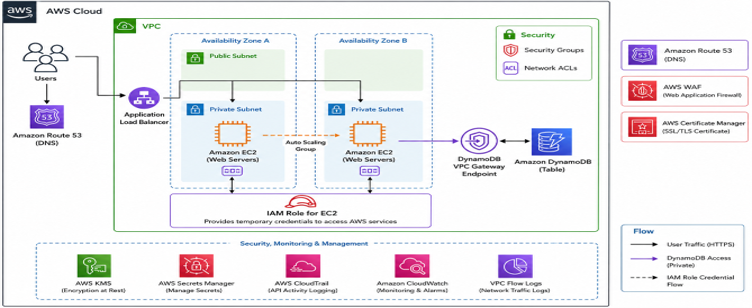
Fig 1: Secure AWS architecture for scalable EC2 and DynamoDB integration.
Why Enterprises Prefer This Architecture
Compared to traditional credential-based access methods, this AWS-native architecture provides:
- Stronger security
- Reduced credential exposure
- Centralized access management
- Simplified operations
- Better scalability
- Improved audit and compliance support
It aligns with modern cloud security and zero-trust architecture principles.
Secure Cloud Data Access
Securely connecting Amazon EC2 web servers to Amazon DynamoDB is essential for building secure, scalable cloud-native applications.
By implementing IAM roles, VPC endpoints, encryption, and centralized monitoring, organizations can significantly improve security while simplifying operational management.
A properly designed AWS security architecture not only protects sensitive application data but also enables businesses to scale confidently and securely in the cloud.
Upskill Your Teams with Enterprise-Ready Tech Training Programs
- Team-wide Customizable Programs
- Measurable Business Outcomes
About CloudThat


WRITTEN BY Avinash Singh Bundela
Avinash Singh Bundela is a Subject Matter Expert at CloudThat, specializing in AWS Architecting / AWS DevOps and AWS Security. With 14 years of experience in Training and Consultancy, he has trained over 10000+ professionals/students to upskill in Multiple Technologies. Known for simplifying complex concepts and delivering interactive hands-on sessions, he brings deep technical knowledge and practical application into every learning experience. Avinash’s passion for continuous learning reflects in his unique approach to learning and development.


 PREV
PREV












Comments