

 Login
Login

 March 12, 2026
|
Voiced by Amazon Polly |
In the current digital workplace landscape, the integration of Artificial Intelligence has shifted from a “helpful assistant” to a core strategic platform. Microsoft Copilot for Microsoft 365 has emerged as the definitive AI-powered productivity tool, designed to reshape how we work, create, and collaborate fundamentally.
By combining the reasoning power of Large Language Models (LLMs), including the latest GPT-5.2 and GPT-5 series, with your organization’s proprietary data in the Microsoft Graph, Copilot provides a secure, context-aware environment that lives directly inside the apps you use every day.
Enhance Your Productivity with Microsoft Copilot
- Effortless Integration
- AI-Powered Assistance
What is Microsoft Copilot Chat?
Microsoft Copilot Chat (formerly Business Chat) is a unified, cross-app intelligence layer. Unlike consumer-facing AI, Copilot Chat is “grounded” in your business data. This means it has real-time access to your emails, calendar, Teams chats, documents, and meetings.
Accessed via the Microsoft 365 Copilot App, web browsers, or pinned directly in Teams, Copilot Chat acts as a central command center. It doesn’t just answer questions; it connects the dots across your entire digital footprint. For instance, you can ask, “Summarize the last three client emails and pull the latest sales numbers from Excel,” and get a consolidated answer in seconds.
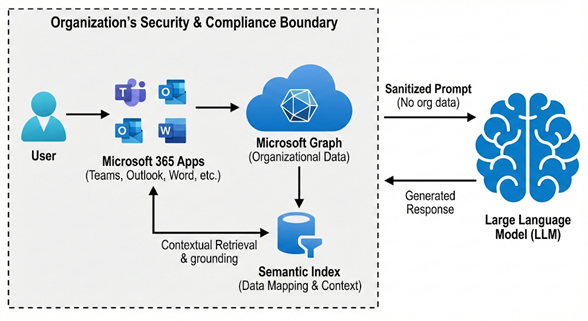
Fig 1: The Microsoft Copilot Architecture
The Architecture: Grounding & "Work IQ."
The secret to Copilot’s accuracy is a process called Grounding. When you submit a prompt, the system follows a sophisticated “Work IQ” workflow:
- Preprocessing: Copilot retrieves relevant context from the Microsoft Graph (e.g., “Find the project update from last Tuesday”).
- Semantic Indexing: The system uses vectorized indices to understand the intent and relationships behind your data, not just keywords.
- Reasoning: The grounded prompt is sent to the LLM to generate a response.
- Verification: The response is filtered through Microsoft’s Responsible AI framework for safety and compliance before being delivered to you.
Key Features and App Integration
Copilot is deeply embedded in the Microsoft 365 Suite, offering unique capabilities in each application:
- In Microsoft Word: Use the “Draft with Copilot” feature to generate 2,000-word reports from a brief outline. Use the “Summarize” agent to condense 50-page documents into five key bullet points.
- In Microsoft Excel: Perform complex data analysis using natural language. Ask, “What are the top three trends in this quarter’s sales data?” and Copilot will automatically create the formulas, charts, and forecasts.
- In Microsoft PowerPoint: Convert a Word document into a professionally designed slide deck, complete with speaker notes and AI-generated imagery via DALL-E 3 or Sora 2 video placeholders.
- In Microsoft Teams: Never miss a meeting detail. Copilot provides real-time summaries, highlighting who said what, where the group agreed, and the specific action items, even if you join the meeting late.
The Rise of AI Agents
A key theme for 2026 is the evolution of Autonomous Agents. Through Microsoft Copilot Studio, organizations can now build “Frontier Agents” such as:
- Researcher Agent: For complex, multi-step market research pulling from web and work data.
- Project Opal: A task-based agent that executes work inside a secure, observable environment.
- Agent 365: Specialized bots for HR, Finance, and IT that operate independently within your tenant to solve routine problems.
Privacy, Security, and "Zero Trust."
For enterprises, the “Trust Layer” is paramount. Microsoft ensures that:
- No Training on Customer Data: Your prompts and organizational data are never used to train foundation LLMs.
- Enterprise Data Protection (EDP): Copilot inherits your organization’s Microsoft Purview labels, ensuring sensitive data remains encrypted and accessible only to authorized users.
- Regional Residency: All data processing stays within the EU Data Boundary or your specific regional tenant.
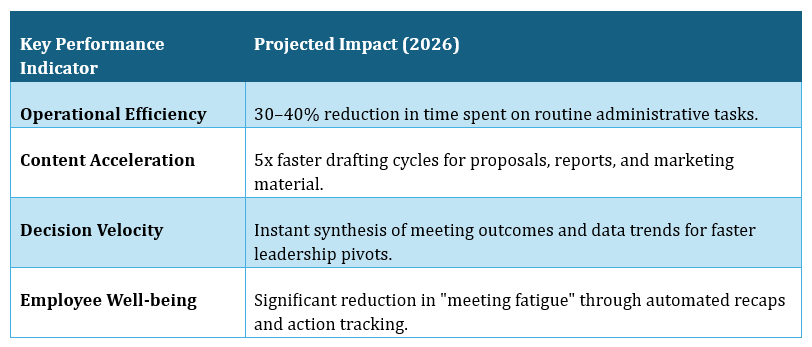
Strategic Business Impact
The Future of Work
Microsoft Copilot for Microsoft 365 isn’t just software; it is a fundamental shift in how we work. By automating “busy work” like data entry and endless email threads, you’re freed to focus on what truly matters: creativity, strategy, and problem-solving. As we move toward a future filled with autonomous AI agents and advanced tools that understand voice, video, and text, the role of the professional is changing. The leaders of tomorrow will be those who learn to orchestrate these AI tools effectively, turning technology into a partner that drives the next wave of global business innovation.
Upskill Your Teams with Enterprise-Ready Tech Training Programs
- Team-wide Customizable Programs
- Measurable Business Outcomes
About CloudThat


WRITTEN BY Pankaj P Waghralkar
Pankaj Waghralkar is a Subject Matter Expert and Microsoft Certified Trainer at CloudThat. He has total of 15+ years of professional experience in various fields like Cloud Computing, Web Development, Digital Marketing and training experience in IT & Computer Engineering streams. He has trained more than 2500 students, working & corporate professionals. He published two national patents on biometric technologies and also published more than 10+ international research articles on different trends in technologies. His expertise includes designing secure hybrid cloud infrastructures and enhancing online visibility through strategic web development and marketing initiatives. Proficient in leveraging advanced cloud technologies, effective networking solutions and comprehensive software engineering practices to drive business growth, Pankaj has trained professionals across industries, helping them master Azure services such as Virtual Networks, Azure Active Directory, Security, Networking and more. Known for his clear teaching style and deep technical knowledge, Pankaj is dedicated to shaping the next generation of cloud experts.


 PREV
PREV












Comments