

 Login
Login


 March 12, 2026
|
Voiced by Amazon Polly |
Introduction
MLflow has become a popular open-source platform for tracking machine learning experiments, managing models, and recording metrics. While powerful, running MLflow in a self-managed setup, whether on-premises or on Amazon EC2, comes with operational overhead. Teams must provision infrastructure, manage scaling, handle security updates, and ensure high availability. As experimentation grows, this infrastructure management can distract teams from their core goal: building and improving machine learning models.
AWS addresses this challenge by offering a serverless MLflow tracking server through Amazon SageMaker AI. This managed approach removes the burden of infrastructure management while preserving the familiar MLflow experience. Based on the AWS blog “Migrate MLflow Tracking Servers to Amazon SageMaker AI with Serverless MLflow”, this article explains why and how to migrate and highlights the benefits of adopting a serverless MLflow architecture on AWS.
Pioneers in Cloud Consulting & Migration Services
- Reduced infrastructural costs
- Accelerated application deployment
Why Move to Serverless MLflow on Amazon SageMaker?
Challenges with Self-Managed MLflow
In a traditional setup, MLflow tracking servers require constant attention. You need to size instances correctly to handle peak experiment loads, even though they may sit idle much of the time. Scaling up during heavy usage and scaling down later often requires manual intervention. Additionally, teams must manage upgrades, security patches, backups, and monitoring.
This operational overhead increases as teams and experiments grow, making infrastructure management a bottleneck for ML productivity.
Advantages of Amazon SageMaker Serverless MLflow
Amazon SageMaker’s serverless MLflow tracking server eliminates these challenges. AWS fully manages the underlying infrastructure and automatically scales resources based on demand. There is no need to maintain servers, configure autoscaling, or worry about uptime.
The serverless model also improves cost efficiency. You can stop the MLflow app when it’s not in use, ensuring you only pay for active usage instead of running a tracking server 24/7. In addition, Amazon SageMaker integrates seamlessly with AWS security (IAM), storage (Amazon S3), and development environments like Amazon SageMaker Studio.
High-Level Migration Architecture
The migration approach recommended by AWS uses an export–import pattern:
- Export data from the existing MLflow tracking server
- Create a serverless MLflow app on Amazon SageMaker
- Import the data into the new Amazon SageMaker-managed MLflow server
The process preserves experiments, runs, parameters, metrics, and registered models, ensuring continuity and minimal disruption.
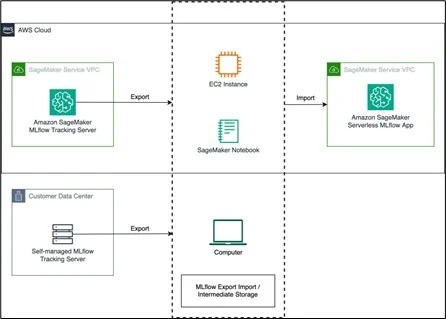
Step-by-Step Migration
- Export MLflow Data from the Source Server
The first step is exporting all MLflow artifacts from your existing tracking server. AWS recommends using the open-source MLflow Export Import tool. This tool extracts experiments, runs, and models into an intermediate format that can be imported elsewhere later.
Before exporting, ensure:
- Network access to the source MLflow server
- Compatible MLflow versions
- Appropriate permissions to read experiments and artifacts
This export acts as a backup and migration package.
- Create a Serverless MLflow App in Amazon SageMaker
Next, you create a new MLflow tracking server within Amazon SageMaker. This is done through SageMaker Studio or the AWS CLI by provisioning an MLflow App.
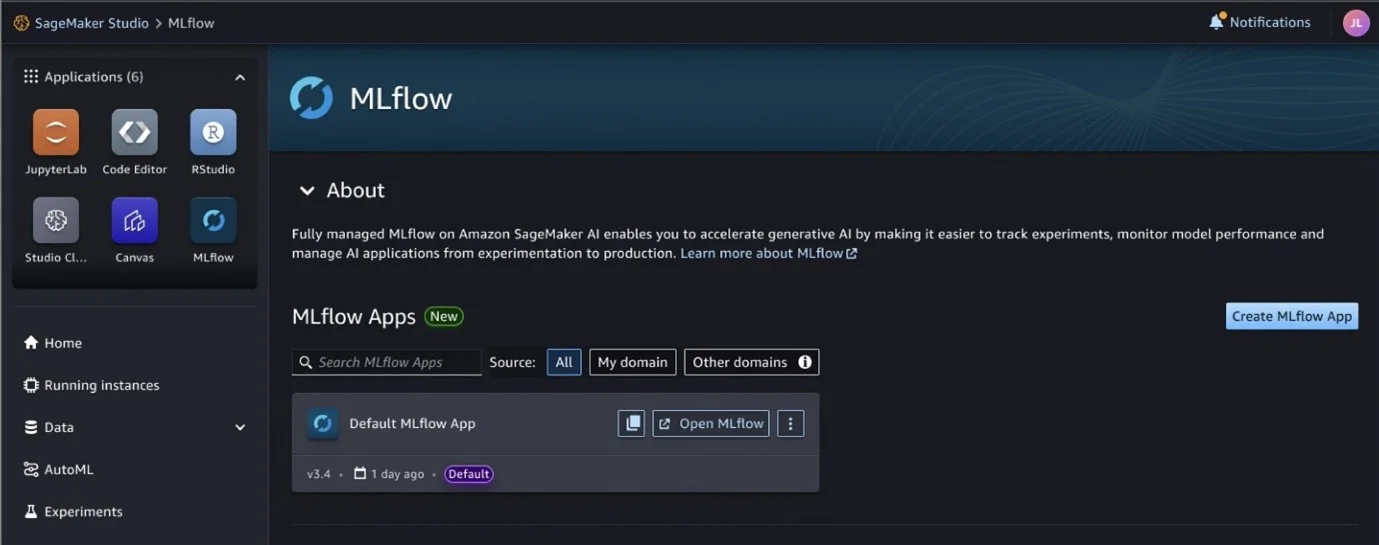
Once created, Amazon SageMaker provides an ARN (Amazon Resource Name) that acts as the tracking URI. This ARN replaces the traditional HTTP endpoint used in self-managed MLflow setups.
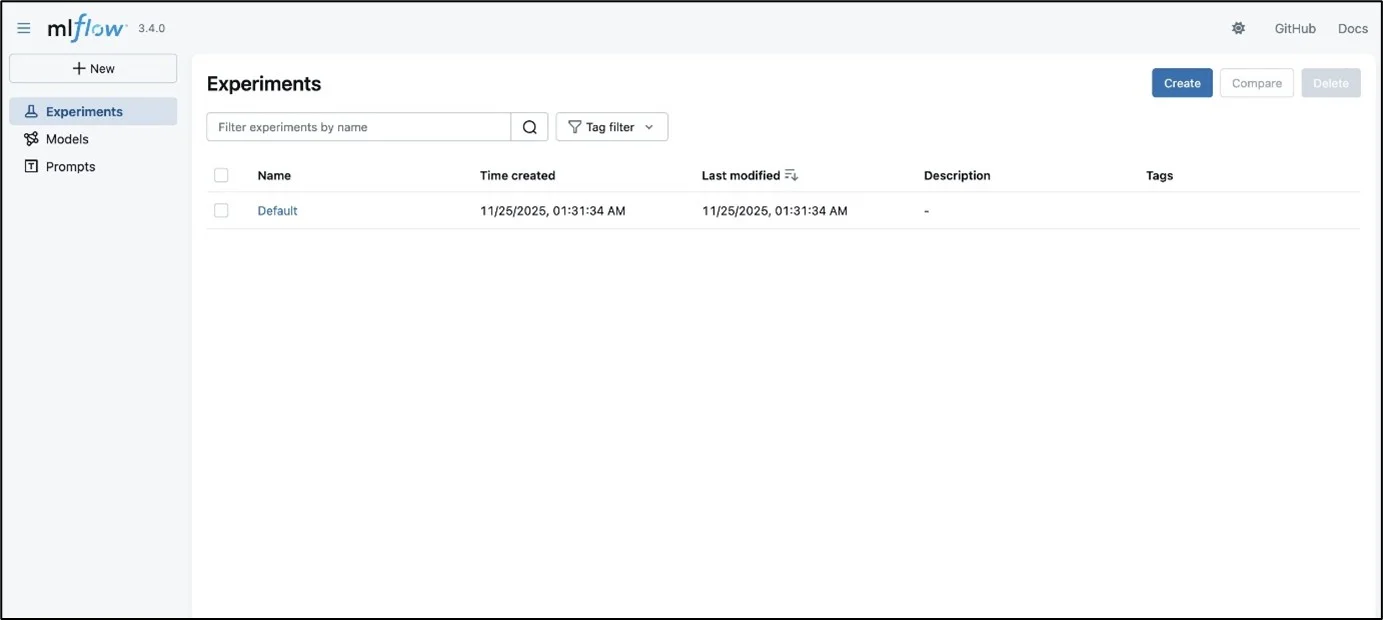
At this stage, the tracking server is empty but fully operational and managed by AWS.
- Import Data into Amazon SageMaker MLflow
Using the same MLflow Export Import tool, you import the exported data into the Amazon SageMaker MLflow app. The tool recreates experiments, runs, and model registries in the new server.
After the import:
- Validate experiments via the MLflow UI in Amazon SageMaker Studio
- Optionally verify counts programmatically using MLflow APIs
- Update your ML pipelines to use the new tracking URI
Once validated, the old MLflow server can be safely decommissioned.
Key Benefits of Serverless MLflow on Amazon SageMaker
Cost Optimization
Serverless MLflow allows you to start and stop the tracking server as needed. You avoid paying for idle compute, making it significantly more cost-efficient than always-on EC2-based setups.
Automatic Scalability
The tracking server automatically scales to handle bursts of experiment logging without manual intervention. This ensures reliability during heavy experimentation periods.
Native AWS Integration
Amazon SageMaker MLflow integrates directly with:
- Amazon SageMaker Studio for experiment visualization
- AWS IAM for secure access control
- Amazon S3 for artifact storage
This tight integration simplifies ML workflows across the AWS ecosystem.
Reduced Operational Overhead
AWS handles patching, scaling, availability, and security. Teams can focus entirely on experimentation and model development instead of infrastructure maintenance.
Conclusion
Migrating MLflow tracking servers to Amazon SageMaker using a serverless MLflow architecture is a practical step for teams looking to scale machine learning operations without increasing operational complexity. The migration process, exporting existing data, creating a SageMaker MLflow app, and importing experiments, is straightforward and preserves historical experiment data.
Drop a query if you have any questions regarding MLflow and we will get back to you quickly.
Empowering organizations to become ‘data driven’ enterprises with our Cloud experts.
- Reduced infrastructure costs
- Timely data-driven decisions
About CloudThat
FAQs
1. Do I need to rewrite my ML code after migrating to Amazon SageMaker MLflow?
ANS: – No. You only need to update the MLflow tracking URI to point to the Amazon SageMaker MLflow app. The MLflow APIs remain unchanged.
2. Can I stop the MLflow tracking server when not in use?
ANS: – Yes. You can stop the Amazon SageMaker MLflow app to avoid unnecessary costs and restart it when needed.
3. Is Amazon SageMaker MLflow suitable for large teams?
ANS: – Yes. Its serverless architecture and IAM-based access control make it well-suited for collaborative, multi-team ML environments.


WRITTEN BY Venkata Kiran
Kiran works as an AI & Data Engineer with 4+ years of experience designing and deploying end-to-end AI/ML solutions across domains including healthcare, legal, and digital services. He is proficient in Generative AI, RAG frameworks, and LLM fine-tuning (GPT, LLaMA, Mistral, Claude, Titan) to drive automation and insights. Kiran is skilled in AWS ecosystem (Amazon SageMaker, Amazon Bedrock, AWS Glue) with expertise in MLOps, feature engineering, and real-time model deployment.


 PREV
PREV












Comments