

 Login
Login


 May 25, 2026
|
Voiced by Amazon Polly |
Overview
AI-powered chatbots have evolved from simple scripted responders to intelligent systems capable of handling dynamic conversations, generating structured outputs, and even visualizing data. With the rise of cloud platforms like Amazon Web Services, building scalable and production-ready chatbot systems has become more accessible than ever.
In this blog, we will walk through how to build a real-time AI chatbot using AWS services and a custom frontend (without being locked into any specific framework). This approach gives you full control over performance, UI behavior, and extensibility, something often limited in pre-built solutions.
We will focus on:
- System architecture
- Real-time response handling
- Frontend flexibility
- AI integration
- Practical challenges and solutions
Pioneers in Cloud Consulting & Migration Services
- Reduced infrastructural costs
- Accelerated application deployment
Why Avoid Framework Lock-in?
Modern frontend frameworks like React, Angular, or Vue are powerful, but they can also introduce unnecessary complexity for certain use cases. When building chatbot interfaces, especially those that require rendering dynamic content (tables, charts, scripts), a framework-agnostic approach can be beneficial.
Advantages:
- Full control over DOM rendering
- Easier integration of dynamic scripts
- Lightweight performance
- No dependency overhead
In real-world chatbot implementations, responses are not always predictable. They may include:
- Plain text
- HTML tables
- Chart scripts
- Embedded logic
Handling such variability is often easier when strict rendering rules do not constrain you.
System Architecture
A typical real-time AI chatbot architecture looks like this:
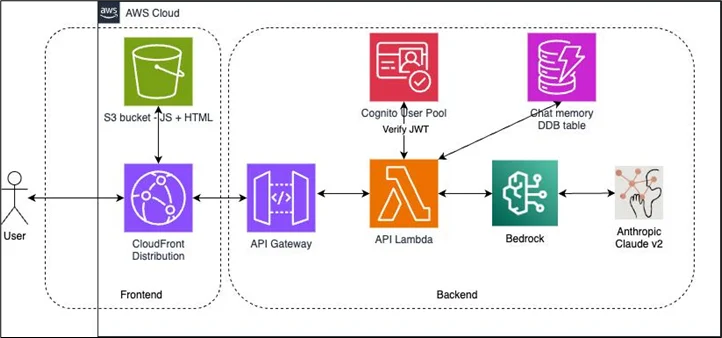
Frontend → Amazon API Gateway → AWS Lambda → AI Model → Response
Components Breakdown:
- Frontend (Custom UI)
- Built using JavaScript (or optionally React)
- Handles user input
- Displays messages dynamically
- Manages typing indicators and streaming responses
- API Layer
Using AWS API Gateway:
- Acts as an entry point
- Routes requests securely
- Handles authentication if needed
- Backend (AWS Lambda)
- Processes user queries
- Calls AI services (like OpenAI or AWS Bedrock)
- Formats responses
- AI Engine
- Generates intelligent responses
- Can return structured or unstructured data
Real-Time Response Handling
One of the most important aspects of a chatbot is real-time interaction.
Instead of waiting for the full response, modern chatbots:
- Stream partial responses
- Show typing animations
- Improve user experience
Implementation Idea:
- Use chunked responses or WebSockets
- Display messages progressively
- Add a typing indicator while waiting
Example behavior:
- User sends a message
- Loader appears
- Text appears word-by-word
This small UX improvement makes the chatbot feel significantly more responsive and human-like.
Handling Dynamic Responses in Frontend
This is where most chatbot implementations fail.
AI responses can include:
- Tables
- Charts
- Scripts
- Mixed content
Common Challenge
If you directly try to render dynamic scripts in frameworks like React, you may encounter errors such as:
“Objects are not valid as a React child”
This happens because frameworks restrict raw DOM manipulation.
Practical Solution
Instead of directly rendering:
- Parse response content
- Identify content type (text, table, script)
- Render accordingly
For example:
- If response contains <table> → render as HTML
- If response contains <script> → execute separately
- If response contains chart config → inject into canvas
This layered rendering approach avoids UI breakage.
Rendering Charts Dynamically
A powerful feature of AI chatbots is the ability to generate visual insights.
Example:
- AI returns chart configuration
- Frontend dynamically creates a <canvas>
- Script renders chart
Key Considerations:
- Use unique IDs for each chart
- Ensure scripts execute after DOM load
- Prevent duplicate rendering
Security Note:
Executing scripts from API responses can be risky.
Always:
- Sanitize inputs
- Avoid executing untrusted scripts directly
- Use controlled environments
Voice Input Integration (Optional but Powerful)
Adding voice input can significantly improve usability.
How it works:
- Capture voice using browser APIs
- Convert speech to text
- Send text to backend
- Convert the response back to speech
This creates a full voice assistant experience inside the browser.
Performance Optimization
Real-time chat systems must be optimized for:
- Speed
- Cost
- Scalability
Best Practices:
- Reduce API Calls
- Avoid sending unnecessary context
- Use caching for repeated queries
- Optimize AWS Lambda
- Minimize cold starts
- Use lightweight dependencies
- Response Size Handling
- Limit large payloads
- Paginate large tables
Security Considerations
Security is often overlooked in AI applications.
Key Risks:
- Prompt injection
- Unauthorized API access
- Script execution vulnerabilities
Solutions:
- Validate user inputs
- Use authentication (JWT)
- Sanitize all responses
- Implement rate limiting
Real-World Challenges
When building production-level chatbots, you’ll encounter issues like:
- Inconsistent AI Responses
AI may return:
- Unexpected formats
- Broken HTML
- Incomplete data
Solution:
- Add a validation layer before rendering
- UI Breaking with Dynamic Content
Rendering unpredictable content can break the layout.
Solution:
- Use fallback UI
- Limit the max width/height of elements
- Managing Chat History
Tracking conversation context is tricky.
Solution:
- Store message IDs
- Send only relevant context
Conclusion
The key to success lies in:
- Designing a scalable architecture
- Handling real-time interactions smoothly
- Rendering dynamic content safely
- Optimizing performance and cost
As AI continues to evolve, chatbots will become more interactive, visual, and context-aware. Building your own system from scratch not only gives you technical control but also prepares you for the next wave of intelligent applications.
Drop a query if you have any questions about the Real-Time AI Chatbot, and we will get back to you quickly.
Empowering organizations to become ‘data driven’ enterprises with our Cloud experts.
- Reduced infrastructure costs
- Timely data-driven decisions
About CloudThat
FAQs
1. Why should I use AWS for building a chatbot?
ANS: – AWS provides scalable, serverless services such as AWS Lambda and Amazon API Gateway, which let you build and deploy chatbots without managing infrastructure. It also integrates well with AI services.
2. Can I build this chatbot without React or any frontend framework?
ANS: – Yes. In fact, using vanilla JavaScript gives you more control over dynamic content rendering, especially when dealing with scripts, charts, and mixed responses.
3. How do I handle large AI responses in the UI?
ANS: – You can:
- Stream responses instead of loading all at once
- Paginate large data
- Use collapsible sections for better readability


WRITTEN BY Shreya Shah
Shreya Shah is a Frontend Developer II at CloudThat, specializing in building scalable, user-focused web applications. She has a strong emphasis on creating clean, responsive interfaces with seamless integration to cloud-based solutions. Passionate about delivering smooth user experiences, Shreya continuously explores innovative ways to enhance efficiency, quality, and overall product performance.


 PREV
PREV












Comments