

 Login
Login


 June 19, 2026
|
Voiced by Amazon Polly |
As organizations embrace Azure DevOps for rapid delivery, the attack surface expands across code, pipelines, and cloud resources. Integrating Microsoft Defender for Cloud and Defender for DevOps into your DevOps toolchain helps you detect misconfigurations, exposed secrets, and vulnerable dependencies before they ever reach production. This blog explains how to bring these capabilities into Azure DevOps in a practical, DevSecOps‑friendly way.
Start Learning In-Demand Tech Skills with Expert-Led Training
- Industry-Authorized Curriculum
- Expert-led Training
Why DevSecOps Needs Defender for DevOps
DevSecOps is about embedding security controls into every stage of your CI/CD pipeline instead of relying on late, manual reviews. Defender for DevOps, part of Microsoft Defender for Cloud, provides centralized visibility and recommendations across multi‑pipeline environments like GitHub and Azure DevOps. When you connect Azure DevOps to Defender, you gain:
- A unified view of repositories, pipelines, and cloud workloads.
- DevOps‑specific security recommendations and secure score contributions.
- Automated scanning for code, secrets, infrastructure‑as‑code (IaC), and containers via the Microsoft Security DevOps extension.
For teams just starting with Azure DevSecOps, CloudThat’s dedicated Azure security and DevOps training can accelerate adoption and skill development.
Keywords used: DevSecOps, Microsoft Defender for Cloud, Azure DevOps Security.
High‑Level Architecture:
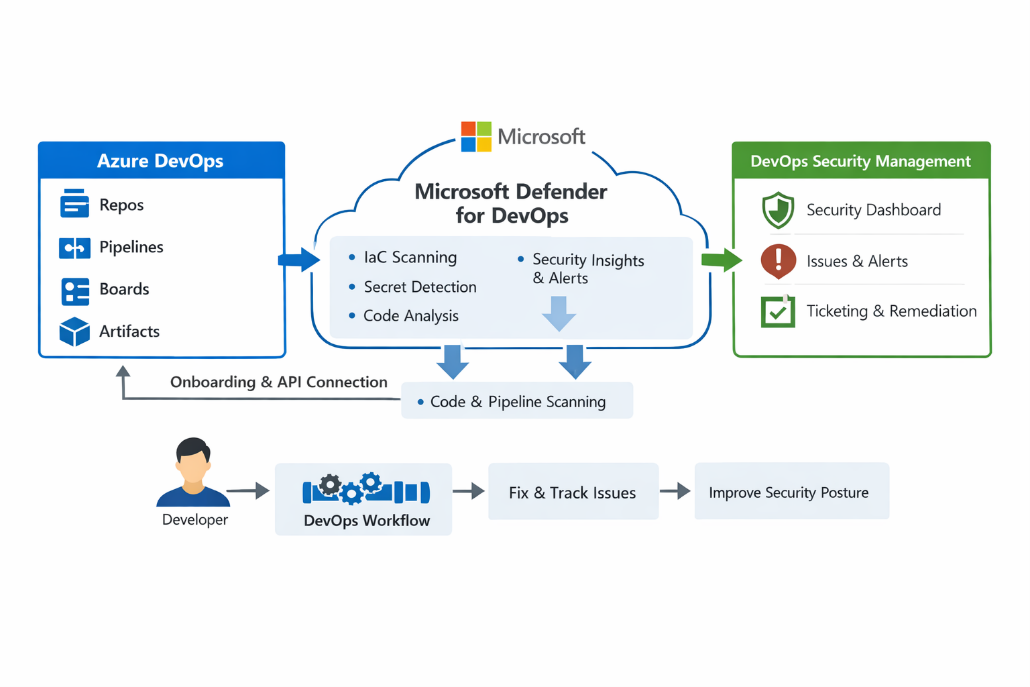
Fig 1: Architecture diagram of Defender integration with Azure DevOps.
Connecting Azure DevOps to Microsoft Defender for Cloud
From a security architecture perspective, integrating Azure DevOps with Defender for Cloud is a low‑friction way to extend existing cloud security governance into the CI/CD layer. The native DevOps connector in Defender for Cloud allows security teams to:
- Onboard one or more Azure DevOps organizations.
- Select which projects and repositories to monitor.
- Receive DevOps‑aware recommendations, such as “Code repositories should have secret scanning findings resolved.”
The connector is configured directly from the Azure portal under Microsoft Defender for Cloud → Environment settings → Add environment → Azure DevOps, where you authorize access to your Azure DevOps org and pick projects and repos to include. Defender for Cloud offers a free trial. We can explore the pricing details on pricing-defender-for-cloud. Once configured, these DevOps entities appear alongside subscriptions and resource groups in Defender for Cloud, which is especially powerful in hybrid and multi‑cloud environments.
If you’re mapping out your longer‑term skill path around this, you can refer to the blog on the Azure DevOps security: DevSecOps, which outlines how DevSecOps capabilities fit into modern DevOps roles.
Embedding Microsoft Security DevOps in Pipelines
The Microsoft Security DevOps Azure DevOps extension is where day‑to‑day DevSecOps work happens. Once installed, it adds a pipeline task that runs multiple tools and aggregates results in SARIF format, enabling rich dashboards and correlation in Defender for Cloud.
A typical YAML snippet looks like this:
text
– task: MicrosoftSecurityDevOps@1
displayName: ‘Microsoft Security DevOps scan’
inputs:
categories: ‘code,secrets,IaC,containers’
tools: ‘all’
break: true
This task orchestrates a curated toolset to cover static application security testing, secret detection, container scanning, and IaC checks, all from a single integration point. The break: true parameter is particularly important; it enables security teams to convert findings into hard gates on critical branches, a cornerstone of mature Azure DevOps security practices.
For configuration options, including policies such as Azure DevOps or Microsoft that determine which tools run by default, the official Microsoft Learn article on the Microsoft Security DevOps extension provides detailed YAML reference samples.
Making Findings Actionable with Secure Score
Security tools only deliver value when findings drive consistent remediation. Defender for Cloud addresses this through:
- DevOps‑centric recommendations covering code, secrets, IaC, and more, each with a list of affected repos and suggested remediation steps.
- A unified secure score that quantifies your overall posture across subscriptions, resources, and now DevOps environments.
Each recommendation contributes a defined number of points to your secure score, enabling teams to prioritize work by impact and track improvement over time. Security and platform teams frequently export these insights into dashboards or SIEM/SOAR tools to guide sprint planning and release readiness reviews.
For organizations building broader cloud security strategies, if your team wants to go beyond tooling and build hands‑on expertise, courses like Azure DevOps and Azure Security include labs that cover Azure security, automation, and DevOps practices, making them a natural complement to the integration described in this blog.
Strengthening CI/CD Security
Bringing Microsoft Defender for Cloud, Defender for DevOps, and Azure DevOps together is less about adding another scanner and more about designing a consistent DevSecOps feedback loop. The DevOps connector gives security teams the multi‑pipeline visibility they need, while the Microsoft Security DevOps extension keeps feedback where developers already live, the pipeline run, and the repository view.
Upskill Your Teams with Enterprise-Ready Tech Training Programs
- Team-wide Customizable Programs
- Measurable Business Outcomes
About CloudThat


WRITTEN BY Kavya B.S
Kavya B.S is a Subject Matter Expert and MCT at CloudThat, specializing in Microsoft Azure. With 15 years of experience in training and academics, she has trained over 5,000 professionals to upskill in Architect, Administrator and Security. Known for simplifying complex concepts through real-world analogies, she brings deep technical knowledge and practical application into every learning experience. Kavya’s passion for teaching reflects in her unique approach to learning and development.


 PREV
PREV












Comments