

 Login
Login

 June 19, 2026
|
Voiced by Amazon Polly |
Modern software development is evolving rapidly, and AI coding assistants are becoming an important part of everyday engineering workflows. Traditionally, these assistants handled one request at a time: refactoring code, updating tests, or generating documentation in sequence.
With GitHub Copilot CLI, that model changes significantly. Instead of relying on a single assistant to complete tasks one after another, developers can now use parallel AI agents that work on multiple tasks simultaneously from the command line.
This multi-agent orchestration model allows GitHub Copilot to break a complex request into smaller subtasks, assign them to separate agents, and execute them in parallel. The result is faster task completion, improved efficiency, and better scalability for development workflows.
In this article, we will explore how GitHub Copilot CLI /fleet works, why parallel AI agents matter, and how this feature can improve software development productivity.
Start Learning In-Demand Tech Skills with Expert-Led Training
- Industry-Authorized Curriculum
- Expert-led Training
Understanding GitHub Copilot CLI /fleet
In a traditional AI-assisted workflow, a request like “refactor the authentication module, update tests, and revise documentation” is executed sequentially. Even if the tasks are independent, the assistant processes them one at a time.
GitHub Copilot CLI /fleet introduces orchestration into this process.
When a developer issues a /fleet command, Copilot:
- Analyzes the task request
- Breaks the work into subtasks
- Identifies task dependencies
- Assigns work to multiple AI agents
- Combines the results into a final output
This means that one agent can update stylesheets while another modifies layout files or test cases simultaneously. For teams working on large applications, this model can reduce delays caused by sequential AI processing and improve overall development speed.
Fleet in Action
Consider a front-end enhancement request where multiple UI improvements need to be implemented:
/fleet
- Add a wishlist heart icon overlay on product image hover
- Add “Quick View” button on product card hover
- Make the navbar sticky on scroll with a shadow transition
Instead of handling these one by one, GitHub Copilot CLI Fleet analyzes the command and prepares the work for multiple agents.
When a /fleet command is submitted in GitHub Copilot CLI, the orchestrator first evaluates the request, identifies the individual tasks, and prepares them for distribution.
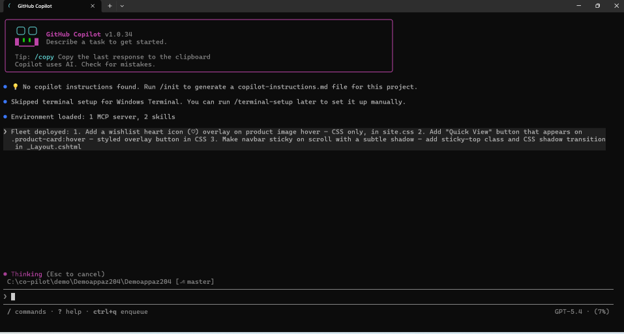
Fig 1: GitHub Copilot CLI Fleet receiving a multi-task /fleet request for frontend UI enhancements.
This approach allows a single natural language instruction to represent multiple independent development tasks, making multi-agent AI workflows more practical in real-world development environments.
Parallel AI Agents in Action
Once the request is analyzed, Fleet identifies independent work items and assigns them to separate AI agents.
For example:
- Agent 1 updates site.css
- Agent 2 updates _Layout.cshtml
Since the tasks involve different files, they can run in parallel without interfering with one another.
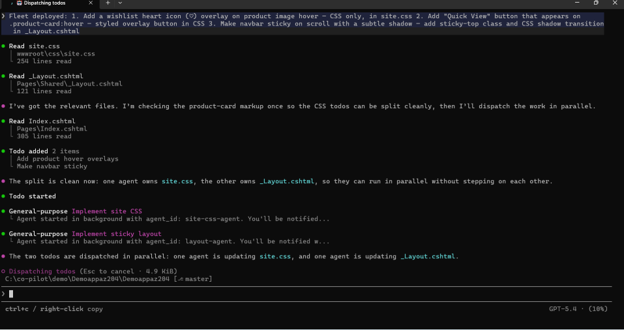
Fig 2: GitHub Copilot CLI Fleet dispatching multiple AI agents in parallel for isolated frontend tasks.
This demonstrates one of the biggest advantages of parallel AI agents; multiple specialized agents can work simultaneously, reducing execution time for multi-file tasks.
Why Parallel AI Agents Matter
The main advantage of parallel AI agents is improved execution speed.
Imagine three independent tasks that each take five minutes:
- Refactoring styles
- Updating layout components
- Revising documentation
In a sequential workflow, the total execution time would be around fifteen minutes.
With GitHub Copilot CLI Fleet, these tasks can be executed simultaneously, reducing the overall completion time.
This becomes especially valuable in:
- Large web applications
- Mono repositories
- Microservices projects
- CI/CD workflows
- Batch code refactoring
One practical benefit of GitHub Copilot CLI Fleet is file-level task isolation. Separate agents can be assigned to files like site.css and _Layout.cshtml, allowing UI updates to proceed in parallel while minimizing conflicts.
This improves productivity while helping teams deliver changes faster.
Teams exploring intelligent developer workflows can further strengthen these capabilities y training on GitHub Copilot, which covers practical AI-assisted development strategies.
The Importance of Clear Task Boundaries
To use GitHub Copilot CLI Fleet effectively, tasks need to be clearly defined.
A vague prompt like:
/fleet update frontend UI
does not provide enough information for effective orchestration.
A clearer request gives better results:
/fleet update site.css for hover effects and _Layout.cshtml for sticky navbar
This tells Fleet:
- what needs to be changed
- where the changes belong
- which tasks can run independently
The clearer the task boundaries, the better the orchestration.
This means prompt design becomes an essential part of multi-agent AI workflows, especially when multiple agents are expected to work efficiently without overlap.
Benefits for Development Teams
Using GitHub Copilot CLI /fleet provides several practical benefits for development teams.
Faster Execution
Independent tasks can run in parallel, reducing implementation time.
Better Efficiency
Instead of one AI assistant managing all tasks, multiple agents distribute the workload.
Improved Scalability
As projects grow, there are more opportunities to parallelize tasks across multiple files or modules. Organizations adopting AI-powered engineering practices often integrate these tools into DevOps workflows, as covered in Azure DevOps training programs.
Challenges to Consider
Although GitHub Copilot CLI Fleet offers clear benefits, it is important to understand its limitations.
Shared File Conflicts
If multiple agents attempt to modify the same file, conflicts can occur.
Coordination Overhead
For small tasks, the orchestration effort may outweigh the benefit of parallel execution.
Dependency Management
Some tasks depend on others and cannot run simultaneously.
For example:
- Update database schema
- Update API logic
- Run integration tests
These dependencies must be respected, which means parallel AI agents work best when tasks are naturally independent.
Future of AI Workflows
GitHub Copilot CLI /fleet advances AI-assisted development by enabling parallel AI agents to handle multiple tasks at once. Instead of processing requests sequentially, Fleet breaks them into subtasks, assigns them to specialized agents, and executes them simultaneously. This improves speed, boosts efficiency, and makes AI workflows more scalable for development teams. As AI tools evolve, GitHub Copilot CLI Fleet demonstrates how multi-agent AI workflows can help teams manage complex tasks more quickly and effectively. For organizations adopting AI-enabled engineering practices, using these orchestration capabilities early can provide a strong productivity advantage.
Upskill Your Teams with Enterprise-Ready Tech Training Programs
- Team-wide Customizable Programs
- Measurable Business Outcomes
About CloudThat


WRITTEN BY MD Azhar Uddin
Azhar is a Microsoft Certified Trainer (MCT) and multicloud expert with a Master’s degree in computer applications. With a proven track record of training over 10,000 professionals worldwide, he specializes in cloud, DevOps, and system administration- emphasizing scalable, secure and cost-effective solutions. He brings deep expertise in Azure, AWS and Oracle Cloud, skillfully integrating complex multicloud environments and designing modern cloud-native architectures using microservices and containers. Recognized among the Top 100 MCTs globally acclaimed for delivering real-world, high-impact training in Microsoft Data & AI and cloud technologies.


 PREV
PREV












Comments