

 Login
Login


 March 18, 2026
|
Voiced by Amazon Polly |
Overview
Modern users access applications from multiple devices, such as mobile phones, laptops, office systems, and tablets. If you are building a production-grade application using React, Node.js, and PostgreSQL, you must design authentication that supports:
- Multiple simultaneous device logins
- Secure logout from a single device
- Secure logout from all devices
- Token invalidation and rotation
This guide explains the architecture, database design, token strategy, logout flows, and production best practices for implementing multi-device authentication in JWT-based systems.
Pioneers in Cloud Consulting & Migration Services
- Reduced infrastructural costs
- Accelerated application deployment
Why Multi-Device Authentication Is Challenging with JWT?
JWT (JSON Web Token) is stateless by default.
When the server generates a JWT, it does not store it. The token itself contains user data and expiry information.
That makes JWT scalable and efficient, but it creates a limitation:
- You cannot invalidate a specific device without tracking sessions.
- You cannot selectively log out a user.
- You cannot monitor active devices.
A pure stateless JWT is not enough for real-world systems.
To properly support multi-device login, you must combine JWT with database-backed session tracking.
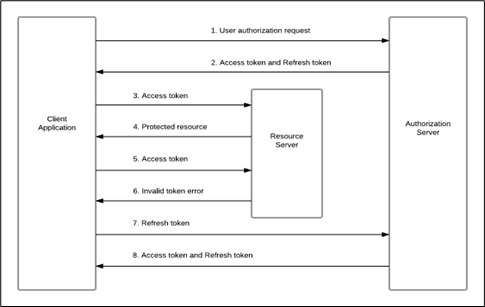
Instead of relying only on stateless JWT, we introduce controlled session storage.
Flow:
User logs in →
Server generates:
- Access Token (short-lived)
- Refresh Token (long-lived)
- Session entry in the database
Each device creates its own session record.
Example:
- Mobile login → Session A
- Laptop login → Session B
- Desktop login → Session C
Each session is independently controllable.
Token Strategy: Access + Refresh Tokens
A secure system separates authentication into two layers.
Access Token
- Short lifespan (10–15 minutes)
- Sent in the Authorization header
- Contains user ID and session ID
- Not stored in the database
Refresh Token
- Long lifespan (7–30 days)
- Stored in an HTTP-only cookie
- Hashed and stored in the database
- Used only to generate new access tokens
This model provides both scalability and security.
Create a sessions table:
|
1 2 3 4 5 6 7 8 9 10 |
CREATE TABLE sessions ( id UUID PRIMARY KEY, user_id UUID REFERENCES users(id), refresh_token_hash TEXT NOT NULL, device_info TEXT, ip_address TEXT, created_at TIMESTAMP DEFAULT NOW(), expires_at TIMESTAMP, is_revoked BOOLEAN DEFAULT FALSE ); |
Why this is important:
Each login inserts a new row.
Each row represents one device session.
This enables:
- Device-level logout
- Logout from all devices
- Suspicious session detection
- “Manage Devices” feature
Login Flow
Backend steps:
- Validate user credentials
- Create a new session record
- Generate a refresh token
- Hash refresh token
- Store the hashed token in the session row
- Generate an access token including the session ID
- Send:
- Access token in the response body
- Refresh token in an HTTP-only cookie
Example:
|
1 2 3 4 5 6 7 8 |
const accessToken = jwt.sign( { userId: user.id, sessionId: session.id }, process.env.ACCESS_SECRET, { expiresIn: "15m" } ); |
Including the sessionId links in every request to a specific device.
Refresh Token Flow
When the access token expires:
- Client sends refresh token from cookie
- The server verifies the refresh token
- Server hashes the token
- Server checks the sessions table:
- Token exists
- is_revoked = false
- Not expired
- If valid → issue new access token
If the session is revoked, the refresh fails, and the user must log in again.
Logout From Single Device
To log out from the current device:
|
1 2 3 |
UPDATE sessions SET is_revoked = TRUE WHERE id = sessionId; |
Clear the refresh cookie.
Result:
- Current device logged out
- Other devices remain active
Logout From All Devices
Used for password reset or security reasons:
|
1 2 3 |
UPDATE sessions SET is_revoked = TRUE WHERE user_id = userId; |
All sessions become invalid.
Security Best Practices
- Always hash refresh tokens
- Rotate refresh tokens on every refresh
- Use HTTP-only secure cookies
- Keep the access token expiry short
- Implement session expiry cleanup job
- Rate limit refresh endpoint
- Monitor unusual IP or device changes
Common Developer Mistakes
- Using long-lived access tokens
- Storing tokens in localStorage
- Not hashing refresh tokens
- Not rotating refresh tokens
- Not maintaining a session table
These mistakes reduce security and device control.
Conclusion
Multi-device login in JWT systems requires more than just generating tokens.
To build a secure and scalable authentication system:
- Use Access + Refresh token strategy
- Store refresh tokens securely
- Track sessions per device
- Implement selective and global logout
- Rotate tokens
- Monitor suspicious activity
This architecture supports real-world authentication requirements while maintaining scalability and security.
Drop a query if you have any questions regarding JWT and we will get back to you quickly.
Making IT Networks Enterprise-ready – Cloud Management Services
- Accelerated cloud migration
- End-to-end view of the cloud environment
About CloudThat
FAQs
1. Why can’t we use only access tokens?
ANS: – Access tokens are short-lived and stateless. Without refresh tokens and session tracking, you cannot support long sessions or device-level logout securely.
2. Why store refresh tokens in the database?
ANS: – To revoke sessions individually. Without database storage, you cannot invalidate a specific device.
3. Should access tokens be stored in localStorage?
ANS: – No. Storing tokens in localStorage exposes them to XSS attacks. Use HTTP-only cookies for refresh tokens and store access tokens in memory.


WRITTEN BY Shreya Shah
Shreya Shah is a Frontend Developer II at CloudThat, specializing in building scalable, user-focused web applications. She has a strong emphasis on creating clean, responsive interfaces with seamless integration to cloud-based solutions. Passionate about delivering smooth user experiences, Shreya continuously explores innovative ways to enhance efficiency, quality, and overall product performance.


 PREV
PREV












Comments