

 Login
Login


 March 18, 2026
|
Voiced by Amazon Polly |
In real-world IT environments, Docker is rarely used only to run a single container and leave it untouched. In enterprise setups, engineers are responsible for restarting services after outages, pausing workloads during maintenance, cleaning up unused resources, monitoring performance, and safeguarding data. These responsibilities fall squarely under day-to-day DevOps operations.
This blog presents a small yet practical Docker automation that brings together commonly used container management tasks into a structured workflow. Instead of treating Docker commands as isolated actions, we group them based on real operational scenarios. This approach aligns closely with how containerized systems are handled in production environments and corporate projects.
The intent is to help learners and professionals understand not just how commands work, but where and why they are used in real-world scenarios.
Start Learning In-Demand Tech Skills with Expert-Led Training
- Industry-Authorized Curriculum
- Expert-led Training
Overview
This blog demonstrates how routine Docker tasks can be automated using simple shell scripts. Each script focuses on a specific operational requirement that DevOps engineers regularly encounter when managing Docker Containers in development, testing, and production environments.
The toolkit can be implemented on:
- A local Linux system
- A cloud-based virtual machine
- A corporate lab or training environment
By the end of this blog, users will gain hands-on experience with practical Container Management rather than isolated command execution.
Grouping Docker Tasks by Real-World Usage
Instead of treating each Docker command independently, the tasks are grouped below based on how they are used in real production workflows.
Container Lifecycle and Availability Management
Automatically Start, Stop, and Restart Containers
In enterprise environments, containers often need to be restarted after system reboots, patching activities, or unexpected failures. Ensuring service availability is a core responsibility of DevOps teams.
Starting all containers at once is useful after:
- Server reboots
- Cloud VM restarts
- Planned maintenance windows
Stopping or restarting containers becomes necessary during:
- Application upgrades
- Configuration changes
- Infrastructure maintenance
Restart policies such as unless-stopped are commonly used to ensure services recover automatically from failures. These practices are widely adopted in production systems to reduce downtime and manual intervention.
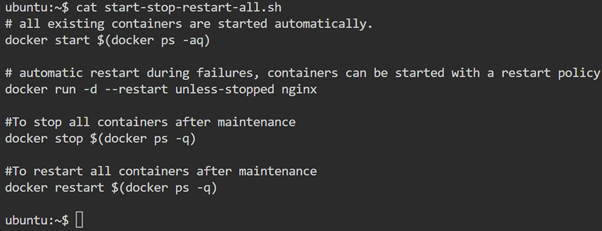
Real-world use case:
In a corporate environment hosting multiple microservices, administrators rely on bulk start and restart operations to quickly bring the entire application stack back online after maintenance.
Resource Cleanup and Environment Hygiene
Removing Stopped Containers, Dangling Images, and Unused Resources
Over time, Docker environments accumulate unused containers, images, volumes, and networks. If not cleaned regularly, these unused resources can consume disk space and cause operational issues.
Auto-pruning unused Docker resources is a standard operational practice, especially in:
- CI/CD build servers
- Shared training environments
- Development and testing machines
Automated cleanup scripts help maintain a clean and predictable Docker environment.
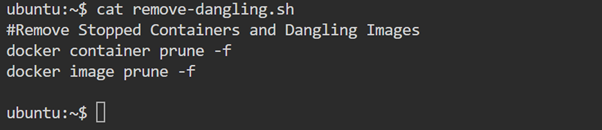
Real-world use case:
CI/CD pipelines frequently create short-lived containers. Auto-pruning ensures build servers remain stable without manual cleanup after every pipeline execution.
Data Protection and Recovery
Backup and Restore of Container Data
While containers are ephemeral by nature, the data they manage is often critical. Databases, logs, and uploaded files must be protected against accidental deletion or failures.
Backing up container volumes allows teams to:
- Safeguard application data
- Restore services quickly after failures
- Migrate data between environments
Restoring data from backups is equally important during disaster recovery scenarios.
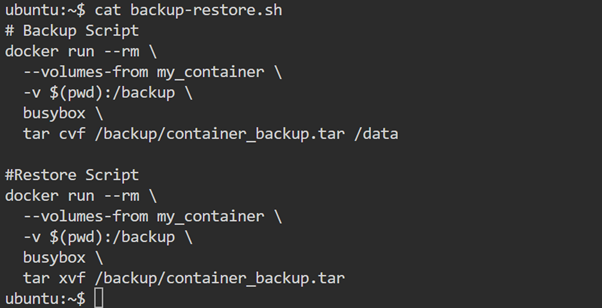
Real-world use case:
In production environments running containerized databases, scheduled backups are mandatory to meet business continuity and compliance requirements.
Monitoring and Troubleshooting
Monitoring Resource Usage and Checking Logs
Visibility into container performance is essential for maintaining system stability. Monitoring CPU, memory, and network usage helps teams detect performance bottlenecks early.
Log inspection plays a crucial role during:
- Application failures
- Deployment issues
- Security investigations
These monitoring and logging practices form the foundation of observability in containerized systems.
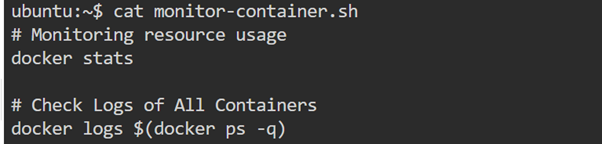
Real-world use case:
During peak business hours, operations teams monitor container metrics to ensure applications remain responsive and within resource limits.
Application Updates and Maintenance
Updating Running Containers
Updating applications in Docker environments typically involves replacing existing containers with new versions built from updated images. This ensures consistency and repeatability across environments.
This approach supports:
- Controlled application upgrades
- Rollback strategies
- Version consistency across development and production
Real-world use case:
During release cycles, DevOps teams update container images to deploy new application versions without changing the underlying infrastructure.
File Access and Network Visibility
Copying Files and Listing Exposed Ports
Operational teams often need to extract configuration files or logs directly from running containers for debugging or audits.
Listing exposed ports helps verify:
- Network configurations
- Security rules
- Service accessibility
These checks are essential for validating deployments before applications go live.
Real-world use case:
Before handing over an application to QA or business users, engineers verify exposed ports and service accessibility.
Temporary Workloads and Safe Execution
Run-and-Remove Containers Automatically
Not all containers are meant to run continuously. Some workloads are short-lived, such as:
- Data processing jobs
- Automated tests
- One-time administrative tasks
Using containers that clean themselves up after execution prevents environmental clutter and reduces manual cleanup effort.
Real-world use case: Testing teams frequently use temporary containers to validate application builds before releasing them to production.
Why This Blog Is Relevant for DevOps Professionals
This Docker automation reflects the responsibilities DevOps engineers handle in real enterprise environments. It focuses on operational stability, observability, cleanup, and data safety, areas that are critical in production
To deepen your expertise further, explore:
Mastering Docker Operations
Managing Docker environments effectively requires more than knowing individual commands. It demands an understanding of how containers behave across their lifecycle, how resources are maintained, and how systems recover from failures.
This grouped, scenario-based Docker automation project provides a realistic view of Docker, Containers, and Container Management in professional DevOps environments.
Upskill Your Teams with Enterprise-Ready Tech Training Programs
- Team-wide Customizable Programs
- Measurable Business Outcomes
About CloudThat


WRITTEN BY Martuj Nadaf
Martuj Nadaf is a Subject Matter Expert at CloudThat, specializing in DevOps Tools and multi-cloud. With 14 years of experience in training and industry, he has trained over 2000+ professionals/students to upskill in Hardware, Networking, Windows, Linux, DevOps, Docker, Kubernetes, Monitoring tools, Multi-cloud globally. Known for explaining complex technical concepts in a simple and understandable manner, hands-on teaching and industry insights, he brings deep technical knowledge and practical application into every learning experience. Martuj's passion for exploring new technologies reflects in his unique approach to learning and development.


 PREV
PREV












Comments