

 Login
Login


 March 17, 2026
|
Voiced by Amazon Polly |
Overview
Backstage is designed to be highly customizable. Beyond providing a central place for service catalogs and developer tools, it allows teams to tailor the user interface and extend platform capabilities through plugins.
Plugins are the foundation of Backstage’s extensibility. They allow developers to integrate internal tools, external APIs, dashboards, and automation workflows directly into the developer portal. We will create a simple frontend plugin that fetches random advice from an external API and displays it on an entity page.
Pioneers in Cloud Consulting & Migration Services
- Reduced infrastructural costs
- Accelerated application deployment
Creating Your Own Backstage Plugin
We will build a simple frontend plugin named advice. This plugin will:
- Provide a full-page route at /advice
- Expose a reusable AdviceCard component
- Fetch random advice from an external API
- Display the advice on an entity page
Each time the entity page is refreshed, the plugin retrieves a new piece of advice and renders it inside a card component.
Step-by-Step Guide
Step 1: Scaffold the Plugin
Backstage provides a CLI tool that automatically generates plugin boilerplate.
From the root of your Backstage project, run:
|
1 |
yarn new --select plugin |
When prompted, select:
|
1 |
plugin - A new frontend plugin |
Then enter the plugin ID:
|
1 |
advice |
After the command completes, Backstage generates the plugin directory and initial files.
Generated Directory Structure
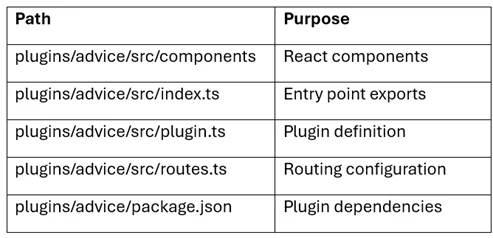
The plugin ID is important because it determines routing paths, packaging, and workspace commands.
Step 2: Understanding the Generated Files
The CLI creates several files that define how the plugin works.
routes.ts
This file defines a route reference used for navigation inside Backstage.
|
1 2 3 4 5 |
import { createRouteRef } from '@backstage/core-plugin-api'; export const rootRouteRef = createRouteRef({ id: 'advice-root', }); |
This route reference is later used when registering the plugin page.
plugin.ts
This file registers the plugin and defines its routable extension.
|
1 2 3 4 5 6 7 8 9 10 11 12 13 14 15 16 17 18 |
import { createPlugin, createRoutableExtension, } from '@backstage/core-plugin-api'; import { rootRouteRef } from './routes'; export const advicePlugin = createPlugin({ id: 'advice', routes: { root: rootRouteRef }, }); export const AdvicePage = advicePlugin.provide( createRoutableExtension({ name: 'AdvicePage', component: () => import('./components/ExampleComponent').then(m => m.ExampleComponent), mountPoint: rootRouteRef, }), ); |
This configuration registers the plugin and specifies where its page should appear in Backstage.
Step 3: Register the /advice Route
To make the plugin accessible, add the page route to the main application router.
Inside packages/app/src/App.tsx:
|
1 2 3 4 5 6 |
import { AdvicePage } from '@internal/backstage-plugin-advice'; const routes = ( <FlatRoutes> {/* other routes */} <Route path="/advice" element={<AdvicePage />} /> </FlatRoutes> ); |
Now visiting:
|
1 |
http://localhost:3000/advice |
Will display the plugin page.
Step 4: Create the AdviceCard Component
Next, create a reusable component that can be embedded within entity pages.
Create the file:
|
1 |
plugins/advice/src/components/AdviceCard.tsx |
Basic component example:
|
1 2 3 4 5 |
import React from 'react'; export const AdviceCard = () => { return <div>This is my advice for the day</div>; }; |
Add an index file for easier imports:
|
1 |
export { AdviceCard } from './AdviceCard'; |
Step 5: Expose the Component as an Extension
To allow Backstage to use the component, it must be exposed through the plugin.
Update plugin.ts:
|
1 2 3 4 5 6 7 8 9 10 11 12 |
import { createComponentExtension } from '@backstage/core-plugin-api'; import { advicePlugin } from './plugin'; export const AdviceCard = advicePlugin.provide( createComponentExtension({ name: 'AdviceCard', component: { lazy: () => import('./components/AdviceCard').then(m => m.AdviceCard), }, }), ); |
Then export the plugin components in index.ts:
|
1 |
export { advicePlugin, AdvicePage, AdviceCard } from './plugin'; |
Step 6: Embed the Plugin on an Entity Page
To display the plugin inside Backstage’s entity pages, add the card component to the entity layout.
Open:
|
1 |
packages/app/src/components/catalog/EntityPage.tsx |
Add the card inside the overview grid:
|
1 2 3 4 5 |
import { AdviceCard } from '@internal/backstage-plugin-advice'; const overviewContent = ( <Grid container spacing={3} alignItems="stretch"> <Grid item md={3} xs={12}> <AdviceCard /> </Grid> </Grid> ); |
After refreshing the application, the AdviceCard will appear alongside other entity overview cards.
Step 7: Style the Card with InfoCard
Backstage provides UI components that follow the platform’s design system. Instead of using a simple <div>, we can use the InfoCard component.
|
1 2 3 4 5 6 |
import React from 'react'; import { InfoCard } from '@backstage/core-components'; export const AdviceCard = () => ( <InfoCard title="Random Advice"> This is my advice for the day </InfoCard> ); |
This improves the visual consistency with the rest of the Backstage interface.
Step 8: Fetch Live Advice from an API
Finally, we enhance the component to fetch data dynamically using Backstage’s API utilities.
|
1 2 3 4 5 6 7 8 9 10 11 12 13 14 15 16 17 18 19 |
import React, { useEffect, useState } from 'react'; import { InfoCard } from '@backstage/core-components'; import { fetchApiRef, useApi } from '@backstage/core-plugin-api'; export const AdviceCard = () => { const fetchApi = useApi(fetchApiRef); const [advice, setAdvice] = useState<string>(); useEffect(() => { fetchApi .fetch('https://api.adviceslip.com/advice') .then(res => res.json()) .then(data => setAdvice(data.slip.advice)) .catch(() => setAdvice('Failed to load advice')); }, [fetchApi]); return ( <InfoCard title="Random Advice"> {advice ?? 'Loading advice...'} </InfoCard> ); }; |
Every time the entity page is refreshed, the component retrieves a new piece of advice from the API and displays it inside the card.
Running the Plugin in Development
You can run the plugin independently while developing it.
From the plugin directory:
|
1 2 |
cd plugins/advice yarn start |
Or from the monorepo root:
|
1 |
yarn workspace @internal/backstage-plugin-advice start |
This launches a development server that allows you to test plugin functionality quickly without starting the entire Backstage application.
Conclusion
Backstage’s plugin architecture makes it easy to extend the developer portal with custom features tailored to your organization.
In this guide, we created a simple plugin that fetches data from an external API and displays it within the platform. Along the way, we covered how to scaffold a plugin, register routes, create reusable components, and integrate them with entity pages.
Drop a query if you have any questions regarding Backstage and we will get back to you quickly.
Making IT Networks Enterprise-ready – Cloud Management Services
- Accelerated cloud migration
- End-to-end view of the cloud environment
About CloudThat
FAQs
1. Do I need to create a backend service for every Backstage plugin?
ANS: – No. Many plugins are purely frontend and interact directly with external APIs. Backend services are required only when you need server-side logic, authentication, or integrations with internal infrastructure.
2. Can a Backstage plugin be reused across multiple projects?
ANS: – Yes. Plugins can be packaged and shared across Backstage deployments. Many organizations maintain internal plugin libraries so multiple teams can reuse common integrations and components.


WRITTEN BY Anirudh Singh
Anirudh works as a DevOps Engineer at CloudThat. He specializes in building scalable, automated, and secure cloud infrastructure solutions. With hands-on experience in tools like Terraform, Kubernetes, Jenkins, and AWS services, he plays a key role in streamlining CI/CD pipelines and improving deployment efficiency. Anirudh is passionate about infrastructure as code, cloud-native architectures, and automation best practices. In his free time, he explores new trends and enjoys optimizing workflows to enhance system reliability and performance.


 PREV
PREV












Comments