

 Login
Login


 December 2, 2025
|
Voiced by Amazon Polly |
Introduction
Today’s applications often require storing semi-structured data, such as user settings or product specifications. Rather than adding a separate NoSQL database, you can leverage PostgreSQL’s built-in JSON capabilities. Starting from version 9.2, PostgreSQL introduced a JSON type; later releases added JSONB and introduced powerful functions. The release of PostgreSQL 18 in September 2025 introduced asynchronous I/O and faster JSON operators, further enhancing the efficiency of document-style queries. This article summarizes key concepts, design patterns, and performance tips for using PostgreSQL as a document store, comparing it to NoSQL systems.
Pioneers in Cloud Consulting & Migration Services
- Reduced infrastructural costs
- Accelerated application deployment
JSON vs. JSONB
PostgreSQL supports storing JSON data as either JSON or jsonb. Both types accept the same values, but the type of underlying storage differs. The JSON type retains a copy of the input string. That makes inserts cheap, but forces PostgreSQL to re-parse the text on each query. The JSON type also preserves key order, whitespace, and duplicate keys. By contrast, jsonb converts JSON into a binary format during write operations. This increases the insertion cost slightly, but allows for much faster queries and supports indexes. Since jsonb strips insignificant whitespace and orders keys arbitrarily, it should be your default choice unless you need absolute fidelity to the input text.
Designing a JSON Document Table
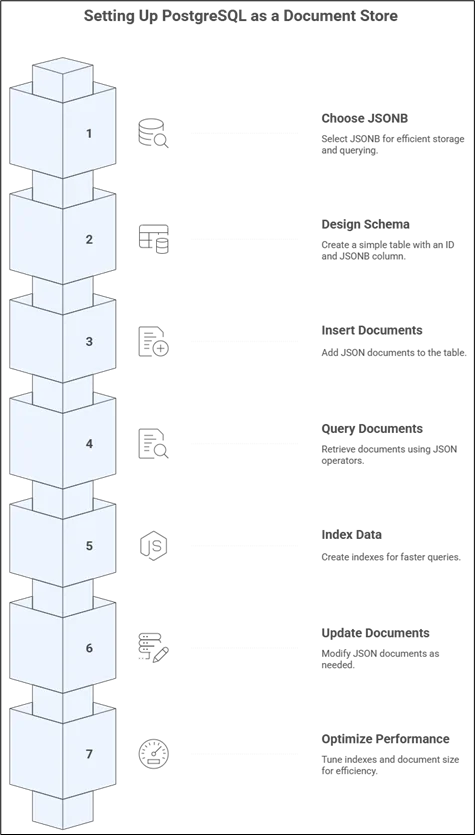
A document store requires only a simple schema. Create a table with an identifier and a JSONB column:
|
1 2 3 4 |
CREATE TABLE docs ( id SERIAL PRIMARY KEY, data JSONB ); |
Each row’s data field can contain different attributes. To insert documents:
|
1 2 3 |
INSERT INTO docs (data) VALUES ('{"title": "JSONB Guide", "author": {"name": "Alice"}, "tags": ["postgres", "json"]}'::jsonb), ('{"title": "SQL vs NoSQL", "review": {"rating": 4.5}}'::jsonb); |
You query JSON keys using -> to get a JSON value and ->> to extract a scalar. For example:
— Find documents with title = ‘JSONB Guide’
|
1 |
SELECT id FROM docs WHERE data->>'title' = 'JSONB Guide'; |
— Find documents where the author.name = ‘Alice’
|
1 |
SELECT id FROM docs WHERE data->'author'->>'name' = 'Alice'; |
To update a value inside JSON, use jsonb_set:
|
1 2 3 |
UPDATE docs SET data = jsonb_set(data, '{author,age}', '35'::jsonb) WHERE data->'author'->>'name' = 'Alice'; |
Although this modifies only a field, PostgreSQL rewrites the entire JSON value, so avoid frequent updates on very large documents.
Indexing and Performance
Generalized Inverted Indexes (GIN) allow you to index keys and values within a JSONB column. A basic GIN index covers all keys and speeds up existence (?) and containment (@>) queries as well as JSONPath operators:
|
1 |
CREATE INDEX idx_docs_data ON docs USING GIN (data); |
Once this index is built, queries like WHERE data @> ‘{“author”: {“name”: “Alice”}}’ will not require a full table scan. For containment and JSONPath queries, PostgreSQL also offers an index class, jsonb_path_ops, that only indexes values and is thus much quicker for those queries, requiring much less space. However, this variant does not support key existence operators. For targeted filters, such as data->>’title’, use a B-tree index on that expression.
Index maintenance is expensive. Write-heavy workloads will pay the price for GIN indexes, as they must update every key and value upon insertion. For hot fields, limit the number of indexes and prefer expression indexes. Documents should be kept quite small; rows bigger than about 2 KB get moved to TOAST storage, incurring extra I/O. PostgreSQL 18 also enhances JSON performance thanks to optimized JSON operators and faster asynchronous I/O, yielding more responsive JSON searches.
The Best Methods
- Employ hybrid schemas: Store flexible attributes in a JSONB column and commonly accessed attributes, like IDs or status flags, as regular columns.
- Avoid duplicate data: Pick one authoritative place instead of storing the same data in both columns and JSON.
- Index selectively: Utilize expression indexes for specific keys and a GIN index for general containment queries. Improve write performance by dropping unused indexes.
- Structure validation: Use jsonb_typeof() or add CHECK constraints to ensure that certain keys do exist and are of the correct types. IS JSON predicates were added in PostgreSQL 16 for light-weight validation.
- Monitor the document size: If possible, break oversized records into separate rows or tables to speed up query and update performance.
PostgreSQL vs. MongoDB
Consider the following when selecting either PostgreSQL or MongoDB:
- Query Language: MongoDB uses a JSON-style query API, which is simpler for simple operations but less effective for complex aggregations. PostgreSQL has SQL; it is excellent in joins and analytics.
- Transactions: MongoDB supports transactions, but their semantics and costs differ from those of PostgreSQL, which offers strong ACID transactions across multiple tables and rows.
- Indexing: While both allow indexing inside the document, the jsonb_path_ops variation allows for optimized containment searches with a smaller index size, while PostgreSQL’s GIN index with jsonpath gives more sophisticated search capabilities.
- Scaling: PostgreSQL scales upwards and, with the help of extensions like Citus, horizontally, whereas MongoDB is designed to scale horizontally by sharding. PostgreSQL often does not require additional complexity for moderate data sizes.
- Ecosystem: PostgreSQL can combine relational tables and JSON documents within a single database, thereby reducing operational overhead and complexity.
Choose PostgreSQL when you need a single system for both relational and document data, with strong consistency and the full power of SQL. Choose MongoDB if you require easy sharding and a purely document‑oriented API.
Common Use Cases
- E-commerce product catalogues: Store core fields (product ID, price) in columns and variable attributes (size, colour, metadata) in a JSONB column. Query by attributes using containment operators.
- Content management systems: Articles contain fixed metadata, such as title and author, and variable content sections in JSON.
- User preferences: A jsonb column stores optional settings, allowing each user to have different key-value pairs.
- Event or log data: Each row stores event metadata in columns (timestamp, user ID) and event details in JSON, simplifying schema evolution.
- Multi-tenant applications: Tenants can define custom fields that are stored in a JSONB column; indexes can be created on the fields that are most frequently queried.
Quick Start Example
The following condensed example shows how to create a document table, insert data, query it, and index it.
- Create the table:
|
1 2 3 4 |
CREATE TABLE notes ( id SERIAL PRIMARY KEY, doc JSONB ); |
2. Insert documents:
|
1 2 3 |
INSERT INTO notes (doc) VALUES ('{"title": "Postgres Guide", "author": {"name": "Alice"}, "tags": ["postgres"]}'::jsonb), ('{"title": "NoSQL vs SQL", "review": {"rating": 4.5}}'::jsonb); |
3. Query documents:
Get titles: SELECT doc->>’title’ FROM notes;
Find documents where the author.name = ‘Alice’: SELECT id FROM notes WHERE doc->’author’->>’name’ = ‘Alice’;
Find documents with tag ‘postgres’ using containment: SELECT id FROM notes WHERE doc @> ‘{“tags”: [“postgres”]}’::jsonb;
4. Add an index to speed up searches:
CREATE INDEX idx_notes_doc ON notes USING GIN (doc);
After indexing, the containment query uses a bitmap index scan instead of a full table scan.
5. Update a value:
UPDATE notes
SET doc = jsonb_set(doc, ‘{author,age}’, ’31’::jsonb)
WHERE doc->’author’->>’name’ = ‘Alice’;
These steps outline the fundamental operations required to utilize PostgreSQL as a document database.
Conclusion
PostgreSQL’s jsonb data type turns the database into a general-purpose document store. You can store heterogeneous documents, query nested fields efficiently with GIN and JSONPath, and retain the power of SQL and ACID transactions. The enhancements in PostgreSQL 18 further improve the performance of JSON.
Drop a query if you have any questions regarding PostgreSQL and we will get back to you quickly.
Empowering organizations to become ‘data driven’ enterprises with our Cloud experts.
- Reduced infrastructure costs
- Timely data-driven decisions
About CloudThat
FAQs
1. JSON vs. JSONB: What Should I Use?
ANS: – Use JSONB for almost everything (binary storage, indexable, faster reads). Use JSON only if you need to preserve whitespace/key order, or if you require exact duplicate keys.
2. How do I filter by a JSON key?
ANS: – SELECT * FROM docs WHERE data->>’status’=’active’;
3. Writes feel slow after adding GIN, why?
ANS: – GIN indexes are heavy to maintain (each doc has many index entries). Index only what you query often; use expression/partial indexes where possible.


WRITTEN BY Akanksha Choudhary
Akanksha works as a Research Associate at CloudThat, specializing in data analysis and cloud-native solutions. She designs scalable data pipelines leveraging AWS services such as AWS Lambda, Amazon API Gateway, Amazon DynamoDB, and Amazon S3. She is skilled in Python and frontend technologies including React, HTML, CSS, and Tailwind CSS.


 PREV
PREV












Comments