

 Login
Login


 March 17, 2026
|
Voiced by Amazon Polly |
Overview
In modern cloud architecture, applications need to communicate efficiently without creating tight dependencies. AWS EventBridge emerges as the solution, a serverless event bus that acts as the central nervous system for distributed systems. It enables loosely coupled microservices, real-time data processing, and seamless integration between AWS services, custom applications, and third-party SaaS platforms.
Whether you’re orchestrating complex microservices workflows, responding to AWS service state changes, or integrating with external platforms like Shopify or Datadog, AWS EventBridge provides the robust infrastructure to handle millions of events per second with built-in reliability and zero infrastructure management.
Pioneers in Cloud Consulting & Migration Services
- Reduced infrastructural costs
- Accelerated application deployment
AWS EventBridge
AWS EventBridge is a serverless event bus service that routes events from various sources to designated targets based on defined rules. Think of it as an intelligent router that sits between event producers and consumers, making routing decisions based on event content.
AWS EventBridge supports three types of event buses:
- Default Event Bus – Every AWS account has a default event bus that receives events from AWS services such as Amazon EC2, Amazon S3, Amazon CloudWatch, and over 90 others. When an Amazon EC2 instance changes state or an Amazon S3 object is uploaded, these events automatically flow to your default bus.
- Custom Event Buses – These are created for your application-specific events. You might create separate buses for different domains (orders, inventory, shipping) or environments (dev, staging, production). This separation provides better organization, security, and cost attribution.
- Partner Event Buses – These receive events from SaaS partners. AWS EventBridge integrates with platforms such as Zendesk, Datadog, Shopify, and Auth0, enabling you to build hybrid architectures that respond to external events.
Practical Implementation Steps
Step 1: Create a Custom Event Bus
aws events create-event-bus –name orders-event-bus
# Verify creation
aws events list-event-buses
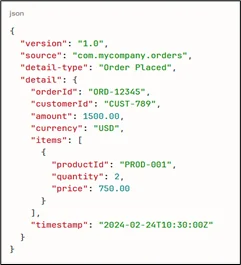
Step 2: Define Event Schema
Create a consistent event structure for your domain:
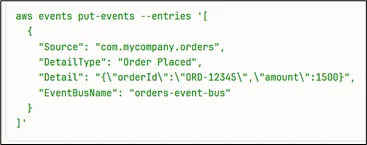
Step 3: Publish Events to EventBridge
Using AWS CLI:
Using Python (boto3):
|
1 2 3 4 5 6 7 8 9 10 11 12 13 14 15 16 |
import boto3 import json client = boto3.client('events') response = client.put_events( Entries=[{ 'Source': 'com.mycompany.orders', 'DetailType': 'Order Placed', 'Detail': json.dumps({ 'orderId': 'ORD-12345', 'customerId': 'CUST-789', 'amount': 1500 }), 'EventBusName': 'orders-event-bus' }] ) |
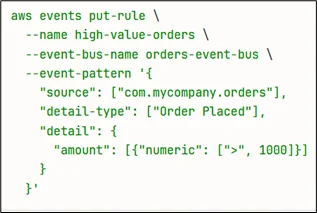
Step 4: Create Event Rules with Pattern Matching
Rules determine which events are routed to which destinations. Here’s an advanced pattern that filters high-value orders from premium customers:
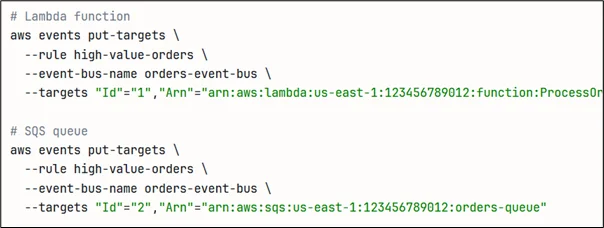
Step 5: Add Targets
Connect multiple services to process events:
Step 6: AWS Lambda Consumer Function
|
1 2 3 4 5 6 7 8 9 10 11 12 13 14 15 16 17 18 19 20 21 22 23 24 25 26 27 28 29 |
import json import boto3 dynamodb = boto3.resource('dynamodb') eventbridge = boto3.client('events') def lambda_handler(event, context): order_id = event['detail']['orderId'] amount = event['detail']['amount'] # Save to database table = dynamodb.Table('Orders') table.put_item(Item={ 'orderId': order_id, 'amount': amount, 'status': 'PROCESSING' }) # Publish downstream event eventbridge.put_events( Entries=[{ 'Source': 'com.mycompany.inventory', 'DetailType': 'Inventory Check', 'Detail': json.dumps({'orderId': order_id}), 'EventBusName': 'orders-event-bus' }] ) return {'statusCode': 200} |
Step 7: Configure Dead Letter Queue
|
1 2 3 4 5 6 7 |
bash aws events put-targets \ --rule high-value-orders \ --targets \ "Id"="1",\ "Arn"="arn:aws:lambda:us-east-1:123456789012:function:ProcessOrder",\ "DeadLetterConfig"={Arn=arn:aws:sqs:us-east-1:123456789012:failed-events} |
Core Features
- Content-Based Filtering
Filter events based on payload content with advanced patterns:
|
1 2 3 4 5 6 7 8 9 10 11 12 |
json { "detail": { "amount": [{"numeric": [">=", 100, "<=", 10000]}], "customer": { "tier": ["premium", "vip"] }, "location": { "country": [{"prefix": "US-"}] } } } |
- Input Transformation
Reshape event data before delivery:
|
1 2 3 4 5 6 7 8 |
json { "InputPathsMap": { "orderId": "$.detail.orderId", "amount": "$.detail.amount" }, "InputTemplate": "{\"id\":\"<orderId>\",\"total\":<amount>}" } |
- Schema Registry
Auto-discover and version event schemas:
|
1 2 3 |
bash aws schemas create-discoverer \ --discoverer-arn arn:aws:events:us-east-1:123456789012:event-bus/orders-event-bus |
- Cross-Account Delivery
Share events between AWS accounts:
|
1 2 3 4 5 |
bash aws events put-permission \ --event-bus-name orders-event-bus \ --action events:PutEvents \ --principal 987654321098 |
- Archive and Replay
Store and replay events for debugging:
|
1 2 3 4 5 6 7 8 9 10 |
bash aws events create-archive \ --archive-name orders-archive \ --event-source-arn arn:aws:events:us-east-1:123456789012:event-bus/orders-event-bus aws events start-replay \ --replay-name debug-replay \ --event-source-arn arn:aws:events:us-east-1:123456789012:archive/orders-archive \ --event-start-time 2024-02-20T00:00:00Z \ --event-end-time 2024-02-21T00:00:00Z |
- Monitoring
|
1 2 3 4 5 6 7 8 9 10 |
bash aws cloudwatch put-metric-alarm \ --alarm-name EventBridge-Failures \ --metric-name FailedInvocations \ --namespace AWS/Events \ --statistic Sum \ --period 300 \ --threshold 5 \ --comparison-operator GreaterThanThreshold ``` |
|
1 2 3 4 5 6 7 8 9 10 11 |
## Example: E-Commerce Order Processing ``` 1. Order Service publishes "OrderPlaced" event → EventBridge 2. EventBridge routes to: - Inventory Service (reserve items) - Payment Service (process payment) - Shipping Service (calculate delivery) - Analytics Service (track metrics) 3. Each service processes independently and publishes results 4. Step Functions orchestrates overall workflow 5. Failed events go to DLQ for retry |
Conclusion
AWS EventBridge transforms distributed system communication by providing a serverless, scalable event routing infrastructure. With sophisticated content-based filtering, schema management, cross-account delivery, and built-in reliability, it eliminates the complexity of building custom event routing systems. The practical examples demonstrate how AWS EventBridge enables loose coupling, allowing services to evolve independently while maintaining seamless integration.
Start with a custom event bus, define clear event schemas, configure appropriate filters, and set up monitoring. EventBridge’s pay-per-event model makes it cost-effective at any scale, charging only $1 per million events. As your architecture grows, AWS EventBridge scales automatically, handling millions of events per second without infrastructure management. For modern cloud applications that embrace microservices and event-driven patterns, AWS EventBridge is the essential backbone that connects everything.
Drop a query if you have any questions regarding AWS EventBridge and we will get back to you quickly.
Empowering organizations to become ‘data driven’ enterprises with our Cloud experts.
- Reduced infrastructure costs
- Timely data-driven decisions
About CloudThat
FAQs
1. What's the difference between AWS EventBridge and Amazon SNS?
ANS: – AWS EventBridge offers content-based filtering, schema registry, and integration with 90+ AWS services. Amazon SNS is simpler for basic pub-sub patterns. Use AWS EventBridge for complex routing, Amazon SNS for simple fan-out.
2. What's the maximum event size?
ANS: – 256 KB. For larger payloads, store in Amazon S3 and reference in the event.
3. How does AWS EventBridge ensure reliability?
ANS: – At-least-once delivery with automatic retries and exponential backoff. Failed events route to Dead Letter Queues. 99.99% SLA.


WRITTEN BY Amisha Naik
Amisha Naik is a Research Associate at CloudThat, working as a Full Stack Developer. She specializes in JavaScript, React.js, Python, Node.js, SQL, and AWS, building scalable web applications and cloud-native solutions. Amisha contributes to designing and developing modern applications, integrating frontend and backend services, optimizing databases, and leveraging AWS services for deployment and scalability.


 PREV
PREV












Comments