

 Login
Login


 December 9, 2025
|
Voiced by Amazon Polly |
Introduction
The Gateway API is a family of APIs that provide dynamic infrastructure provisioning and advanced traffic routing. Make network services available by using an extensible, role-oriented, protocol-aware configuration mechanism. The Gateway API is an add-on containing various API types that provide dynamic infrastructure provisioning and advanced traffic routing. It is the successor of Ingress.
Pioneers in Cloud Consulting & Migration Services
- Reduced infrastructural costs
- Accelerated application deployment
Solution Overview
We will set up the Gateway API in Amazon EKS and configure an Amazon VPC network for establishing service-to-service communication.
Process involved:
- Installing Amazon EKS pod identity association for access to AWS services.
- Installing Gateway API CRDs.
- Installing the Gateway API controller in Amazon EKS.
- Setting up required permissions
- Setting up the gateway and HTTP route core components for the gateway API.
Amazon VPC Lattice: Amazon VPC Lattice is an AWS service that provides a unified, managed framework for connecting, securing, and monitoring services across multiple VPCs and accounts. It simplifies application networking by handling service discovery, traffic routing, and access control, allowing developers to focus on building applications instead of managing complex network configurations.
Prerequisites
Amazon EKS Cluster: Set up one Amazon EKS cluster with the necessary permissions to deploy the Gateway API controller and the required CRDs.
Steps
- Install Gateway CRDs.
Install the necessary CRD required for the Gateway API to run on any Kubernetes cluster by running the command below.
|
1 |
kubectl apply --server-side -f https://github.com/kubernetes-sigs/gateway-api/releases/download/v1.4.0/standard-install.yaml |
Verify CRD installation.
|
1 |
kubectl get crd | grep gateway.networking.k8s.io |

2. Configure the security group
Allow the security group of node groups to allow traffic from the VPC lattice. Run the command below to obtain the security group ID of the node group in your Amazon EKS cluster.
|
1 |
aws eks describe-cluster --name <cluster-name> --output json | jq -r '.cluster.resourcesVpcConfig.clusterSecurityGroupId' |
Allow communication from the Amazon VPC lattice for both IPv6 and IPv4.
Allow traffic from the two sources.

3. Set up AWS IAM permissions
Create a policy in AWS IAM that will invoke the Gateway API controller. Policy should include the following permissions.
|
1 2 3 4 5 6 7 8 9 10 11 12 13 14 15 16 17 18 19 20 21 22 23 24 25 26 27 28 29 30 31 32 33 34 35 36 37 38 39 40 41 42 43 44 45 46 47 48 49 50 |
{ "Version": "2012-10-17", "Statement": [ { "Effect": "Allow", "Action": [ "vpc-lattice:*", "ec2:DescribeVpcs", "ec2:DescribeSubnets", "ec2:DescribeTags", "ec2:DescribeSecurityGroups", "logs:CreateLogDelivery", "logs:GetLogDelivery", "logs:DescribeLogGroups", "logs:PutResourcePolicy", "logs:DescribeResourcePolicies", "logs:UpdateLogDelivery", "logs:DeleteLogDelivery", "logs:ListLogDeliveries", "tag:GetResources", "firehose:TagDeliveryStream", "s3:GetBucketPolicy", "s3:PutBucketPolicy", "tag:TagResources", "tag:UntagResources" ], "Resource": "*" }, { "Effect" : "Allow", "Action" : "iam:CreateServiceLinkedRole", "Resource" : "arn:aws:iam::*:role/aws-service-role/vpc-lattice.amazonaws.com/AWSServiceRoleForVpcLattice", "Condition" : { "StringLike" : { "iam:AWSServiceName" : "vpc-lattice.amazonaws.com" } } }, { "Effect" : "Allow", "Action" : "iam:CreateServiceLinkedRole", "Resource" : "arn:aws:iam::*:role/aws-service-role/delivery.logs.amazonaws.com/AWSServiceRoleForLogDelivery", "Condition" : { "StringLike" : { "iam:AWSServiceName" : "delivery.logs.amazonaws.com" } } } ] } |
4. Create the aws-application-networking-system namespace
Run the command to create the namespace, as the Gateway API controller is created by default in the same namespace. To modify, you can create a different namespace and modify the YAML for the Gateway API controller, changing the namespace there.
|
1 |
kubectl apply -f https://raw.githubusercontent.com/aws/aws-application-networking-k8s/main/files/controller-installation/deploy-namesystem.yaml |
5. Set up pod identity association
- Install the addon in Amazon EKS for pod identity association and provide the necessary permissions.
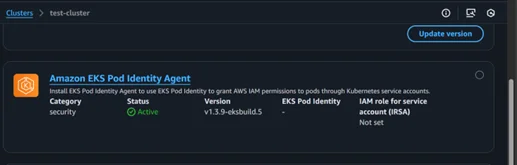
- Run the command to check if the pod identity Daemon Set is running or not kubectl get pods -n kube-system | grep ‘eks-pod-identity-agent’
- Create one service account with the name gateway-api-controller in the aws-application-networking-system
- Create a trust policy for the AWS IAM role
|
1 2 3 4 5 6 7 8 9 10 11 12 13 14 15 16 |
{ "Version": "2012-10-17", "Statement": [ { "Sid": "AllowEksAuthToAssumeRoleForPodIdentity", "Effect": "Allow", "Principal": { "Service": "pods.eks.amazonaws.com" }, "Action": [ "sts:AssumeRole", "sts:TagSession" ] } ] } |
- Now, create the AWS IAM role, attach the trust policy (iv) and AWS IAM policy (Step 3) that we created earlier to the AWS IAM role.
- Create the pod identity association either by using the CLI or by creating it from the console.
|
1 |
aws eks create-pod-identity-association --cluster-name <EKS_CLUSTER_NAME> --role-arn <VPCLatticeControllerIAMRoleArn> --namespace aws-application-networking-system --service-account gateway-api-controller |
To create from the console, click on the Access tab in the Amazon EKS console, then click on “Create” in Pod Identity Association.
6. Deploy the controller
Deploy the controller using the command below.
|
1 |
kubectl apply -f https://raw.githubusercontent.com/aws/aws-application-networking-k8s/main/files/controller-installation/deploy-v1.1.6.yaml |
Verify whether the controller has been deployed successfully.
|
1 |
kubectl get deployment gateway-api-controller -n aws-application-networking-system |
7. Create the Gateway Class
|
1 2 3 4 5 6 |
apiVersion: gateway.networking.k8s.io/v1beta1 kind: GatewayClass metadata: name: amazon-vpc-lattice spec: controllerName: application-networking.k8s.aws/gateway-api-controller |
8. Create Gateway
With the AWS Gateway API Controller (amazon-vpc-lattice GatewayClass), Gateway/HTTPRoute are reconciled into Amazon VPC Lattice resources. The controller creates a Service Network in Amazon VPC Lattice and associates your Amazon VPC with it. That enables service-to-service (east-west) communication via Lattice Services/Target Groups. (It’s not “inside a single VPC”, it’s a Lattice Service Network that can span multiple associated VPCs.)
|
1 2 3 4 5 6 7 8 9 10 11 |
apiVersion: gateway.networking.k8s.io/v1beta1 kind: Gateway metadata: name: demo-gw namespace: demo spec: gatewayClassName: amazon-vpc-lattice # same as installed gateway class listeners: - name: http protocol: HTTP port: 80 |
Check the gateway, it should be Programmed True.

Gateway will create the service network in VPC-Lattice. Check from the console.
Note: Sometimes, the service network will not be created automatically via the gateway. Create manually, if necessary, using the console or CLI, and associate the Amazon VPC.
9. Create HTTP Route
|
1 2 3 4 5 6 7 8 9 10 11 12 13 14 15 16 17 |
apiVersion: gateway.networking.k8s.io/v1beta1 kind: HTTPRoute metadata: name: echo-route namespace: demo spec: parentRefs: - name: demo-gw sectionName: http rules: - matches: - path: type: PathPrefix value: / backendRefs: - name: echo-svc # ClusterIP service for your application port: 80 |
The HTTP Route will create a lattice service check in the console to verify whether it has been created or not.
10. Get the lattice domain.
Run the command below to obtain the lattice domain.
|
1 |
kubectl -n demo get httproute echo-route -o jsonpath='{.metadata.annotations.application-networking\.k8s\.aws/lattice-assigned-domain-name}{"\n"}' |
You will get the output like below

11. Test the application.
From any Amazon EC2 instance within the same Amazon VPC, test by running the curl command.
|
1 |
"curl -i http://echo-route-demo-0f9ccd054fa71b796.7d67968.vpc-lattice-svcs.us-east-1.on.aws/" |
You will get the output from your application.

Key Benefits
- Service-to-service (east–west): With the Gateway API Controller on Amazon EKS, Gateway API maps to Amazon VPC Lattice for secure Service to Service across namespaces and even across VPCs/accounts in the same region.
- Ingress evolution: The Gateway API is the successor to Ingress, offering more expressive support (HTTP/gRPC/TCP/TLS), portability via Gateway Class, and support for policies, cross-namespace references, and both north–south (ALB) and east–west (Lattice) scenarios.
Conclusion
Drop a query if you have any questions regarding Gateway API and we will get back to you quickly.
Empowering organizations to become ‘data driven’ enterprises with our Cloud experts.
- Reduced infrastructure costs
- Timely data-driven decisions
About CloudThat
FAQs
1. Can we use the Gateway API to access our application from the internet?
ANS: – Yes. With the AWS Load Balancer Controller’s Gateway Class, Gateway API provisions an AWS ALB so your app is accessible from the internet.
2. What are the benefits of Gateway API instead of using Ingress?
ANS: – Gateway API provides more security features than Ingress. It helps in solving communication between different namespaces easily.


WRITTEN BY Suryansh Srivastava
Suryansh is an experienced DevOps Consultant with a strong background in DevOps, Linux, Ansible, and AWS. He is passionate about optimizing software development processes, ensuring continuous improvement, and enhancing the scalability and security of cloud-based production systems. With a proven ability to bridge the gap between IT and development teams, Surayansh specializes in creating efficient CI/CD pipelines that drive process automation and enable seamless, reliable software delivery.


 PREV
PREV












Comments