

 Login
Login


 May 19, 2026
|
Voiced by Amazon Polly |
Introduction
In the rapidly evolving landscape of Artificial Intelligence, we are moving past simple chatbots that talk and toward intelligent agents that can do. Amazon Bedrock has been at the forefront of this shift, and its latest innovation, Amazon AgentCore Harness (Preview), is a game-changer for developers and businesses alike.
If you have ever wanted to build an AI agent that can browse the web, remember past conversations, execute code, and use specialized tools without managing complex infrastructure, this guide is for you.
Pioneers in Cloud Consulting & Migration Services
- Reduced infrastructural costs
- Accelerated application deployment
Overview
Amazon Bedrock AgentCore Harness is a managed environment designed to simplify the creation, testing, and deployment of autonomous AI agents. Think of it as a “sandbox” or a “workspace” where your AI agent lives. It provides the agent with everything it needs to function: a brain (the Foundation Model), instructions (the System Prompt), and hands (Tools like the Browser or MCP servers).
The “Harness” allows developers to move from a conceptual prompt to a working, multi-step agent in minutes, providing a streamlined interface for iterating on logic and observing performance in real time.
Building an AI agent used to be a fragmented process. You had to choose a model, find a way to store memory, write custom code to connect it to the internet, and figure out how to host the whole thing securely. Amazon Bedrock AgentCore changes the narrative by offering a “Harness.”
A Harness is essentially a pre-configured execution environment. When you create a harness, you aren’t just writing code; you are setting up a managed instance that can reason through complex problems, call external APIs, and complete tasks autonomously. Whether you are building a research assistant that needs to look up the latest market trends or a technical support bot that needs to run shell commands to verify a system’s status, AgentCore Harness provides the infrastructure to make it happen.
About Amazon Bedrock AgentCore Harness in Detail
- The Core Architecture: How it Works
At its heart, an Amazon AgentCore Harness is built on three pillars: Reasoning, Tool Use, and Autonomy.
When you interact with a harness, the process follows a sophisticated loop:
- The Brain: You select a Foundation Model (like Claude Sonnet or Amazon Titan). This model acts as the reasoning engine.
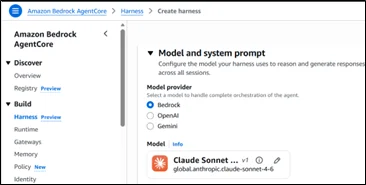
- The Instructions: You provide a “System Prompt.” This defines the agent’s identity, its boundaries, and its goals.

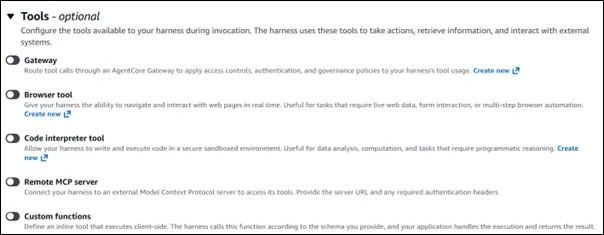
- The Tools: This is where the magic happens. You can equip your harness with “built-in” capabilities like a Web Browser, Memory (to retain context across sessions), or a Gateway. You can also connect “Model Context Protocol” (MCP) servers or define your own inline functions.
Key Features of the Harness
Quick Creation & No Infrastructure Setup
In the past, setting up an agent meant spinning up Amazon EC2 instances or AWS Lambda functions. With Amazon AgentCore Harness, you can “Quick Create.” By defining your model and prompt in the AWS Console, Amazon Bedrock handles the underlying compute power. This allows you to focus on the logic of the agent rather than the plumbing of the server.
Built-in Capabilities
- Browser: The agent can navigate the live web to find real-time information, bypassing the “knowledge cutoff” limitations of standard LLMs.
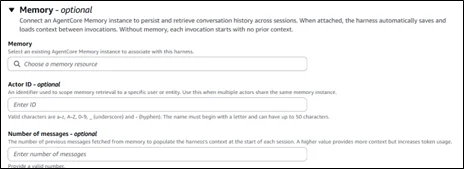
- Memory: Instead of treating every message as a brand-new interaction, the harness can remember the user’s preferences and previous steps in a multi-step task.
- Isolated Runtime: When an agent runs a tool or a shell command, it does so in a secure, isolated environment, ensuring your primary data remains safe.
MCP Servers and Custom Tools
Amazon AgentCore supports the Model Context Protocol (MCP). This is an open standard that enables your agent to connect seamlessly to various data sources and tools. If the built-in tools aren’t enough, you can define your own functions, enabling the agent to interact with your company database or third-party APIs such as Slack, Jira, or GitHub.
The Playground: Testing and Iteration
One of the most powerful aspects of the Harness is the Playground. Before you ever deploy your agent to a customer-facing application, you can talk to it in a sandbox environment.
In the playground, you can:
- Override Tools: Temporarily disable or change a tool to see how the agent reacts.
- Adjust Parameters: Change the “temperature” or “top-P” of the model to make it more creative or more factual.
- Inspect Shell Commands: See exactly what the agent is doing in its runtime environment. This “transparent box” approach is vital for debugging complex workflows.
Observability and Performance
“Black box” AI is a major concern for enterprises. You need to know why an agent made a specific decision. AgentCore addresses this through deep observability.
By monitoring sessions, traces, and spans, you can see a step-by-step log of the agent’s “thought process.”
- Trace: Shows the sequence of events (e.g., User Input -> Model Reasoning -> Tool Call -> Tool Output -> Final Answer).
- Spans: Measures how long each step took, helping you identify bottlenecks in your workflow.
- Tool Usage: Tracks which tools are being used most frequently and if they are returning errors.
Security and AWS IAM Roles
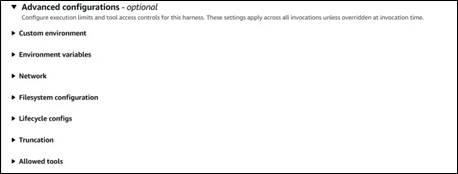
Because the Harness can access tools and potentially sensitive data, security is paramount. Amazon AgentCore uses Identity and Access Management (IAM) roles. You must ensure that your “Execution Role” has permissions to invoke the specific Bedrock models and access the tools associated with the harness. This ensures that even an autonomous agent operates strictly within the permissions you’ve granted it.
Conclusion
The Amazon Bedrock AgentCore Harness (Preview) marks a significant leap toward democratizing autonomous AI. By removing infrastructure hurdles and providing a robust testing and observability environment, AWS has enabled any developer to build sophisticated AI agents.
The future of AI isn’t just about answering questions, it’s about getting work done, and Amazon AgentCore Harness is the engine driving that future.
Drop a query if you have any questions regarding Amazon Bedrock AgentCore Harness and we will get back to you quickly.
Empowering organizations to become ‘data driven’ enterprises with our Cloud experts.
- Reduced infrastructure costs
- Timely data-driven decisions
About CloudThat
FAQs
1. What is the difference between a standard Bedrock model and an AgentCore Harness?
ANS: – A standard model is just the “brain” that generates text based on an input. An Amazon AgentCore Harness is the “body” and “environment” around that brain. It includes the model, tools (such as a browser), memory, and a secure space to execute tasks autonomously.
2. Do I need to be a coding expert to use Amazon AgentCore Harness?
ANS: – No. While knowing how to write prompts and understand API structures helps, the “Quick Create” and “Playground” features are designed to be user-friendly. You can set up and test a fully functional agent directly from the AWS Management Console without writing a single line of backend infrastructure code.
3. Is my data safe when an agent uses the Browser or Shell tools?
ANS: – Yes. Amazon Bedrock AgentCore runs tools in an isolated runtime environment. Furthermore, you control exactly what the agent can and cannot do via AWS IAM roles, ensuring it accesses only the resources you have explicitly authorized.


WRITTEN BY Yerraballi Suresh Kumar Reddy
Suresh is a highly skilled and results-driven Generative AI Engineer with over three years of experience and a proven track record in architecting, developing, and deploying end-to-end LLM-powered applications. His expertise covers the full project lifecycle, from foundational research and model fine-tuning to building scalable, production-grade RAG pipelines and enterprise-level GenAI platforms. Adept at leveraging state-of-the-art models, frameworks, and cloud technologies, Suresh specializes in creating innovative solutions to address complex business challenges.


 PREV
PREV












Comments