

 Login
Login


 April 29, 2026
|
Voiced by Amazon Polly |
Overview
Organizations handle diverse document types such as contract notes, identity proofs, resumes, and invoices, each with varying structures and complexity. While some documents follow fixed schemas, others are highly unstructured, and scanned files add further challenges due to the lack of machine-readable text. Managing separate extraction pipelines for each type increases complexity, costs, and inconsistency. This creates a need for a unified intelligent system that can automatically classify documents, apply the appropriate extraction method, and generate structured outputs efficiently without manual intervention.
Pioneers in Cloud Consulting & Migration Services
- Reduced infrastructural costs
- Accelerated application deployment
How the System Works?
Path 1: Contract Notes (Digital PDFs)
When a document is identified as a contract note based on specific keywords such as trade date, settlement number, or brokerage, it is processed using a schema-driven approach.
- Extraction Tool: pdfplumber
- Strategy: Structured extraction using predefined mapping logic
- Output: Header, trades, and levies in a fixed schema
This ensures high accuracy and consistency for financial documents.
Path 2: General Documents (Digital PDFs)
If the document contains readable text but does not match contract note patterns, it is treated as a general document.
- Extraction Tool: pdfplumber
- Strategy: Open-ended extraction using LLM
- Output: Flexible key-value pairs
This approach allows the system to adapt to resumes, invoices, and other unstructured documents without predefined schemas.
Path 3: Scanned Documents
When the system detects very low text content (e.g., fewer than 50 characters per page), it classifies the document as scanned.
- Extraction Tool: Amazon Textract
- Strategy: OCR + LLM-based structuring
- Output: Dynamic key-value pairs
This fallback mechanism ensures that even image-based documents are processed effectively.
Key Components of the System
- Digital vs Scanned Detection
The first step is identifying whether a document is digital or scanned. Instead of relying on metadata, we use a simple yet effective technique, character count per page.
If the extracted text is below a certain threshold, the document is classified as scanned. This method is lightweight, fast, and highly reliable in real-world scenarios.
- Document Type Classification
Once the document is confirmed as digital, the system checks for domain-specific keywords.
For example:
- Trade Date
- Settlement No
- Brokerage
If these are present, the document is routed to the contract note pipeline. Otherwise, it is treated as a general document.
This rule-based classification provides a strong baseline without requiring complex machine learning models.
- Text Extraction with pdfplumber
For digital PDFs, pdfplumber plays a crucial role. It helps extract:
- Raw text
- Tables
- Structured content
This extracted data is then passed to the LLM for further processing and structuring.
- OCR with Amazon Textract
For scanned documents, Amazon Textract acts as the OCR engine. It converts images into machine-readable text while preserving layout information.
Amazon Textract is particularly useful for:
- Identity documents
- Signed forms
- Low-quality scans
This ensures that no document is left unprocessed due to format limitations.
- LLM-Based Structuring with Amazon Bedrock
Once text is extracted, the next step is structuring it. This is handled using Amazon Bedrock with powerful models like Qwen.
We use two different prompting strategies:
Schema-Driven Prompt (for Contract Notes)
- Enforces a strict structure
- Maps fields like UCC, trade number, and charges
- Ensures consistency and accuracy
Open-Ended Prompt (for General Documents)
- Extracts all relevant information
- Adapts to different document formats
- Produces flexible key-value outputs
This dual approach allows the system to handle both structured and unstructured data efficiently.
Architecture Flow
The document extraction pipeline has a smart, modular flow that ensures each document is processed in the best possible way. The design of the architecture makes it scalable, fault-tolerant, and able to work with different types of documents.
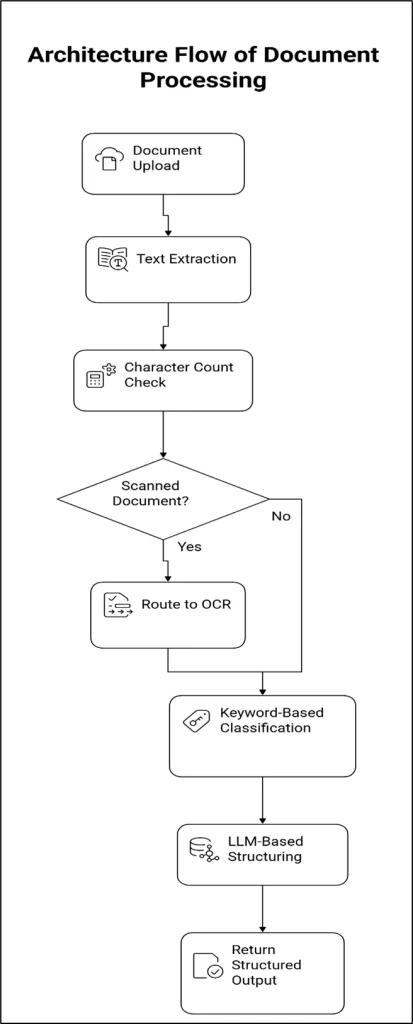
Step-by-Step Guide
Step 1: Document Digestion
The process starts when a user uploads a document using a frontend app, an API, or a batch processing system.
- PDF (digital or scanned) is a supported format.
- The document is kept for a short time, as in object storage such as Amazon S3.
- The backend service gets a request to process
This step ensures that all incoming documents are the same before processing begins.
Step 2: Initial Text Extraction
The system tries to use pdfplumber to extract text from the file.
- Gets tables and plain text from the PDF
- Works well for PDFs that were made on a computer
- Offers a quick way to check the content of a document
This step serves as both a data extraction and validation layer to determine what kind of document it is.
Step 3: Digital vs Scanned Classification
After the text is taken out, the system counts the characters.
- If there is more text on each page than the limit, the document is classified as Digital.
- If the amount of text on a page is less than a certain amount, the document is called Scanned.
This simple heuristic doesn’t rely on complex ML models, yet it still works very well in real life.
Step 4: OCR Processing
If the document is marked as scanned:
- Amazon Textract gets the document.
- OCR extracts text without altering the layout or structure.
- Output includes forms, tables, and text blocks that were found
This makes sure that even documents that are just pictures or of poor quality can be read by machines.
Step 5: Classification by Document Type
For digital documents (and/or OCR-generated text), the following keyword-based classification technique is employed.
Search for the presence of certain industry keywords:
- Trade Date
- Settlement Number
- Brokerage
If found, it is classified as a Contract Note
Otherwise, it is classified as a General Document
The above methodology is quick and efficient, requiring little computation.
Step 6: Intelligent Routing Layer
Using the classification result, the document will be channeled into one of three pipelines:
- Contract Note Pipeline (structured documents)
- General Documents Pipeline (unstructured digital documents)
- Scanned Documents Pipeline (OCR-based processing)
This step guarantees that each document is processed using the most appropriate extraction method.
Step 7: LLM-Based Structuring (Amazon Bedrock)
The text is then sent to the LLM using Amazon Bedrock to structure the information.
Schema-Driven Prompt (Contract Notes)
- Fulfills a specific schema
- Extracts values like trade, charges, and identifiers
- Produces accurate and consistent results
Unstructured Prompt (General and Scanned Documents)
- Automatically structures the key-value pairs
- Flexible to handle multiple document types
Step 8: Output Structuring & Validation
The response from LLM is:
- Converted to JSON format
- Validated against schema (as per requirement)
- Cleansed and normalized for consumption
Step 9: Response Delivery
The structured response will now be:
- Passed as an API response
- Persisted to the database/data lake
- Passed to downstream systems
This facilitates smooth integration with enterprise systems.
Production Considerations
For real-world deployment, a few factors are important:
- Optimize OCR usage to control cost
- Monitor token usage in LLM calls
- Add validation layers for structured outputs
- Handle edge cases like mixed-content PDFs
- Implement logging and traceability for debugging
These considerations ensure the system remains reliable and cost-efficient at scale.
Conclusion
Document processing is no longer just about extracting text, it’s about understanding context and producing structured, meaningful outputs.
This approach eliminates the need for multiple pipelines, reduces operational complexity, and enables scalable automation across use cases.
Drop a query if you have any questions regarding Document processing and we will get back to you quickly.
Empowering organizations to become ‘data driven’ enterprises with our Cloud experts.
- Reduced infrastructure costs
- Timely data-driven decisions
About CloudThat
FAQs
1. How does the system automatically detect whether a document is scanned or digital?
ANS: – The system uses a simple character-count threshold after extracting text with pdfplumber. If the extracted text is very low (e.g., less than 50 characters per page), the document is classified as scanned. In such cases, OCR is performed using Amazon Textract to extract readable content.
2. How does the pipeline differentiate between contract notes and general documents?
ANS: – The system uses keyword-based detection for classification. If specific financial keywords such as “Trade Date,” “Settlement Number,” or “Brokerage” are present, the document is treated as a contract note and processed using a schema-driven approach. Otherwise, it is handled as a general document with an open-ended extraction strategy using Amazon Bedrock.
3. Why are two different prompt strategies used in the system?
ANS: – Two prompt strategies ensure flexibility and accuracy. Schema-driven prompts are used for structured documents, such as contract notes, to maintain consistency and precise field mapping. Open-ended prompts are used for general or unknown document types to extract all possible information dynamically. This combination allows the system to handle both fixed and flexible document formats effectively.


WRITTEN BY Balaji M
Balaji works as a Research Associate in Data and AIoT at CloudThat, specializing in cloud computing and artificial intelligence–driven solutions. He is committed to utilizing advanced technologies to address complex challenges and drive innovation in the field.


 PREV
PREV












Comments