

 Login
Login


 March 20, 2026
|
Voiced by Amazon Polly |
GitHub Copilot is highly effective when generating boilerplate code, suggesting methods, or assisting with debugging. However, when working in real-world repositories, suggestions may not fully align with project structure, naming conventions, or architectural standards.
This mismatch becomes more noticeable in repositories that contain backend services, infrastructure code, CI/CD workflows, and configuration files together. In such cases, general suggestions may be technically correct but inconsistent with the repository’s design.
This is where GitHub Copilot Custom Instructions becomes valuable. By adding repository-level guidance through a simple configuration file, teams can influence how Copilot responds within that specific project. The outcome is more consistent code suggestions, reduced refactoring effort, and improved Developer Productivity across teams.
In this article, we use a public repository example to illustrate how repository-specific guidance works and why it matters in enterprise development environments.
Start Learning In-Demand Tech Skills with Expert-Led Training
- Industry-Authorized Curriculum
- Expert-led Training
Why Repository-Specific Guidance Matters
By default, Copilot generates suggestions based on its training data and the immediate file context. While this works well for generic coding tasks, it does not automatically understand:
- Repository folder structure
- Naming conventions for services and models
- Logging patterns
- Exception-handling approaches
- Infrastructure or CI/CD standards
Without explicit guidance, developers often need to rewrite or refine AI-generated code to match project conventions.
Providing Repository-Specific Guidance ensures that Copilot aligns more closely with the architectural and stylistic patterns already present in the codebase.
For illustration purposes, consider a multi-layer cloud application repository such as
Demoappaz204 on GitHub.
This type of repository includes application logic, infrastructure definitions, and deployment workflows; exactly the kind of environment where structured instructions significantly improve output consistency.
How GitHub Copilot Custom Instructions Work
Copilot allows repositories to include a configuration file that provides project-level rules. According to the official GitHub documentation on Customizing GitHub Copilot, repository instructions are included as contextual guidance for Copilot to use when generating suggestions.
This file is typically stored at: .github/copilot-instructions.md
Once committed to the default branch, Copilot incorporates this file into its contextual understanding when generating suggestions within that repository.
Instead of repeatedly prompting Copilot with instructions such as:
- “Follow existing patterns.”
- “Do not modify unrelated files.”
- “Use the same logging conventions.”
Developers can define these rules once and rely on consistent behavior thereafter.
These instructions are intentionally direct and structured. Copilot responds best when rules are clear, specific, and aligned with repository patterns.
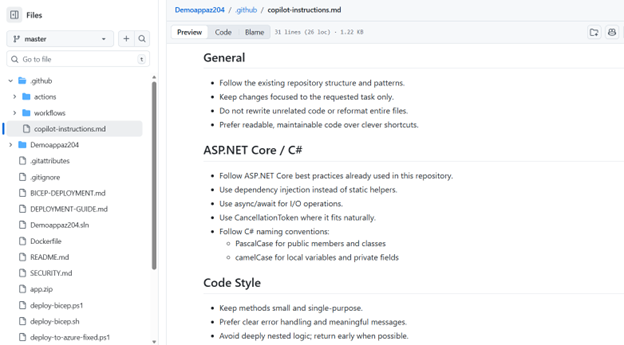
Fig 1: Example copilot-instructions.md file providing repository-level guidance for consistent AI-assisted development.
Path-Based Instructions for Complex Repositories
In larger repositories, different parts of the codebase may require separate guidelines. GitHub also supports path-based instruction files that apply rules only to specific directories or file types. This approach prevents instruction overload and keeps guidance relevant to each component.
For example, teams can define separate guidance for:
- Backend services
- Infrastructure templates (such as Bicep files)
- Workflow files inside .github/workflows
In enterprise DevOps environments, this ensures that application developers and infrastructure engineers both receive relevant contextual suggestions without mixing responsibilities.
Enterprise Benefits of Custom Instructions
When implemented correctly, GitHub Copilot Custom Instructions offer measurable benefits:
- Improved consistency across contributors
- Reduced repetitive prompting
- Better alignment with architectural standards
- Faster onboarding for new developers
- Lower rework effort on pull requests
Most importantly, instructions do not override repository permissions or CI/CD controls. They operate within GitHub’s governance model, complementing existing review processes and security scanning mechanisms.
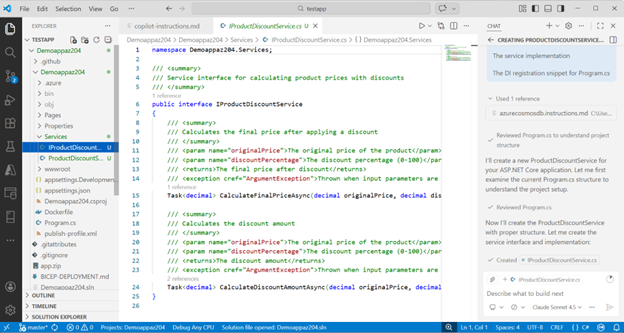
Fig 2: Copilot generating suggestions aligned with repository-specific guidance, demonstrating improved contextual consistency.
Structured Enablement for Teams
While adding a single markdown file is simple, enterprise adoption requires alignment between developers, DevOps engineers, and governance teams.
For professionals seeking deeper hands-on experience with Copilot features, including custom instructions, prompt strategies, and integration into real development workflows, structured training such as GH-300 GitHub Copilot course can help teams implement these practices responsibly and effectively.
GitHub Copilot Summary
GitHub Copilot Custom Instructions are among the most practical ways to improve AI-generated code quality in real repositories. By defining clear repository-level expectations, teams reduce inconsistency, minimize manual corrections, and strengthen collaboration across contributors.
The setup requires minimal effort, a single configuration file committed to the repository, but the long-term impact on consistency and Developer Productivity can be substantial.
In enterprise DevOps environments, where governance and standardization matter, repository-specific guidance transforms Copilot from a general assistant into a context-aware development companion.
Upskill Your Teams with Enterprise-Ready Tech Training Programs
- Team-wide Customizable Programs
- Measurable Business Outcomes
About CloudThat


WRITTEN BY MD Azhar Uddin
Azhar is a Microsoft Certified Trainer (MCT) and multicloud expert with a Master’s degree in computer applications. With a proven track record of training over 10,000 professionals worldwide, he specializes in cloud, DevOps, and system administration- emphasizing scalable, secure and cost-effective solutions. He brings deep expertise in Azure, AWS and Oracle Cloud, skillfully integrating complex multicloud environments and designing modern cloud-native architectures using microservices and containers. Recognized among the Top 100 MCTs globally acclaimed for delivering real-world, high-impact training in Microsoft Data & AI and cloud technologies.


 PREV
PREV












Comments