

 Login
Login


 January 19, 2026
|
Voiced by Amazon Polly |
Overview
Schema drift is one of the biggest headaches in Azure data engineering. Imagine this: your Azure Data Factory pipeline runs perfectly for months, then suddenly fails at 3 AM because the source system added a new column. Your reports are delayed, stakeholders are frustrated, and you’re scrambling to fix it. This scenario plays out daily in organizations worldwide. The good news? Azure provides powerful built-in tools to handle schema drift, keeping your data pipelines resilient automatically and your data flowing smoothly without constant manual intervention.
Pioneers in Cloud Consulting & Migration Services
- Reduced infrastructural costs
- Accelerated application deployment
Understanding Schema Drift
Schema drift happens when your data structure changes unexpectedly. A marketing team adds a “customer segment” column to Azure SQL Database. An API update removes a deprecated field. A ZIP code changes from an integer to a string in Cosmos DB. These changes are inevitable as businesses evolve, applications update, and requirements shift. Without proper handling, schema drift causes Azure pipeline failures, data loss, and increased maintenance costs.
Azure Solutions for Schema Drift
- Azure Data Factory Mapping Data Flows
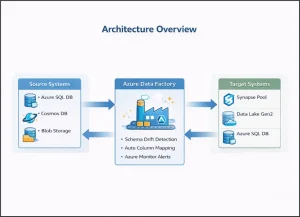
Azure Data Factory’s Mapping Data Flows is your primary weapon against schema drift. This native Azure capability automatically detects and processes new columns without pipeline modifications. In your Source transformation settings, enable “Allow Schema Drift” and disable “Validate Schema.” This tells Azure to accept whatever columns appear in your source data, whether it’s Azure SQL Database, Cosmos DB, or Azure Data Lake Storage Gen2.
The beauty of this approach is its simplicity. Your pipeline continues running even when unexpected columns appear. New fields are automatically mapped and processed. No emergency fixes at 3 AM. No manual pipeline updates. Azure handles it seamlessly in the background.
- Azure Synapse Analytics Integration
Azure Synapse Analytics offers identical Mapping Data Flow capabilities with deeper workspace integration. Use Synapse when working with dedicated SQL pools, serverless SQL pools, or Spark pools. The schema drift settings work the same way, but you get unified monitoring across your entire Synapse workspace. This is particularly valuable for enterprise-scale data platforms where visibility and governance matter.
- Column Pattern Matching
Instead of hardcoding column names, Azure Mapping Data Flows support wildcard patterns. Map all columns starting with “customer_” or automatically exclude audit fields. This Azure-native feature makes your pipelines adaptable without manual updates. When new customer-related columns appear, they are automatically included in your transformations.
- Delta Lake on Azure Data Lake Storage Gen2
Store your data in Azure Data Lake Storage Gen2 using Delta Lake format. This is the gold standard for handling schema evolution in Azure. Delta Lake provides ACID transactions, time travel, and automatic schema merging. When new columns appear, Delta Lake handles them seamlessly without rewriting existing data. Existing records show NULL values for the new columns, and everything continues to work.
Azure Databricks integrates seamlessly with Delta Lake, providing advanced capabilities for complex transformations while maintaining schema flexibility. This combination is unbeatable for Azure-based data lakes.
- Azure Synapse Serverless SQL Pools
Azure Synapse serverless SQL pools let you query data with flexible schemas using the OPENROWSET function. Query files in Azure Data Lake without predefined schemas. Serverless pools automatically detect column types and handle varying schemas across different files. You pay only for queries executed, making it cost-effective for exploratory analysis and schema validation.
- Metadata-Driven Pipelines
Store expected schemas in Azure SQL Database. Your Azure Data Factory pipelines query this metadata at runtime to understand what columns to expect, which are mandatory, and how to handle missing fields. Update schemas in one place, and all pipelines adapt automatically. This Azure-native pattern reduces maintenance and enables self-service data integration.
- Azure Purview for Governance
Azure Purview automatically discovers schema changes across your Azure data sources. It maintains lineage, showing how changes propagate through pipelines, and provides a centralized catalog for governance. While Azure Data Factory handles technical drift, Azure Purview adds enterprise-grade governance and visibility.
Monitoring with Azure Monitor
Set up Azure Monitor alerts specifically for schema drift. Query Azure Data Factory diagnostic logs for schema-related warnings. Track pipeline failures related to schema mismatches. Configure email or Teams notifications when drift is detected. Create Azure dashboards visualizing schema drift patterns across your environment. Proactive monitoring prevents surprises and keeps stakeholders informed.
Best Practices
Enable schema drift in staging layers where flexibility matters most. Use Azure Data Lake Gen2 with Delta Lake for optimal schema evolution support. Leverage Azure Synapse serverless pools for flexible querying. Configure Azure Monitor alerts for immediate notifications. Store metadata in Azure SQL Database for centralized management. Implement Azure DevOps CI/CD to version control all pipeline definitions. Use Azure Purview for enterprise-wide schema governance.
Start permissive in early pipeline stages but enforce strict schemas in final consumption layers. This balances flexibility with data quality. Test your pipelines regularly with schema variations to ensure resilience.
Conclusion
Drop a query if you have any questions regarding Azure Data Pipelines and we will get back to you quickly.
Empowering organizations to become ‘data driven’ enterprises with our Cloud experts.
- Reduced infrastructure costs
- Timely data-driven decisions
About CloudThat
FAQs
1. Does enabling schema drift slow down Azure pipelines?
ANS: – No. Schema inference in Azure Mapping Data Flows happens once and is cached. Performance impact is negligible, under 1% overhead.
2. Can Azure Synapse dedicated SQL pools handle schema drift?
ANS: – Dedicated SQL pools require predefined schemas. Use Mapping Data Flows to handle drift before loading or use serverless SQL pools for flexible querying.
3. How does this work with real-time data?
ANS: – Azure Stream Analytics supports schema flexibility for Event Hubs and IoT Hub sources. Land data in Azure Data Lake with Delta Lake for schema evolution support.


WRITTEN BY Anusha
Anusha works as a Subject Matter Expert at CloudThat. She handles AWS-based data engineering tasks such as building data pipelines, automating workflows, and creating dashboards. She focuses on developing efficient and reliable cloud solutions.


 PREV
PREV












Comments