

 Login
Login


 December 15, 2025
|
Voiced by Amazon Polly |
When operating in a hybrid cloud environment where your on-premises data centre is connected to AWS via a Site-to-Site VPN or Direct Connect, seamless DNS resolution across environments becomes critical. Amazon Route 53 Resolver acts as a bridge, enabling DNS queries to flow between on-premises systems and AWS-hosted workloads.
Start Learning In-Demand Tech Skills with Expert-Led Training
- Industry-Authorized Curriculum
- Expert-led Training
What is Route 53 Resolver?
Amazon Route 53 Resolver is the Amazon-provided DNS service within a VPC. It automatically answers DNS queries for AWS resources (like EC2 instances, RDS endpoints, etc.).
Beyond default resolution, Route 53 Resolver supports a hybrid DNS architecture with features like:
- Inbound endpoints to receive DNS queries from on-prem or other VPCs.
- Outbound endpoints to forward VPC-originated queries to on-premises resolvers or other networks.
- Resolver rules for conditional domain-based forwarding.
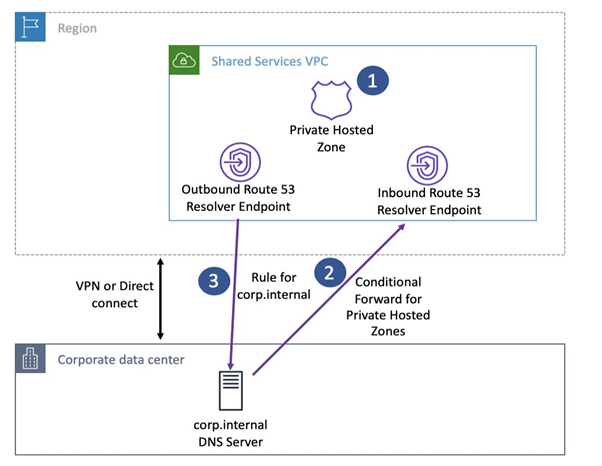
Route 53 Resolver enables hybrid DNS with inbound/outbound endpoints and conditional forwarding.
Scenario
When you run workloads both in AWS (inside VPCs) and on-premises (in your data centre), each environment typically has its own DNS system.
- AWS uses Amazon Route 53 Resolver for DNS inside VPCs.
- On-premises systems use local DNS servers (like Microsoft DNS, BIND, etc.).
- To make applications communicate seamlessly, each side must be able to resolve the other’s domain names, for example:
- An EC2 instance in AWS might need to resolve cloudthat.training (hosted on-prem).
- A server on-prem might need to resolve aws.internal (hosted in AWS).
The Solution - Route 53 Resolver Endpoints
Amazon Web Services provides Route 53 Resolver Endpoints to enable bidirectional DNS resolution between AWS and on-premises environments via VPN or AWS Direct Connect.
There are two key endpoint types:
- Inbound Endpoint
- Allows on-premises DNS servers to forward queries to AWS.
- These queries can then resolve private hosted zone records or VPC internal names.
- Think of it as: “On-prem to AWS”.
- Outbound Endpoint
- Allows AWS resources to forward queries to on-premises DNS servers.
- Useful when VPC resources need to resolve on-prem names.
- Think of it as: “AWS to On-prem”.
Conditional Forwarding Rules
You can create rules in Route 53 Resolver to tell AWS where to send queries based on domain names.
For example:
- Forward all queries ending in onprem.training → On-premises DNS (via outbound endpoint).
- Forward all queries ending in .aws.internal → Route 53 private zone.
These rules are then associated with one or more VPCs, making the configuration flexible and centralized.
Use Cases
- Hybrid DNS resolution
- EC2 resolves on-prem names via Outbound endpoints and rules.
- On-prem clients resolve VPC-hosted private names via Inbound endpoints.
- Multi-account DNS sharing
- Use Resource Access Manager (RAM) to share inbound/outbound endpoints and rules across VPCs in different accounts.
- (You need only one outbound endpoint for multiple VPCs. You don’t have to create an outbound endpoint in each VPC. Instead, you share an outbound endpoint by sharing the rules created for that endpoint with additional accounts using RAM. Endpoints cannot be used across regions.)
- High availability and resilience
- Deploy endpoints across multiple Availability Zones or replicate outbound endpoints; Resolver duplicates queries for redundancy.
- Route 53 Resolver DNS Firewall for security
Filter queries based on domain allow/block lists or advanced threat protections, like detecting DNS tunnelling and Domain Generation Algorithm (DGA) based threats.
To achieve this, we’ll configure:
- Site-to-Site VPN
- Route 53 Resolver inbound endpoint
- Route 53 Resolver outbound endpoint
- Relevant rules and security groups
Prerequisites
- A VPC in AWS with private subnets and NAT/GW.
- Site-to-Site VPN established with route-based VPN.
- On-premises DNS server accessible over VPN (UDP port 53).
- AWS IAM permissions to configure Route 53 and VPC settings.
Step-by-Step Setup
Step 1: Set up Site-to-Site VPN
- Use AWS Virtual Private Gateway or AWS Transit Gateway.
- Ensure route propagation is enabled to the subnets hosting the endpoints.
- Confirm DNS traffic (UDP/53) flows across the tunnel.
Step 2: Create a Route 53 Resolver Outbound Endpoint
Used for resolving on-prem DNS names from AWS.
- Go to Route 53 Console → Resolver → Endpoints.
- Click “Create outbound endpoint”.
- Provide:
- Name: outbound-to-onprem
- VPC: Select the correct VPC
- Security group: Allow UDP/53 to on-prem
- Add two or more IP addresses (from different AZs).
- Click Create.
Step 3: Create a Forwarding Rule for On-Prem Domain
Example: Forward all queries for corp.example.com to on-prem DNS.
- Go to Route 53 Resolver → Rules.
- Click “Create rule”.
- Type: Forward
- Domain name: corp.example.com
- Target IPs: 192.168.1.10 (on-prem DNS server)
- Associate this rule with the VPC.
Step 4: Create Route 53 Resolver Inbound Endpoint
Used for resolving AWS-hosted DNS from on-prem.
- Go to Route 53 Console → Resolver → Endpoints.
- Click “Create inbound endpoint”.
- Provide:
- Name: inbound-from-onprem
- VPC: Same as AWS workloads
- Security group: Allow UDP/53 from on-prem network
- Add two or more IP addresses (from different subnets/AZs).
- Click Create.
Note: These IPs will be used by your on-prem DNS server as forwarders.
Step 5: Update On-Premises DNS Server
Configure your DNS server to forward queries for AWS domains to the inbound endpoint IPs.
Example (for Windows Server DNS):
- Go to DNS Manager → Conditional Forwarders
- Domain: ec2.internal or your private hosted zone
- Forward to: <inbound endpoint IPs>
Step 6: Validate DNS Resolution
From on-prem, test resolution:
nslookup pc1.aws.internal
From AWS EC2, test resolution to on-prem domain:
nslookup myserver. onprem.training
Security Considerations
- Ensure security groups and NACLs allow:
- Inbound and outbound UDP port 53
- Internal traffic across VPN subnets
- Use VPC Flow Logs to debug DNS traffic
- Monitor with CloudWatch Resolver Query Logs
Troubleshooting Tips
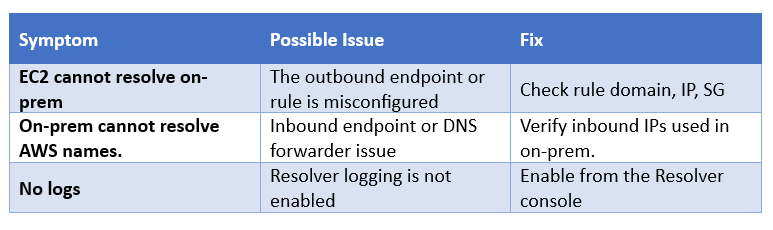
Secure DNS Across Hybrid Networks
Amazon Route 53 Resolver brings flexibility and control to hybrid DNS architectures. When used with Site-to-Site VPN, it ensures reliable and secure DNS resolution across cloud and on-premises systems. As organisations move toward hybrid and multi-account models, mastering this setup becomes an essential skill for cloud architects.
Upskill Your Teams with Enterprise-Ready Tech Training Programs
- Team-wide Customizable Programs
- Measurable Business Outcomes
About CloudThat


WRITTEN BY Sheeja Narayanan
Sheeja Narayanan is Champion Amazon Authorized Instructor, Microsoft Certified trainer and Senior Subject Matter Expert at CloudThat, specializing in AWS infra and Migration. With 19 years of experience in Training and consulting, she has trained over 2500 professionals/students to upskill in Networking, Windows and Linux administration, AWS, Azure and Vmware. Known for simplifying complex concepts and delivering highly hands-on sessions, she brings deep technical knowledge and practical expertise into every learning experience. Sheeja's passion for training delivery reflects in her unique approach to learning and development.


 PREV
PREV












Comments