

 Login
Login


 December 2, 2025
|
Voiced by Amazon Polly |
In the age of agentic AI, Microsoft Fabric Data Agent is at the forefront of transforming how enterprises harness their structured data. By seamlessly integrating with generative AI, organizations can unlock intelligent, context-aware insights from their data assets through natural language interactions.
Together with the Azure AI Foundry Agent Service, the Fabric Data Agent forms a robust foundation for building secure, scalable and enterprise-ready conversational agents. These agents can access, interpret and act on enterprise data with precision, bridging the gap between raw information and actionable intelligence. This blog provides a comprehensive guide to:
- Overview of Fabric Data Agent and Azure AI Foundry
- Step-by-Step Integration
Start Learning In-Demand Tech Skills with Expert-Led Training
- Industry-Authorized Curriculum
- Expert-led Training
Overview of Fabric Data Agent and Azure AI Foundry
Fabric Data Agent:
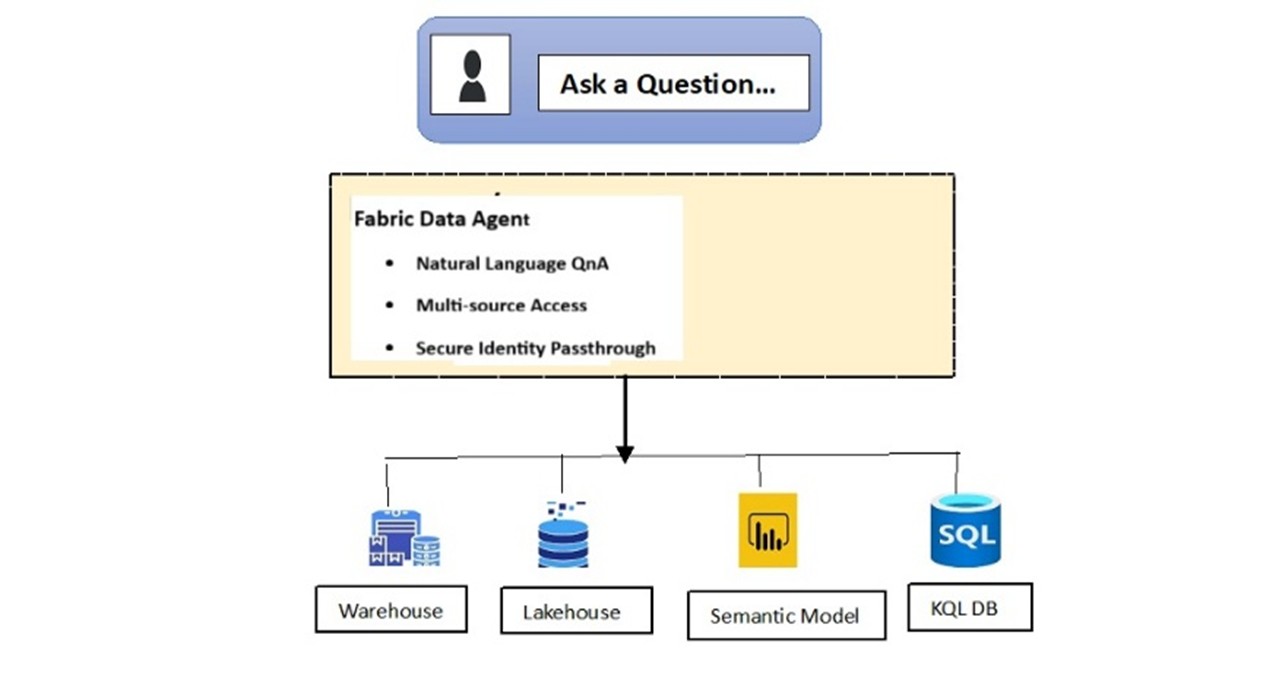
Fabric Data Agent
The Fabric Data Agent is a conversational AI tool within Microsoft Fabric that allows users to interact with enterprise data stored in lakehouses, warehouses, Power BI semantic models and KQL databases in Fabric using natural language queries. It serves as a bridge between complex data systems and non-technical users, providing intuitive, secure and intelligent access to structured data.
Think of it as a chat-based data analyst that understands your data models and responds instantly, without needing SQL, DAX or visuals.
Azure AI Foundry:
Azure AI Foundry is Microsoft’s unified platform-as-a-service for building, deploying and managing AI applications and agents at an enterprise scale. It replaces Azure AI Studio and provides a centralized environment for generative AI development, model orchestration and tool integration, all backed by Azure’s security and scalability.
Integration Process Reference
Prerequisites:
Before integrating, ensure the following:
- Fabric Setup
- Fabric capacity: F2 or higher (or Power BI Premium P1+)
- Fabric Data Agent is created and published
- Tenant settings for AI and cross-geo processing are enabled
- Azure AI Foundry Setup
- Azure AI Foundry project with a deployed agent
- Agent endpoint (PROJECT_ENDPOINT)
- Fabric connection ID (FABRIC_CONNECTION_ID)
- Model deployment name (MODEL_DEPLOYMENT_NAME)
- Users have at least AI Developer RBAC role
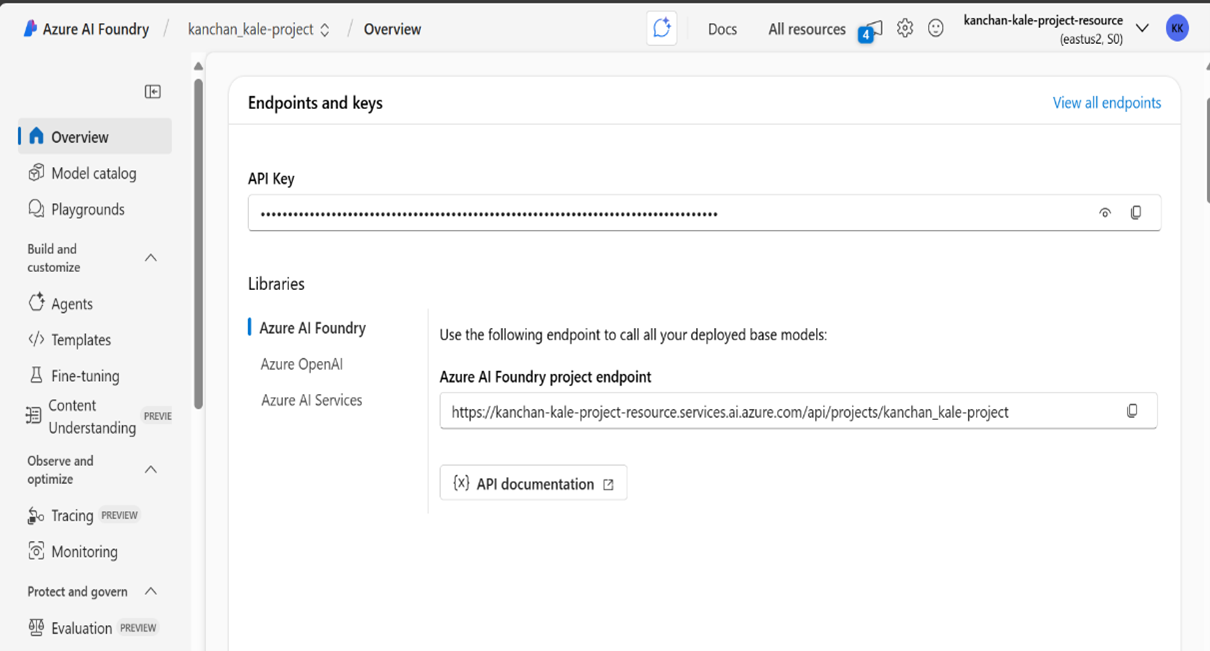
Azure AI Foundry Project
- Both Fabric and Azure AI Foundry must reside in the same Microsoft Entra tenant.
Step-by-Step Integration
- Create and Publish a Fabric Data Agent
- Use the Microsoft Fabric portal to define your data sources
- Publish the agent and note the workspace ID and artifact ID
- Configure Azure AI Foundry Agent
- In the Azure AI Foundry portal:
- Create a new agent, and add the Fabric Data Agent as a knowledge source
- Use the workspace and artifact IDs to link the agent
- Enable Identity Passthrough
- Ensure the agent uses On-Behalf-Of (OBO) flow
- This allows the agent to query data using the end user’s identity, maintaining access control
- Update Agent Instructions
- Provide clear guidance in the agent’s prompt:
- Testing the Integration
- Use the Foundry Playground to test queries. The agent will:
- Evaluate if Fabric is the right tool.
- Use the user’s identity to query Fabric
- Return structured, actionable insights
Real-World Use Case
NTT DATA built HR-focused agents using this integration to analyze staffing and productivity in real-time. Their agents interact directly with Fabric data, enabling faster and more intelligent decision-making.
Driving Real Value with Connected AI
Integrating Azure AI Foundry Agents with Microsoft Fabric Data Agents unlocks a new level of enterprise intelligence. By grounding generative AI in structured, secure data, organizations can build conversational agents that are both powerful and trustworthy.
Upskill Your Teams with Enterprise-Ready Tech Training Programs
- Team-wide Customizable Programs
- Measurable Business Outcomes
About CloudThat


WRITTEN BY Kanchan Kale
Kanchan R Kale is a Microsoft Certified Trainer and working as Subject Matter Expert at CloudThat, specializing in Microsoft Azure Data services. With 12+ years of experience in Data domain, she has successfully delivered 150+ impactful corporate training sessions on Azure data services, empowering over 2500+ professionals from Fortune 500 companies like Accenture, TCS, Capgemini, Deloitte, IBM, Cognizant, Persistent, Infosys and KPMG. Kanchan is well known for simplifying complex concepts, hands-on teaching, industry insights. She brings deep technical knowledge and practical application into every learning experience. Kanchan's passion for teaching trending technologies reflects in her unique approach to learning and development


 PREV
PREV









Comments