

 Login
Login

 September 23, 2026
|
Voiced by Amazon Polly |
Modern users expect applications to be fast, secure, and responsive regardless of their location. Amazon CloudFront accelerates content delivery through a global network of edge locations, but some applications need additional processing before a request reaches the origin.
This is where Lambda@Edge becomes useful. Lambda@Edge allows developers to run AWS Lambda functions at CloudFront edge locations, closer to end users. This enables applications to modify requests and responses, personalize content, perform authentication, and dynamically route requests without processing everything at the origin.
Start Learning In-Demand Tech Skills with Expert-Led Training
- Industry-Authorized Curriculum
- Expert-led Training
What Is Lambda@Edge?
Lambda@Edge is an extension of AWS Lambda that allows serverless functions to execute during the Amazon CloudFront request-response lifecycle.
Instead of sending every request directly to an origin server, CloudFront can invoke Lambda@Edge to perform specific processing at the edge.
Common use cases include:
- URL rewriting
- Request and response modification
- Authentication and authorization
- Request validation
- Dynamic content personalization
- Origin selection
- Header manipulation
For example, an e-commerce website could use Lambda@Edge to identify a user’s location or device and modify the request before it reaches the application.
How Does Lambda@Edge Work?
Lambda@Edge supports four CloudFront events:
- Viewer Request
The function runs when CloudFront receives a request from the user, before CloudFront checks its cache.
It can be used for URL rewriting, request validation, authentication, or modifying headers.
- Origin Request
The function runs when CloudFront is about to send a request to the origin.
This is useful for dynamically selecting an origin or modifying the request before it reaches the backend.
- Origin Response
The function runs after CloudFront receives a response from the origin.
It can modify the response before CloudFront caches it or sends it to the viewer.
- Viewer Response
The function runs before CloudFront returns the response to the user.
It can be used to customize the final response delivered to the viewer.
These four events provide distinct points at which application logic can be introduced into the CloudFront request lifecycle.
How Do You Deploy Lambda@Edge?
A typical Lambda@Edge deployment follows these steps:
Step 1: Create the Lambda function
Develop the required function using a supported runtime such as Node.js or Python.
Step 2: Publish the function
Lambda@Edge requires a published version of the Lambda function.
Step 3: Associate it with CloudFront
Associate the published Lambda version with the appropriate CloudFront event:
- Viewer Request
- Origin Request
- Origin Response
- Viewer Response
Step 4: CloudFront replicates the function
CloudFront distributes the function to its edge locations.
Step 5: Process requests at the edge
When users access the application, Lambda@Edge can modify requests, authenticate users, rewrite URLs, select origins, or customize responses.
What Are the Real-World Use Cases?
- Dynamic Content Personalization
Lambda@Edge can customize application behavior based on information such as user location, device type, cookies, headers, or preferences.
For example, an international website can direct users to content appropriate for their location or language.
- Authentication and Authorization
Lambda@Edge can validate authentication information before a request reaches the origin.
This can help prevent unauthorized requests from reaching the backend infrastructure unnecessarily.
- Intelligent Origin Routing
Applications can dynamically route requests to different origins based on geographic location, URL patterns, headers, or application logic.
This can be useful in multi-region architectures.
- Image Optimization
Lambda@Edge can be used in image-processing workflows to resize, compress, or transform images based on application requirements and device capabilities.
- Lambda@Edge vs. CloudFront Functions
Both technologies allow developers to execute logic at CloudFront edge locations, but they are designed for different requirements.
CloudFront Functions are suitable for lightweight, high-volume operations such as simple URL rewrites or header manipulation.
Lambda@Edge is better suited for more advanced processing, including complex business logic, request-body processing, external API calls, and integration with AWS services. Therefore, the choice depends on the complexity of the required edge processing.
What Does a Typical Architecture Look Like?
A typical Lambda@Edge architecture can be represented as:
Users → Amazon CloudFront → Lambda@Edge → CloudFront Cache → Origin
The origin could be Amazon S3, Amazon EC2, an Application Load Balancer, or Amazon API Gateway.
Amazon CloudWatch can be used for monitoring, while AWS CloudTrail supports auditing.
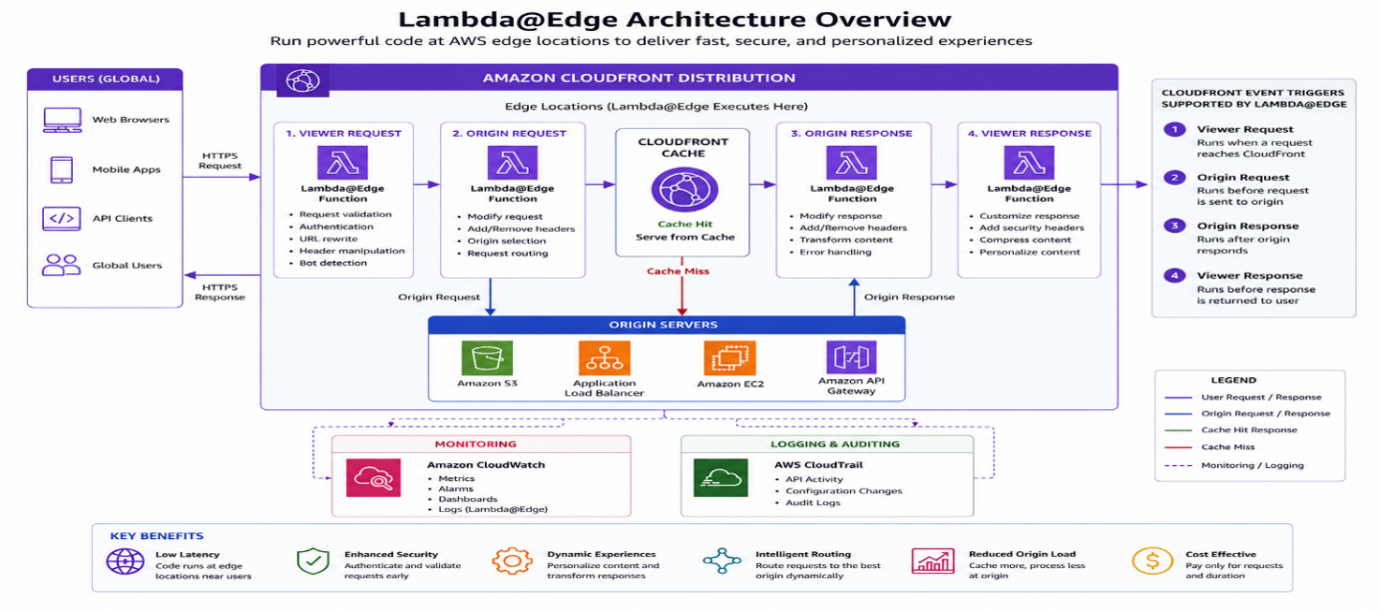
Fig 1: Lambda@Edge enables low-latency request processing and content customization at AWS edge locations.
Key Benefits of Lambda@Edge
Lambda@Edge provides several important benefits:
- Lower latency by processing logic closer to users
- Dynamic request and response customization
- Flexible origin routing
- Request validation and security processing
- Content personalization
- Global scalability
- Reduced processing requirements at the origin
Lambda@Edge Edge Computing Benefits
Lambda@Edge extends the capabilities of Amazon CloudFront by bringing serverless application logic closer to users. It enables developers to modify requests and responses, personalize content, authenticate users, and dynamically route traffic.
For lightweight transformations, CloudFront Functions may be the better choice. For more advanced edge processing, Lambda@Edge provides greater flexibility.
By combining CloudFront’s global content delivery capabilities with Lambda’s serverless execution model, organizations can build high-performance, secure, and globally distributed applications without managing edge infrastructure.
Upskill Your Teams with Enterprise-Ready Tech Training Programs
- Team-wide Customizable Programs
- Measurable Business Outcomes
About CloudThat
FAQs
1. What is Lambda@Edge used for?
ANS: – Lambda@Edge is used to execute custom Lambda logic as part of the Amazon CloudFront request and response lifecycle. Common applications include URL rewriting, request validation, dynamic origin selection, response customization, and advanced edge processing.
2. Is Lambda@Edge different from AWS Lambda?
ANS: – Lambda@Edge uses AWS Lambda functions, but those functions are specifically associated with CloudFront and distributed to CloudFront edge locations. Lambda@Edge also has additional deployment and feature restrictions compared with standard regional Lambda functions.
3. Should I use Lambda@Edge or CloudFront Functions?
ANS: – Use CloudFront Functions for lightweight, highly scalable request and response transformations. Choose Lambda@Edge when the requirement involves more advanced processing, external libraries, AWS service integrations, or other capabilities that CloudFront Functions do not provide.
4. Can Lambda@Edge access the request body?
ANS: – Yes, Lambda@Edge can access request-body data when the appropriate Include Body option is enabled for the CloudFront association. AWS documents request-body processing as a Lambda@Edge capability, subject to specific size and processing restrictions.


WRITTEN BY Avinash Singh Bundela
Avinash Singh Bundela is a Subject Matter Expert at CloudThat, specializing in AWS Architecting / AWS DevOps and AWS Security. With 14 years of experience in Training and Consultancy, he has trained over 10000+ professionals/students to upskill in Multiple Technologies. Known for simplifying complex concepts and delivering interactive hands-on sessions, he brings deep technical knowledge and practical application into every learning experience. Avinash’s passion for continuous learning reflects in his unique approach to learning and development.


 PREV
PREV












Comments