

 Login
Login


 December 8, 2025
|
Voiced by Amazon Polly |
Introduction
Cybersecurity threats continue to evolve at a rapid pace, making it critical for enterprises to adopt robust and scalable security solutions. Trend Micro is one of the leading security platforms used globally to protect endpoints, workloads, networks, and cloud environments.
In this blog, we’ll explore:
- How Trend Micro is used in enterprise environments.
- How to assign user roles in Trend Micro.
- How endpoint security works, including policy deployment and threat visibility.
Pioneers in Cloud Consulting & Migration Services
- Reduced infrastructural costs
- Accelerated application deployment
What is Trend Micro & Why Do Organizations Use It?
Trend Micro provides comprehensive security for hybrid cloud and on-prem environments. It protects workloads, servers, endpoints, and SaaS applications against:
- Malware & ransomware
- Zero-day vulnerabilities
- Unauthorized access
- DDoS & brute-force attacks
- Lateral movement
- Cloud misconfigurations
Key Use Cases
- Endpoint Protection: Prevents malware, ransomware, and exploits on Windows, Linux, and macOS endpoints.
- Workload Security: Protects servers and virtual machines.
- Threat Detection & Response: Correlates alerts and provides root-cause analysis.
- Compliance Support: Helps meet PCI-DSS, HIPAA, ISO 27001, NIST CSF, and other relevant standards.

Trend Micro integrates with multiple cloud vendors, including AWS, Azure, GCP, Kubernetes, and VMware, as well as on-premises infrastructure.
How to Assign Roles in Trend Micro?
User role management is critical for implementing least privilege access, ensuring that admins only receive access required for their responsibilities.
Step-by-Step Guide
Step 1: Log in as Administrator
Use the root or Global Administrator credentials to access the console.
Step 2: Navigate to User Management
Go to:
Administration → User Management → Users / Directory Services
You can manage:
- Local users
- AD/LDAP users
- SSO-integrated identities
Step 3: Create or Select a User
Click on Add to create a new user or pick an existing user to modify.
Step 4: Assign a Role
Trend Micro provides built-in roles:
- Full Administrator
- Read-Only Administrator
- Security Administrator
- Auditor / Compliance Officer
- Endpoint Security Admin
- Custom Role (RBAC)
You can also create custom roles to give specific permissions, including:
- Policy Management
- Dashboard & Reporting
- Investigation & Detections
- Endpoint Administration
- Workload Security settings
Step 5: Save & Test Access
Verify that the user can:
- Log in successfully
- Perform only the actions intended for their role
This ensures proper RBAC implementation.

Trend Micro Endpoint Security – How It Works
Endpoint Security protects laptops, desktops, and servers from modern threats.
Key Components of Trend Micro Endpoint Security
- Anti-malware & ransomware protection
- Web reputation and URL filtering
- Behaviour monitoring
- Exploit protection / virtual patching
- Application control
- Device control (USB restrictions)
- Integrity monitoring
Deployment Options
You can deploy agents using:
- Manual installation
- SCCM / Intune / Group Policy
- AWS SSM / Azure Automation
- Script-based automated deployment
- Cloud environments (AMI-based installation for servers)
Endpoint Workflow
Once an endpoint agent is installed:
- The devices start reflecting in the Trend Micro console in Endpoint Inventory.
- A baseline security policy is automatically applied
- Telemetry and logs are sent to Trend Micro (if not, we can enable it )
- Threats (malware, exploits, suspicious behaviour) are monitored (depends on license )
- Alerts, detections, and vulnerability data are displayed on dashboards
Policy Management
Policies help define:
- Allowed/blocked applications
- Firewall rules
- Device control
- Scan schedules
- URL filtering categories
- Anti-malware settings
Policies can be applied to:
- Device groups
- Organizational units
- Specific workloads
Intelligent Reporting & Visibility
Trend Micro provides rich dashboards, including:
- Infection summary
- Malware trends
- High-risk endpoints
- Vulnerability distribution
- Agent health and update status
- Compliance status
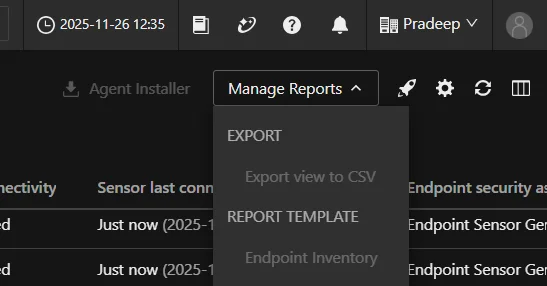
Admins can export detailed CSV, PDF, or integrate logs with:
- SIEM (Splunk, QRadar, Sentinel, Elastic)
- SOAR
Cloud native SIEM tools

Conclusion
Trend Micro is a powerful enterprise-grade security platform that simplifies endpoint protection, threat detection, and centralized management.
Drop a query if you have any questions regarding Trend Micro and we will get back to you quickly.
Empowering organizations to become ‘data driven’ enterprises with our Cloud experts.
- Reduced infrastructure costs
- Timely data-driven decisions
About CloudThat
FAQs
1. What features are included in Trend Micro Endpoint Security?
ANS: – Endpoint Security includes anti-malware, ransomware protection, device control, exploit protection, URL filtering, behaviour monitoring, and application control. It ensures endpoints remain secure, compliant, and protected from zero-day threats.
2. How does Trend Micro help with zero-day and ransomware protection?
ANS: – Trend Micro uses behaviour monitoring, machine learning, real-time reputation filtering, and virtual patching to prevent unknown exploits and ransomware encryption activities. It monitors suspicious behaviour and blocks threats before they spread.
3. Can Trend Micro integrate with cloud platforms like AWS, Azure, and GCP?
ANS: – Yes. Trend Micro integrates seamlessly with cloud-native services, including AWS EC2/EKS, Azure VMs/AKS, and GCP workloads. Cloud One provides automated workload scanning, vulnerability management, and compliance visibility across multi-cloud environments.


WRITTEN BY Pradeep Naik
Pradeep is a Subject Matter Expert – Cloud Security at CloudThat. With a strong foundation in cloud infrastructure and a keen focus on security, he brings in-depth expertise in securing cloud environments across platforms like AWS and Azure. Pradeep specializes in implementing proactive security strategies, vulnerability management, compliance, and automating security workflows. He has hands-on experience with tools such as AWS Security Hub and Prisma Cloud. Passionate about cloud security best practices, Pradeep is committed to helping organizations strengthen their cloud posture. In his spare time, he enjoys exploring new cybersecurity trends and mentoring aspiring professionals in the field.


 PREV
PREV












Comments