

 Login
Login


 December 8, 2025
|
Voiced by Amazon Polly |
Introduction
Web development has traditionally required a mix of coding knowledge, design thinking, and API integration. But what if you could generate a fully functional website just by describing what you want?
Amazon Q, the AI-powered assistant from AWS, is transforming the way we build. With just a single prompt, it can generate code, configure infrastructure, and help you create fully interactive web applications.
Pioneers in Cloud Consulting & Migration Services
- Reduced infrastructural costs
- Accelerated application deployment
Amazon Q
Amazon Q is an AI assistant that helps developers build, test, and deploy applications quickly. It can:
- Understand natural language prompts
- Generate frontend and backend code
- Integrate APIs
- Help with AWS services setup
It’s like ChatGPT but optimized for developers and built into the AWS ecosystem.
Amazon Q Inside Your IDE: Integrated with VS Code
One of the most powerful ways to use Amazon Q is directly inside Visual Studio Code. With the Amazon Q extension.
How to Get Started with Amazon Q in VS Code
Here’s how you can integrate Amazon Q with your IDE:
Step 1: Install the Extension
- Open VS Code
- Go to the Extensions tab (Ctrl + Shift + X)
- Search for “Amazon Q”
- Click Install
Step 2: Sign in with Your AWS Account
- Once installed, click on the Amazon Q icon in the VS Code sidebar.
- You’ll be asked to sign in using your AWS Builder ID.
- Complete the sign-in process through your web browser.
Step 3: Start Chatting
- Open the Amazon Q panel
- You can now:
- Ask coding questions
- Generate app templates
- Configure AWS resources
Step 4: Use in Your Projects
- Highlight a block of code and right-click → “Ask Amazon Q”
- Or open a new file and type a natural language prompt like:
“Create a Node.js Express API with CORS enabled”
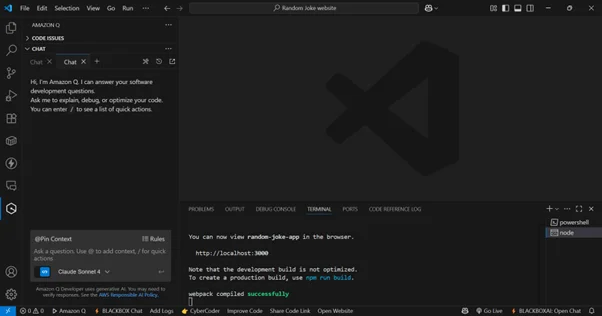
Example
Building a Joke Website with Just One Prompt
Let’s look at a fun and simple example.
Prompt to Amazon Q:
“Build a simple Random Joke App using React. The app should fetch and display a random joke from a public API (e.g., Official Joke API) each time the user clicks a “Get Joke” button. Use functional components and React hooks (useState, useEffect). Style the app with basic CSS to make it user-friendly.”
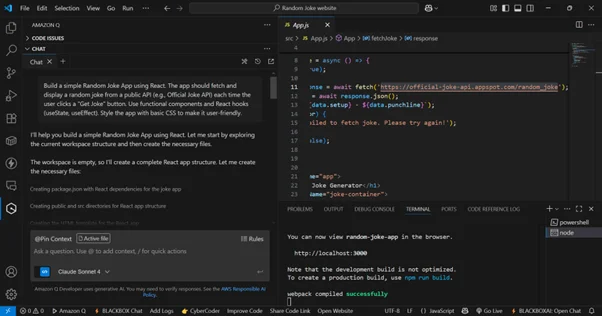
And here’s what Amazon Q did:
- Generated a full React website
- Integrated a public Joke API (https://official-joke-api.appspot.com/random_joke)
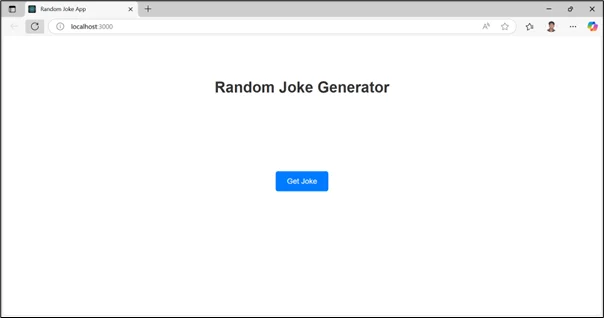
- Added functionality to fetch and display jokes dynamically
- The directory structure:
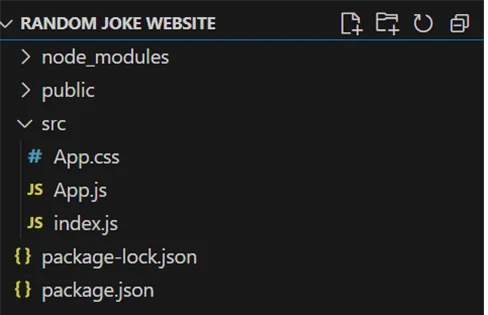
Output:
Why This Is Revolutionary
- Speed: What used to take hours now takes minutes.
- Intelligence: Q understands context and best practices.
- API Integration: Easily integrates APIs with minimal config.
- Scalable Development: Extendable to AWS services like AWS Lambda, Amazon S3, and more.
Imagine the Possibilities
- Generate full-stack apps with backend logic
- Connect to AWS services with a single command
- Deploy directly to the cloud
Conclusion
Amazon Q is more than just a code generator, it’s your intelligent co-pilot for web development.
The future of web development is here, and it starts with a prompt.
Drop a query if you have any questions regarding Amazon Q and we will get back to you quickly.
Empowering organizations to become ‘data driven’ enterprises with our Cloud experts.
- Reduced infrastructure costs
- Timely data-driven decisions
About CloudThat
FAQs
1. Do I need to know programming to use Amazon Q?
ANS: – Not necessarily. Amazon Q is designed to understand natural language prompts, so even beginners can describe what they want in plain English. However, basic programming knowledge helps you better understand and tweak the generated code.
2. Is Amazon Q free to use?
ANS: – Amazon Q is available as part of AWS services. While the extension itself may be free to install in VS Code, usage may incur AWS charges depending on the services you deploy or interact with (e.g., AWS Lambda, Amazon S3, Amazon EC2). Always check the AWS pricing page.
3. How secure is it to use Amazon Q for production projects?
ANS: – Security depends on how you implement and review the generated code. Amazon Q follows best practices, but it’s essential to audit the code, apply AWS IAM roles correctly, and secure API endpoints before using it in production.


WRITTEN BY Vishal Arya
Vishal is a Research Associate at CloudThat who enjoys working with cloud technologies and AI. He loves learning new tools and breaking down complex topics into simple ideas for others.


 PREV
PREV












Comments